I would love a feature that allows me to move where the zoom focuses on! Right now, when zoomed in, it automatically focuses on the middle of the image. This makes it difficult to zoom in on bigger characters! Example below:
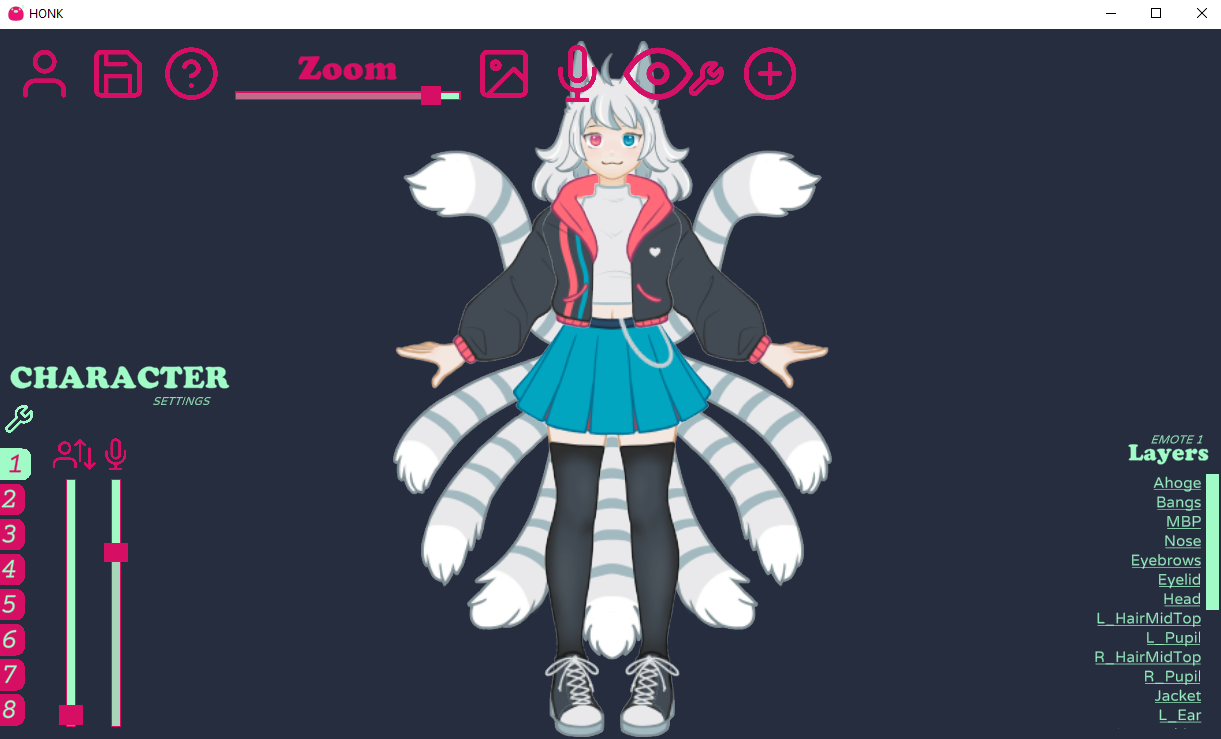

All-in-one suite for mic-only lip-syncing characters! · By
Another thought occurred to me about the "look at cursor" values. As I am working on a fairly small pixel art character the values are very very small. To the point that in order to have more fine control over exactly what values I was getting I was having to manually resize the honk window itself to get the slider to give me different values. This is one of the problems that would be solved with manual value entry as suggested in my previous post, but perhaps it could be solved by making the sliders change in relation to the largest component on the canvas?
Otherwise maybe the nature of the slider variable could be changed. I'm unsure exactly what the variable is supposed to be at the moment, but perhaps it could be changed that the value represents the maximum number of pixels moved at the extremes of the motion. This would bee a very intuitive way to represent the value and would make it very easy for people to "draft" the motion of certain elements inside the apps they use to draw their assets. The variable being representative of pixels would mean that people could take values directly from their drawing apps and copy them across into honk.
Finally, in regards to the oval settings, it would be nice to have a unified oval option that lets you input 2 different values for x and y, giving some freedom for characters with different eye shapes among other things, a similar equivalent for box tracking too maybe? Rectangle? And to put the cherry on top of that, an even more robust solution would be for both of those options to have 4 values, one for each of the 4 directions +x -x +y -y, this would give way to emulating a more "spherical" rotation, allowing both more extreme rotations as well as the ability to rig characters with plenty f tracking motion at extreme angles. Imagine (albeit this is a bit of a comical hypothetical) a character drawn facing directly to one side and being able to rig their iris to still roughly emulate where the eye would be facing while taking into account the perspective from the curvature of the eye.
Once again I've had alot to say but it's just my nature to never give suggestions that I cant think of potential solutions myself. I understand your vision for the app is probably a touch more simplistic than what I would like to get out of it and that's totally fine, I tried to give suggestions that could still be achieved in simple/intuitive ways. Once again this app is incredible and the 3.0 update has come with a bunch of wonderful features, you have done a very good job.
Really love your program, built my first avatar today using v3.0 :)
I would like to request a feature. It was suggested in another form already in this thread, but I want to support that request:
Thank you :)
I love Honk! It really takes PNGtubers to the next level! I have some ideas for new features:
Great job with Honk! Looking forward to next releases!
According to the 3.0a announcement post, that's whats being worked for 3.1!
https://dreamtoaster.itch.io/honk/devlog/388040/honk-30a-coming-this-week
Having the ability to move your view around the "canvas" (similar to the hand tool in photoshop) would be super useful. Right now the only way to adjust your view is to center everything, but for people who are making something that is horizontally tall rather than square that doesn't help, since it will take your focus window away from the face of your character and move it to the torso. Being able to zoom in and move around freely to the part you're working on would make things so much easier. A different way to achieve this would be allowing users to select all layers to move everything around together at the same time, rather than needing to individually reposition every layer.
Love this program btw. I'm having a lot of fun with it, and it has so much potential. Can't wait to see where it goes! :)
i see a lot of additional functionality in the blink feature, would it be possible to have an additional blink layer with a seperate timer and/or randomizer option for when it blinks and possibly what blinks when the timer goes off?
This would allow an additional character/pet to blink at a different time than the figure and possibly trigger small pet emotes (would be especially useful with the upcoming animation features)
Hope that all makes sense, thank you so much for all your hard work!
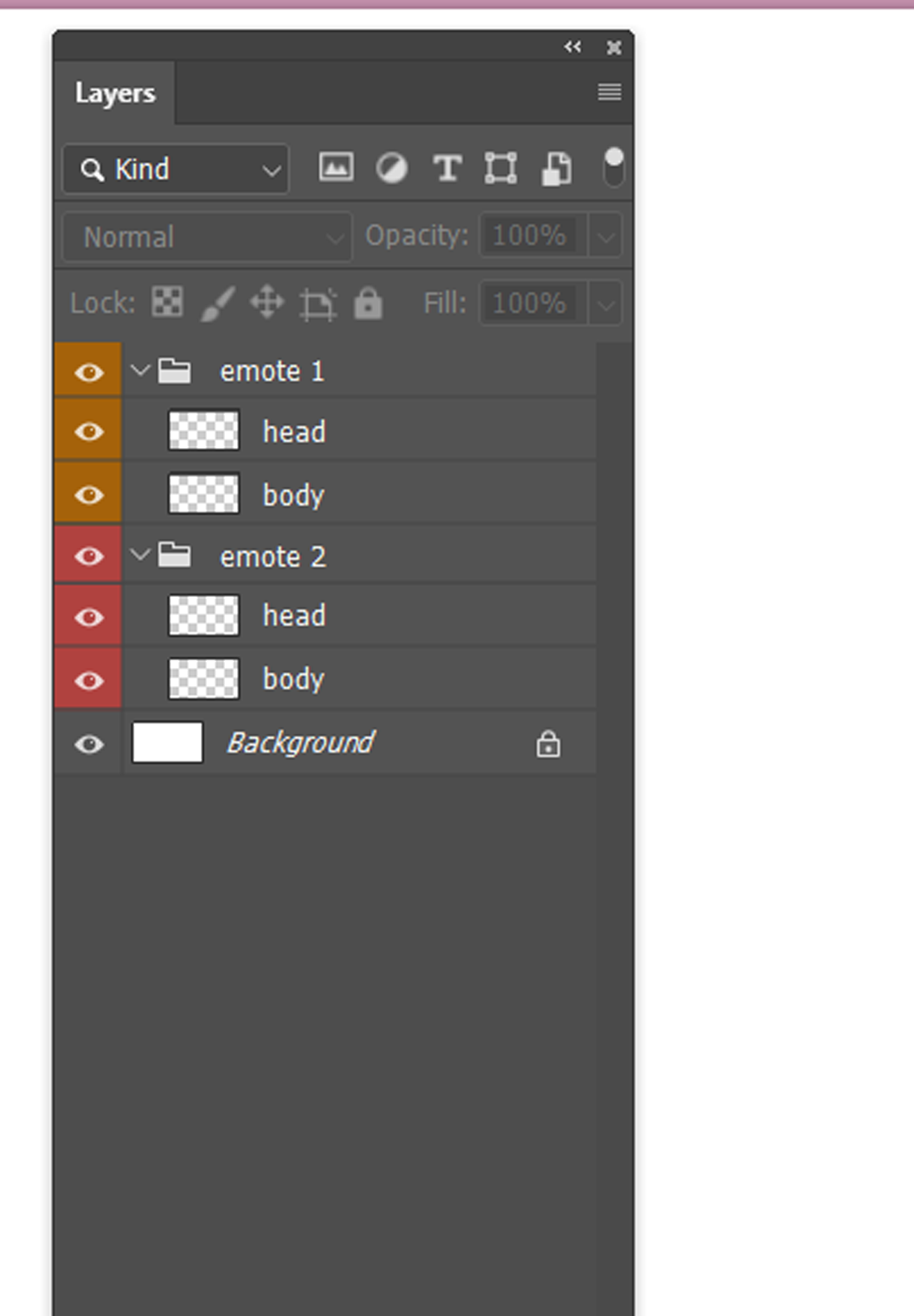
perhaps redesigning the layer manager ui to something that is similiar to what photoshop and clip studio paint provide.
most people use these programs to create there png avatars and are more familiar with the organisation system, this includes grouping assets into folders which will streamline more complex png models. Honk's Layer Manger system at the moment requires toggling assets on and off in order to create an emote. for a simple model the layer manager works well.
i have found when trying to create a 2nd emote for my model, that toggling between emote 1 and emote 2 is more of a guess despite reading the directory's and guides due to the fact that i am cycling between layers and turning them on and off and having assets from emote 1 get mixed in with assets from emote 2. the abilty to lock layers and lock groups would help immensely in creating emotes.
this is an example from photoshop, clip studio paint and procreate have similar layer manager ui.
you can see the layer order of the head being above the body, also the grouping in which these assets fall under for the specific emote.
Not sure if it's been suggested before, but an option to make emotes revert to the previous state on button release instead of toggling between states would be great.
For example, I want to make my character frown when pressing Ctrl+Z while drawing, but not have to press another hotkey after Ctrl+Z, basically making it push-to-emote.
Is there already a mic volume floor activation level? I found that while testing my PNGtuber, my low volume background noise or light mic static was making the mouth phonetics go off. Usually, in something like Discord or OBS, you can set up a noise suppression mic filter to make those issues go away. I couldn’t find that in Honk, so if there isn’t one, could that be added? Thank you!
The software is great as i expected ^^
Though! :0 is there a suggestion existing that to toggle if its able to disable shake image when talking?
Also bump up for the previous suggestion to have a noise supression filter to stop automatic talking when its just my ceiling fan xD
:D keep up the good work >w< ROOTINNNG FOR IT!
Hey, Hi! I recently bought the app and had a fantastic experience building my lil character.
The think that I'd love to see added is an option to have specific layers interacting with the voice bounce. That way I can setup my character and some props around it, but only him bouncing on speech, not the whole composition. Thanks for the amazing app!
EDIT: cancel this first bit!!! in case anyone else is looking at this thread and wondering about setting look distance more precisely: you can bump it up and down one number at a time by hitting the up and down arrow keys while your left click is held down on the slider!!! i'm not sure if this has already been requested, but i was playing around with it today and realized it would be really helpful if we could directly input numbers for the "look distance" rather than just fiddling with the slider! you can get really cool effects by selecting certain pieces and having them all have the same look distance, but it can be difficult to get the numbers exact, especially at smaller numbers, when you're trying to just bump the number 1 value up or down on the slider by barely moving your mouse. (along these lines, being able to grab multiple different pieces while holding down shift and apply look at cursor settings as a batch would be incredible, but i have no idea if that might be super complicated to implement.)
also, i'm pretty sure this has been requested before, but just throwing a +1 onto the pile: being able to scoot pieces around with the arrow keys would be great!
absolutely loving HONK so far (i'm veryroundbird on twitter!) and i'm starting to work on implementing expression toggles for models. I don't know if anyone else has requested this yet, but if somehow you could toggle multiple expressions at once to wombo-combo them, it'd be super useful since I'm realizing I'm definitely going to run up against the 8-expression limit, ahaha
I love honk so much !! , but the only thing that's a little bit hard for me is adding variation of my model as I can't set a custom zoom or placement so I have to do everything manually but its so hard to align everything. So I was wondering if we could be able to input manually how zoomed in we want the model to be because the bar is really hard to control OR be able to edit layers images and change them at will !
Other than just more expressions hotkeys, I think the feature that would be the most useful to the most amount of vtubers would be controller based eyetracking. Where the model looks in the direction a controller's right joystick (which is generally used for camera in games) is being held, like when holding left they look right. But when the stick is let go, it slowly resets back to looking forward. This would emulate the behavior of someone with live2d facetracking really well if put in place.
HONK is a fantastic program! I dunno if anyone else has suggested this yet, but a background color that's is just transparent would be a huge help. There are some parts of my avatar that go off the model and don't have a solid back, so with color as the background to key out in OBS those parts end up disappearing.
Just started using the program and loving how robust it is so far despite it's simplicity, but there's a few features I would like to see tweaked or added if possible that would make it so much more *chef's kiss*
Pain points
- Better layer manager. As it stands, I'm running out of layers, and I've had to resort to changing the names of the files since I noticed that they auto sort alphabetically. More layers would be nice too, but when I realize I need to adjust everything to accommodate something I've added, it would be nice to be able to simply insert the asset where I want it, rather than having to manually adjust every single other asset around it up or down layers.
-Animated gif support. I was using animated gifs in Veodotube to support other expressions and movements outside of what either program can do, and I've been struggling to find workarounds so I can still include some of the work I'd done before. In general this would allow people to include far more complex animations and movements that I bet are probably just beyond the program.
-UI adjustments. I would LOVE some kind of ability to simply type in the exact value I want on all the sliders. Most of my avatar has between 2-4 points of cursor tracking on each asset to simulate a little more movement and depth and it's is downright painful trying to hit those settings via a slider on a scale of 0-500.
Things I would just like
-Ability to set blink frequency and randomization, PER asset. I'm currently working around the lack of animated gif support by putting secondary frames on the blink. ie: I have a pair of hands holding a controller that presses buttons on the blink, and a pair of eyes that cry tears on the blink, and they would both look better if it could happen more frequently, but I would also like the ability to tweak the blink frequency in general for the eyes too, not just as a workaround for lack of animated gif support.
- Cuter/smoother bounce. Current bounce (and rotate on speech) movements are ... kind of janky. Would love if they were smoother, or had the ability to adjust the smoothness. ie: easing out of the movement so it looks a little more natural, bobbing instead of jerking.
-Preset or customizable bounce/movements NOT on speech, PER asset. (or other preset movement types) Sort of an addendum to the above. My character has a tail which I've currently got some rotate on speech and some cursor tracking to try to give it a little sway and it would look way better smoother, but it would also be nice of it just sort of bobbed on it's own without needing input from me. I think this would look great for characters that also have things floating around them, like idk magic orbs, or little floating robot pals etc, so I'm sure it has some other utility.
Also this is something I've just noticed and not sure if it can be fixed, but cursor tracking stops working in games that take over the cursor and turn it in to camera control, such as Genshin Impact.
Hi!
Kind of a long thread, so excuse me if this has already been suggested, but I thought it would be nice if HONK had a Noice Gate filter. It's fairly hard to find a sweet spot where the lip-syncing works and background noise doesn't trigger it, but even then, when there's notice coming from outside, it's impossible to prevent false positives. A Noice Gate would go a long way and would be easy enough to add to the UI by incorporating a second "knob" to the Mic Gain bar and graying out the section of the bar beneath it.
Thanks for the incredible software, and keep it up!
Toodles.
I realize this is quite an ask, but is there any hope or possibility of a native Mac version in the future? I’m pretty sure I could run it under emulation with something like Crossover but it’s always a little nicer to have things run natively if possible, especially while streaming and stuff. I wish I could give it a try before buying just to see how well it works that way. Still, this looks like a really neat tool and I’m excited to see what you do with it over time!
Would it be possible to add an option that lets the user select what channel the avatar reacts to? Like, say I've got two microphones plugged into a mixer and I've got one hard panned to the left channel and the other to the right, and in HONK I have the mixer set as my mic. I'd like to be able to set it so that the avatar only reacts to one of those channels.
A feature to set the process priority would be fantastic! As it stands right now, when my cpu usage is high such as when playing certain games, HONK tends to lag. The ability to set the process priority to high like you can in OBS would help mitigate this.
Animated GIFs would be fantastic as well, but I know it's already something that you have already mentioned and other people have recommended as well. Otherwise absolutely fantastic piece of software and I thank you for all your work!
Properly support all possible F-Keys please.
It's okay to have support for combinations as we already do but CTRL+ALT+SHIFT+F1-F12 is pretty much used by a lot of apps.
F-Keys go up to F24 though, even if they're not on most keyboards they can be mapped using any number of utilities as well as by a streamdeck.
Veadotube and OBS support those keys and the clash rate with default system- and application shortcuts is close to zero.
there is a lot of things mentioned here already and so far I am really enjoying honk. but I have run into a problem when it comes to keying out the background. my character has blue hair and wears yellow... a green background takes from the yellow, blue and magenta from the blue, red from the skin, black from the outline obviously and white from the eye and teeth whites... is there maybe a possibility to just have a transparent background like other programs? since obs allows for transparency I feel like that would open a lot more space for colour creativity!
and other that that a bit of variety in blinking would be cool. like a 1- 1,2 - 1 blink sequence already gives a bit of variety and it doesnt look so dead and robot like :)
I feel stupid for asking this, it's not much & not much of a problem but is there a chance for a preview button? I know I could just minimize everything & test stuff that way but when I started HONK up for the first time I was confused why there was no animation.
I mistook the eye calibration for a preview button twice & messed around with things cause I didn't know what to do. It was a coincidence that I realized I should try having the program be unfocused when I realized I could see the animation now.(I was looking through the documents just in case & either missed it or could find were it said to test it that way)
Can I suggest an idea that may or may not work (I haven't tested the iris tracking yet so forgive me if this doesn't work)? Try making the sclera completely transparent, then put white BEHIND the skin/body/etc to act as a sclera, then have the iris sandwiched between the white background and your model. It's not true clipping, but I think in theory it would work?
Three things I'd like:
- More options when it comes to the bouncing when speaking, ontop of smoother bounce movement options. It's jarring
- Ability to rename layers
- Transparency option for window. It's possible, should be pretty easy, it's nice, and It allows me to not have to modify colours to fit some chroma/luma key restrictions.
Some Things I'd like to see
Clearer Organization of the layers - It's really hard to tell which part is on what layer, even just color grouping for each layer. So everything on Layer 1 are grouped together in a different color background that the user can change the color to make it accessible
The Ability to Move the Entire Model not just Zoom - Since I use Honk with a Full Body Model I'd like the ability to Move everything, I guess the proper term is Panning around the model?
Manual Edit to the Mouse Follow bar - it's hard to get the right amount, if I was able to type in the number it would be easier for tweaking
More Rotate on Speech options - I love how active this makes the model but they can be too much for the parts I want to add, maybe a slider instead?
More Programmable Emotes - I Run 2 instances of the program to run my model and then their hands, I would love to be able to just run one, I know it would be a lot but a second set of 8 emotes that don't change for the first set. So I can change faces while keeping one set of hands up? (I know it's a lot to ask)
The ability to make a smoother bounce - So it can look more like breathing and not so jumpy
Blink Options - I would love to see the blink be set to each Object that uses Blink option. It can be randomized per object so you can have a blink and then something like a character playfully blepping on different times
Reverse mouse cursor settings - Just to make things feel like they are more alive and moving on their own
I know you are working on GIFS and I am excited for that
I also agree with the transparent BG options
Overall This Program is amazing and I love to use it as an anxious person who doesn't have a camera on them all the time like Live2D would. It's so Simple to use and play with, I do Hope there could be a Easy to learn but the allowing of more creativity with the parts for people, if they so choose. Even if there is an option in the settings to turn on a more "Advanced" Version with more sliders and options.
Hello !
I'm playing with Honk for almost a year now, and one thing i'm often thinking is feeling like i'm not having enough emotes sometimes. Or wanting to swap between two posture but with kind off the same model. So i thought about having a keybind to swap between models, not just swap between emotes ! It would be so nice and fluide. Thank you for reading !
I don’t know how difficult it would be to implement or whether it’s already on the to do list, but it would be nice if we could tweak the positions of layers according to emote. Like a transform tool overlay or something, with position, scale, and rotation handles (or sliders, if that’s easier).
For example, say I have a character who I want to raise the eyebrows of when I use an emote. Right now I have to make a layer with the eyebrows in position 1 and export it in my art software, and then make another layer with the eyebrows moved to positions 2 and export that too, then import both images into Honk and swap between them when I use the emote. It would be a lot easier if I just had one eyebrows layer and could set the positon of them according to emote I’m using. It would also make final tweaking of the model’s position a lot easier, rather than making those adjustments in my art program and re-exporting again.
That’s just a simple example, but with a more complex character like I’m making, all the redundant layers of ‘the same thing but just in different positions’ is starting to eat up memory I think. So I would hope (or assume) that if this could be implemented it would save ram, since the program won’t have to load so many image files.
Hope this request makes sense. And thanks for the tool you’ve built so far!
Edit: Oh yes, also, it would be amazing if the eye-tracking could be mapped to a controller analogue stick too.
the ability to move the placements for individual mouth sprites, as well as blinking sprites, would be great (unless i somehow missed it)
also, adding a way to calibrate the different noises made when speaking would be phenomenal (as im typing this, not speaking at all, its changing the mouthes. also, sometimes when speaking it doesn't put the correct mouth, and I think implementing a mic calibration feature would be great)
I would love to have some kind of voice activation sensitivity! There are often times where I breathe near my mic and my model moves as if I am talking, or noise from outside of the room triggers it. Being able to set a decibel level that causes the PNG to react (like Discord can do) would be really nice.
Good afternoon! Absolutely love this program. <3 Question, do you think it would be possible to add a feature where you can tie a honk character to a specific User ID for Discord? =) That way if you are doing a recording with a second person you could have two different characters "speaking" on screen based on who they are receiving the input from. I currently use reactive images for this, but would love to be able to implement Honk for this sort of thing. ^^ <3
Hello, like many others said, it would be nice if there was an option of a transparent background or if the program itself handled the transparency like all other VTuber programs do. Also, another interesting feature would be having a setting or some kind of smooth transitions between images themselves. Thank you for your time. All in all, quite cool, neat little program.
I'd love to see a UI regarding blinking, where you can adjust the frequency/randomness factor. Maybe sliders, or even the ability to type in numbers, like a minimum and maximum number in milliseconds for each one. So you could do, say, 2000ms-2000ms, so exactly every 2 seconds, the "blink" would occur. Or 500ms-3000ms, so between every .5 and 3 seconds, randomly it would occur. It would be nice to have this available on a per-object basis, as well. For instance, I use the blink functionality not just for my character's eyes, but for the arms when using a mouse/keyboard or a controller. The "blink" animation is simply the arms/hands/fingers being in a slightly different position, so it looks like the character is moving the controller or mouse every so often. Being able to adjust the time factors would be great for things like that, especially if it could be separate from the eye blinking frequency!
It would be nice to have a feature that puts the avatar in motion while idle, so it doesnt look so still? Similar to how veadotube mini does it? Like the shaking, slow fast, etc.
Honk looks amazing! I just have 1 question and 1 feature request/idea!
1. Are there ever plans to build this out for mac? I can run it on my M1 using parallels, but native is always nicer, less risk of latency, etc.
2. I sometimes stream music, and a midi clock sync would be a killer feature for me. I would love to have a pngtube app that can listen to either BPM and start/stop messages from ableton/Logic/etc, or even listen to timecode and bounce on the beat!
I'd like to bump this request. The UI animation is a real issue when trying to manually click and drag scrollbars, since the box width changes and affects the hitbox, causing it to constantly change size when hovering over the edge. It'd be really nice to have an option that disables the animations for that reason as well. Also :( to migraines, that's sucky.
Heyo I'd love to see GIF support added to HONK. The character I currently utilize has a separate body (for simplicity), which in itself is a Gif. It's not a /huge/ issue, as layering them in OBS isn't the worst, however it would be nice for the sake of my neck lengths consistency if Gifs were able to be imported. It would also make having more (literally) animated HONKtubers a lot easier.
The ability to add some kind of transitional animation between emotes would also be incredibly handy, as well as the option to add more 'frames' with certain things like blinking. In general it would be cool to have more options to make our HONKtubers more animated with the ability to add frames akin to the blinking for things such as accessories, emotes, etc.
I'm a huge HONK fan, and really would love to see more progress on the program. All the best dev, hope you're doin good.
I've used HONK for years and I've gotten great mileage of it! Some features I would love to see though:
- Alternative blink frame / random idle frame options
I'd like to have my character look to the side or flick their ear occasionally, in addition to blinking, just another blink frame slot or few would work!
- Character options (or more emote slots!)
I use HONK for my characters when I play DnD, so the emote slots run out really fast! I'd want to have multiple emotes for a single character but to be able to switch between characters on the fly.
- Ability to pick which which profile/character loads first when opening HONK
so far I've just had to add number 1 to the profile I want to pop up first, but it's a bit clanky.
Overall, I love HONK! I especially love that I can alt-number swap emotes without having to click the program (something that's missing from other pngtuber program I use).