
Indie game storeFree gamesFun gamesHorror games
Game developmentAssetsComics
SalesBundles
Jobs
TagsGame Engines

Feedback and Oddities

A topic by Succubus Nirriti created 23 days ago Views: 70 Replies: 9
Viewing posts 1 to 5
(3 edits)

Hello! I've tried your plugin, and I generally like it. It's pretty dense though (esp if opened in Notepad++).

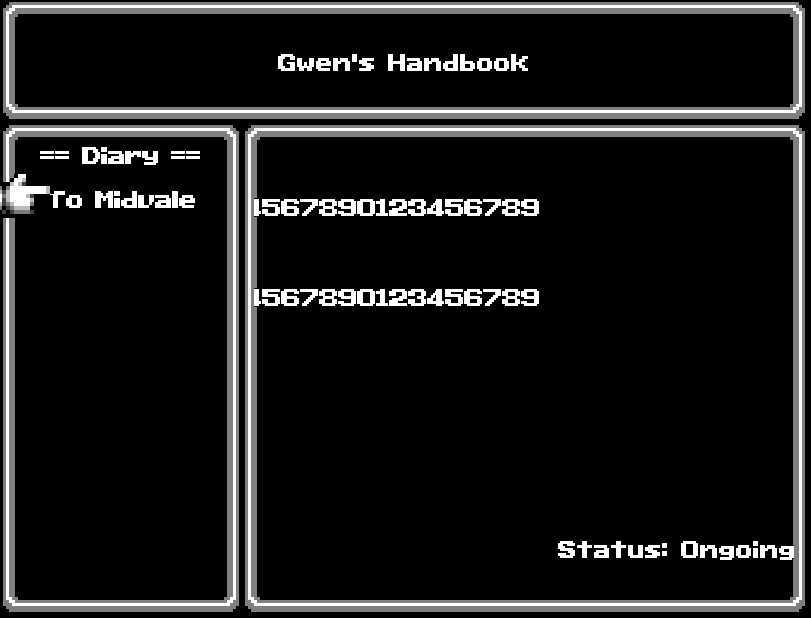
Despite being set to [CENTER] on alignment, you can see here that both the 'subtitle' and the 'description' end up eatened up leftward... To give you an idea of the scale, the string of numbers is '0123456789' repeated 3x back to back. So half is gone. Worth noting, I dont have anything VS/Yanfly in my project (and never will). But... if I copy my project and only keep your plugins, somehow, it all seems right. Meaning the issue is entirely or in big part on my end.

My intention with your plugin, is to use the plugin as as logbook of sort. To give the player lore entries and notes taken when interacting with some events. To that effect, despite deleting all entries for 'ongoing, completed, failed' the plugin STILL shows 'status:ongoing'. I dont know how to remedy that. Lastly, no matter how much I increase the title size, it doesnt change. 
(+1)

Hi there!

Thank you for the detailed report, and especially for testing the plugin in a separate project with only my plugins enabled. That is very useful for narrowing the issue down.

Regarding “Status: Ongoing”, this is a bug on my side. Empty text parameters are currently being treated as missing values and replaced with the default text. This is why deleting both “Status:” and “Ongoing” does not actually hide them. I will change the fallback handling so that intentionally empty values are preserved.

About the title size: the current “Title Font Size” setting only controls the main Quest Log scene title, rather than the title of each individual quest or logbook entry. I can see how the parameter name is misleading here. The individual entry title currently does not have its own font-size setting, so increasing that parameter would not affect it.

As for the centered title and description being clipped, the fact that they display correctly when only my plugins are enabled strongly suggests a compatibility interaction with another plugin. It does not necessarily need to be a VisuStella or Yanfly plugin: any plugin that changes window padding, font handling, text measurements, text wrapping, or RPG Maker’s drawing methods could potentially cause this.

Could you send me your complete plugin list, including the load order? Both the entry title and description use the same wrapping and alignment system, so identifying which plugin affects it should give us a good starting point. Disabling the other plugins in groups may also help isolate the specific one more quickly.

Thanks again for reporting these issues!

(1 edit)

Just to clarify, the 'title font size' issue I meant was 'Gwen's Handbook" (the top-most section only). As for the rest, it rests on me to mass enable/disable plugins by a bunch each and report on my precise findings. Though I wonder if somehow the 0123456789 isnt being redirected to the leftmost border (ignoring the border in the middle)? Im currently overhaul'ing a lot of database entries (500-600) and their orders in the animation tab/skill tab atm. Ill get back to you later on the plugin-clash matter. 

(1 edit)

My bad, I thought the issue was about quest titles as well, but if you mean the QuestLog Title then it should work properly as intended and is conflicting with something. Sorry to hear you'll have to go through a bunch of enable/disable but if you pinpoint the conflicting plugin maybe I can make a workaround patch!


Edit: It's also strange to have the text so pushed on the left as I placed a double padding check with the window size, maybe we can find the source of that problem as well

(3 edits)

Back again with more info! Here's my findings:

  1. The plugin which caused the title font-size-lock was Hakuen BITMAP FONT plugin. Its something I CANNOT let go of, as its all I have to vectorize text properly (after hand-editing every single letter/special characters, by the square, that I added + a separate file for the outline). However... despite everything, its a non-issue. The size is standardized as I like it already, so ignore this worry. 

  2. The plugin which caused the long-title and description text to be 'eaten out' through the border is Hakuen's MessageActions (you can inspect is as its free). I cannot let go of that one either, as it enables a lot of easy-to-use tricks, which honestly should be default in RMMZ. 


PS: Deleted the other reply (exact same) as I had it set to 'reply to another' which made it appear in the middle instead of the end. Its just to prevent confusion and for making it easier to follow to you, me and passerby's. 

(+1)

Thanks for the report, I already found the source of incompatibility between MessageActions and QuestLog, luckily it's on my side so I should be able to correct it with a patch!

Im glad you could spot where so quickly. For curiosity's sake, could you explain to me—in a simplified way—what was the cause? 

(+1)

The cause is in the QuestLog Info window (the one drawing the quest description and informations).

To add the two buttons for Tracking and Log I turned it in a "Horizontal Command Window"

It's a trick I did to save time on the button generation and to be able to use the built in navigation of RMMZ

While it works ok without MessageActions, this plugin add a fix to calculate the button text and it works flawlessly in a "normal" horizontal command window but in a "special" window like QuestLog it generates negative X values for the text

All I need to do is to assign a ProcessText function that recalls Window Base instead of Horizontal Commands Window and block the alignment fix of MessageActions only for the QuestLog Info window commands

(+1)

2.4.4 is out and should solve the incompatibility issue :)

Ill get back to you on the matter in some day(s), promise. Thanks in advance, WinterDream.