

Puppeteer includes a simple screenshake effect. If you're using that library already, you can just include the !shake command in your dialog scripts like in the example. Here's a simplified version of how that works internally that could be used elsewhere- adjusting "shake_mag" and the duration of the transition (here 15) can tune how the effect looks:
go[card on shake_trans c a b t do
  local shake_mag:30,30
  local m:shake_mag*1-t
  c.pattern:1
  c.rect[0,0 c.size]
  c.paste[a (random@2*m)-m]
end 15]
Unfortunately, supporting non-Latin-alphabet languages in Decker is not straightforward. Phinxel has a few suggestions for workarounds, but any way you slice it a great deal of work would be involved.
To hide Decker's main menu, you'll need to lock the deck. (The following page describes how you can save a "protected" copy of the current deck.) Whether you're exporting a protected copy of a deck or using the ordinary save menu, all you need to do to create a web-playable version of a deck is save with an ".html" extension.
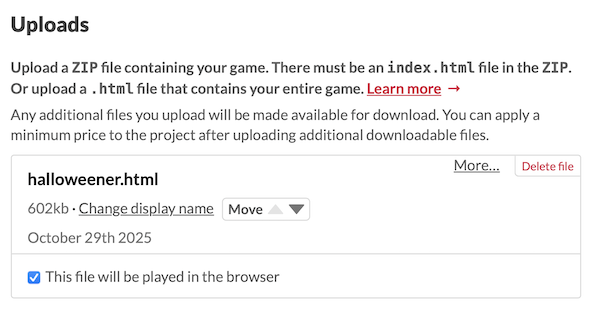
When you create your project page on Itch.io, upload the .html file you saved, and mark it as "played in browser". It'll look something like this:
There are also additional settings to configure how your game will be embedded in the web page:
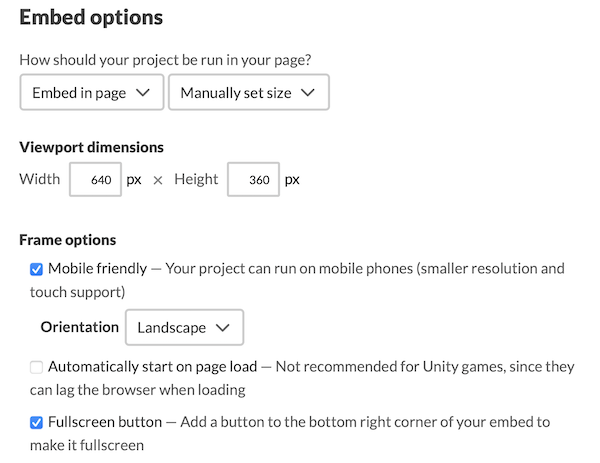
The defaults are mostly fine, but I recommend enabling the "fullscreen button" for most projects.