
Indie game storeFree gamesFun gamesHorror games
Game developmentAssetsComics
SalesBundles
Jobs
TagsGame Engines

Hello everyone! I really truly appreciate all the help from everyone before; you guys solved so many problems! But now I have many new issues.

The good news is, my game is already half-finished, and I want to create a screen shake effect, similar to gunfire or vibrations. I tried using fixed-point screen movement, but it looks really strange... I feel like there might be a better way to achieve this kind of performance effect, I just haven't found it? 💥💥💥

Secondly, I originally wanted to add other language fonts to this game, but even though I copied all the fonts over, some other countries' languages still throw errors and can't be used, such as Chinese, Japanese, Korean, etc... It seems like these fonts just aren't here? But if I really did add these fonts, it would be a massive amount of work—I need hundreds of cards lol...

Also, I really hope someone could personally teach me, step by step, how to export this game and publish it on itch.io when it's done, so that everyone can download and play it. I currently understand that I need to add a little txt file to the software package to include the author's copyright notice? : ) I got it.

And also, after it's really exported, how do I hide the top work panel so that players can only click the cards to play? I found something similar in the Locked decks... but... oh, I feel like I just can't understand it. Does it need something else?

I'm without a doubt a complete computer beginner. If someone is really willing to answer these questions in detail, I'd be really touched. Thank you ❤️
(+2)

Puppeteer includes a simple screenshake effect. If you're using that library already, you can just include the !shake command in your dialog scripts like in the example. Here's a simplified version of how that works internally that could be used elsewhere- adjusting "shake_mag" and the duration of the transition (here 15) can tune how the effect looks:

go[card on shake_trans c a b t do
  local shake_mag:30,30
  local m:shake_mag*1-t
  c.pattern:1
  c.rect[0,0 c.size]
  c.paste[a (random@2*m)-m]
end 15]

Unfortunately, supporting non-Latin-alphabet languages in Decker is not straightforward. Phinxel has a few suggestions for workarounds, but any way you slice it a great deal of work would be involved.

To hide Decker's main menu, you'll need to lock the deck. (The following page describes how you can save a "protected" copy of the current deck.) Whether you're exporting a protected copy of a deck or using the ordinary save menu, all you need to do to create a web-playable version of a deck is save with an ".html" extension.

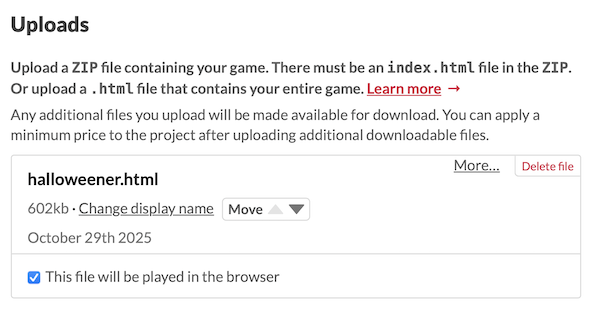
When you create your project page on Itch.io, upload the .html file you saved, and mark it as "played in browser". It'll look something like this:

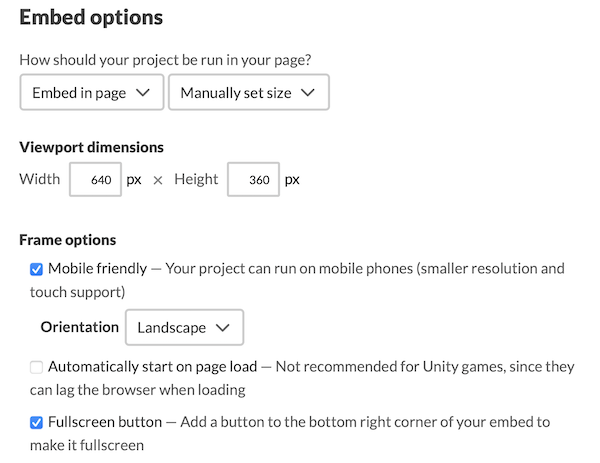
There are also additional settings to configure how your game will be embedded in the web page:

The defaults are mostly fine, but I recommend enabling the "fullscreen button" for most projects.

(+1)

Oh my god, this is amazing! I used the code and the result is absolutely perfect!

Thank you so much for your help—I’m going to work hard on creating my game with Decker ✨🔆