

Reinstalled Visual C++ Redistributable. Sorry I couldn't find where to download Diagnostic build.
Should I continue writing under this post or somewhere else?
Hi!
No worries at all 👍
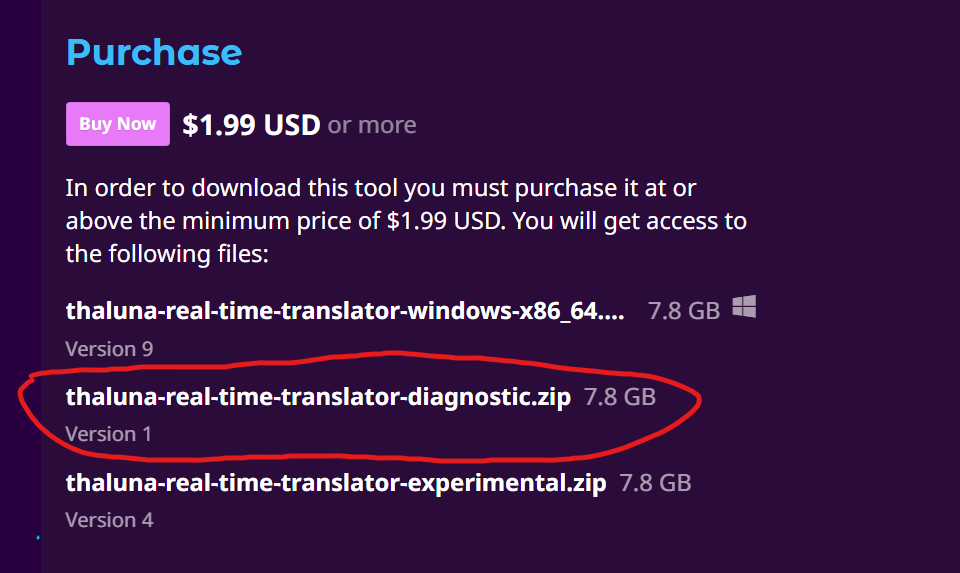
The Diagnostic build is on the same download page, just listed as an additional file. You don’t need a separate link.
Here’s how to find it:
-
Go to the Thaluna download page (where you normally download the app).
-
In the list of available files, look for:
thaluna-real-time-translator-diagnostic.zip
It’s listed alongside the main version.
Once you run the Diagnostic version:
• A visible CMD console window will open together with the app
• All startup logs and errors will be printed there
If it crashes or shows errors, please click the console window, press Ctrl+A to select everything, then Enter to copy it, and paste the output here.
This will let me see exactly what’s happening on your system.
Code:
{
[Thaluna] Starting... HOME=C:\Users\Антон
[Thaluna] Paddle models: C:\Users\Антон\AppData\Local\Thaluna\.paddleocr
[Thaluna] Models OK.
main.py:948: DeprecationWarning: Enum value 'Qt::ApplicationAttribute.AA_EnableHighDpiScaling' is marked as deprecated, please check the documentation for more information.
main.py:949: DeprecationWarning: Enum value 'Qt::ApplicationAttribute.AA_UseHighDpiPixmaps' is marked as deprecated, please check the documentation for more information.
[Thaluna] Starting... HOME=C:\Users\Антон
[Thaluna] Paddle models: C:\Users\Антон\AppData\Local\Thaluna\.paddleocr
torch\cuda\__init__.py:287: UserWarning:
NVIDIA GeForce RTX 5060 Laptop GPU with CUDA capability sm_120 is not compatible with the current PyTorch installation.
The current PyTorch install supports CUDA capabilities sm_37 sm_50 sm_60 sm_61 sm_70 sm_75 sm_80 sm_86 sm_90 compute_37.
If you want to use the NVIDIA GeForce RTX 5060 Laptop GPU GPU with PyTorch, please check the instructions at https://pytorch.org/get-started/locally/
warnings.warn(
FATAL: kernel `fmha_cutlassF_f32_aligned_64x64_rf_sm80` is for sm80-sm100, but was built for sm37
...
FATAL: kernel `fmha_cutlassF_f32_aligned_64x64_rf_sm80` is for sm80-sm100, but was built for sm37
2026-02-08 05:11:27.066 | INFO | manga_ocr.ocr:__init__:35 - OCR ready
Pre-warming default models...
[DEBUG] OCR init: lang=en, gpu=True, models=OK
paddle\utils\cpp_extension\extension_utils.py:711: UserWarning: No ccache found. Please be aware that recompiling all source files may be required. You can download and install ccache from: https://github.com/ccache/ccache/blob/master/doc/INSTALL.md
C:\diag\_internal\paddleocr\ppocr\postprocess\rec_postprocess.py:1229: SyntaxWarning: invalid escape sequence '\W'
noletter = "[\W_^\d]"
C:\diag\_internal\paddleocr\ppocr\postprocess\rec_postprocess.py:1455: SyntaxWarning: invalid escape sequence '\W'
noletter = "[\W_^\d]"
Pre-warming complete.
Unknown property direction
Unknown property direction
Unknown property direction
[DEBUG] OCR init: lang=en, gpu=False, models=OK
...
[DEBUG] OCR init: lang=en, gpu=False, models=OK
}
At some point, the errors start to appear too quickly. And a section of code at the beginning immediately disappears.
This line is repeated over 7,000 times:
FATAL: kernel `fmha_cutlassF_f32_aligned_64x64_rf_sm80` is for sm80-sm100, but was built for sm37
At this point, an error window appears:
[DEBUG] OCR init: lang=en, gpu=False, models=OK
Thaluna - Critical Error
Wystąpił nieoczekiwany błąd: Fatal: Error initializing OCR for en on CPU: (NotFound) Cannot open file C:
\Users\AHTOH\AppData\Local\Thaluna\.paddleocr\whl\det\en\en_PP-
OCRv3_det_infer/inference.pdmodel, please confirm whether the file is normal.
[Hint: Expected paddle::inference::IsFileExists(prog_file_) == true, but received paddle::inference::IsFileExists(prog_file_):0 != true:1.] (at .. \paddle\fluid\inference\api\analysis_config.cc:117)
Aplikacja zostanie zamknięta. Sprawdź konsolę lub logi, aby uzyskać więcej szczegółów.
Hi!
Thank you so much for the detailed logs — they were extremely helpful. We finally pinpointed what’s going on.
There are two separate issues happening at the same time:
1. Non-ASCII Windows username (primary cause)
Your Windows username contains Cyrillic characters (Антон). Unfortunately, PaddleOCR has a known issue with non-ASCII usernames on Windows. The path gets corrupted internally (Антон → AHTOH), which causes PaddleOCR to fail when loading its models.
To fix this, I’ve updated Thaluna to use a safe system path that does not include the username:C:\Users\Public\Thaluna\
This completely avoids the path corruption problem.
2. RTX 5060 (Blackwell) GPU — too new for PaddleOCR
Your RTX 5060 uses the Blackwell architecture (sm_120). The current PaddleOCR / CUDA build does not support this GPU yet, which is why you see repeated sm_120 / kernel errors. This is a limitation of the OCR engine, not your system.
How to run Thaluna successfully right now
- Download the Diagnostic build again
I’ve just uploaded a newly updated Diagnostic build that includes the username path fix.
Please re-download the Diagnostic version from the same Itch page (older diagnostic builds won’t include this fix). - Set OCR Device to CPU
Go to Settings → OCR Device → CPU
GPU OCR will not work on RTX 5060 yet. - Translation Device behavior (important)
- If you use built-in translation, it must also run on CPU
- If you want fast translations, use Ollama instead
- Use Ollama for fast translation (recommended)
Ollama works perfectly on modern GPUs like RTX 5060.
I recommend using the Gemma3:4b model.
Step-by-step guide here:
https://www.youtube.com/watch?v=_9PjiXKfxUY
After downloading the updated Diagnostic build and switching OCR to CPU, please try starting the app again.
If anything still fails:
- Let the Diagnostic version open (CMD window will appear)
- Copy the console output
- Paste it here
Thanks again for your patience — your report genuinely helped improve Thaluna for users with newer hardware and non-ASCII usernames.
Hi! I have new logs:
[Thaluna] Starting... HOME=C:\Users\Антон
[Thaluna] Non-ASCII username detected, using safe path: C:\Users\Public\Thaluna
[Thaluna] Paddle models: C:\Users\Public\Thaluna\.paddleocr
[Thaluna] Models OK.
main.py:977: DeprecationWarning: Enum value 'Qt::ApplicationAttribute.AA_EnableHighDpiScaling' is marked as deprecated, please check the documentation for more information.
main.py:978: DeprecationWarning: Enum value 'Qt::ApplicationAttribute.AA_UseHighDpiPixmaps' is marked as deprecated, please check the documentation for more information.
[Thaluna] Starting... HOME=C:\Users\Антон
[Thaluna] Non-ASCII username detected, using safe path: C:\Users\Public\Thaluna
[Thaluna] Paddle models: C:\Users\Public\Thaluna\.paddleocr
torch\cuda\__init__.py:287: UserWarning:
NVIDIA GeForce RTX 5060 Laptop GPU with CUDA capability sm_120 is not compatible with the current PyTorch installation.
The current PyTorch install supports CUDA capabilities sm_37 sm_50 sm_60 sm_61 sm_70 sm_75 sm_80 sm_86 sm_90 compute_37.
If you want to use the NVIDIA GeForce RTX 5060 Laptop GPU GPU with PyTorch, please check the instructions at https://pytorch.org/get-started/locally/
warnings.warn(
2026-02-08 18:15:55.442 | INFO | manga_ocr.ocr:__init__:16 - Loading OCR model from C:\Thaluna\_internal\models\manga-ocr\manga-ocr-base
2026-02-08 18:15:55.722 | INFO | manga_ocr.ocr:__init__:22 - Using CUDA
...
FATAL: kernel `fmha_cutlassF_f32_aligned_64x64_rf_sm80` is for sm80-sm100, but was built for sm37
...
2026-02-08 18:16:07.027 | INFO | manga_ocr.ocr:__init__:35 - OCR ready
Pre-warming default models...
[DEBUG] OCR init: lang=en, gpu=True, models=OK
paddle\utils\cpp_extension\extension_utils.py:711: UserWarning: No ccache found. Please be aware that recompiling all source files may be required. You can download and install ccache from: https://github.com/ccache/ccache/blob/master/doc/INSTALL.md
C:\Thaluna\_internal\paddleocr\ppocr\postprocess\rec_postprocess.py:1229: SyntaxWarning: invalid escape sequence '\W'
noletter = "[\W_^\d]"
C:\Thaluna\_internal\paddleocr\ppocr\postprocess\rec_postprocess.py:1455: SyntaxWarning: invalid escape sequence '\W'
noletter = "[\W_^\d]"
[2026/02/08 18:16:08] ppocr WARNING: The first GPU is used for inference by default, GPU ID: 0
Pre-warming complete.
Hi! Honestly, those logs were a goldmine, thank you so much for sending them. We finally caught the culprit.
Good news first: the path issue is officially dead. I could see in the logs that Thaluna successfully switched to the safe path: C:\Users\Public\Thaluna. So the Cyrillic username problem is gone for good 👍
The only thing left is your GPU. Since the RTX 5060 is so brand new (Blackwell), the current OCR engine just doesn't know how to talk to it yet. That's why you're seeing those "fatal kernel" errors , it's trying to use tools that don't exist for your card.
Here’s how to get it working right now:
- Grab the latest Diagnostic build I just uploaded to Itch This one includes an additional fix:
Manga Mode now correctly respects the OCR Device setting and will stay on CPU instead of trying to use CUDA automatically. This prevents unnecessary GPU initialization on very new GPUs like the RTX 5060. - Force it to CPU: Go into Settings -> Performance and set both OCR Device and Translation Device to CPU.
- Save and restart.
If the UI gives you any trouble, you can just open Thaluna_internal\config.json and manually change both devices to "cpu".
Since CPU translation can be a bit slow, I really recommend using Ollama. Your 5060 is a beast, and Ollama will use it perfectly for translation, even if the OCR is stuck on the CPU for now. I made a quick guide on how to set it up here:
Give it a shot and let me know if it finally starts reading text for you.