Dude, thank you! I appreciate all this effort so much. It really is helping me a lot to narrow down bugs & you're showing me some I have not even encountered myself.
I'll respond in the same format as you've put it down;
1. I have not seen this before. It would seem like the Stream Friendly mode has alignment issues for some reason. Do you use really high windows scaling by any chance? I upped mine to my max (175%) but I still couldn't reproduce the bug, so I'm not sure what's happening here.. It could be that I've set up the screenshot window with the wrong sizes somehow.
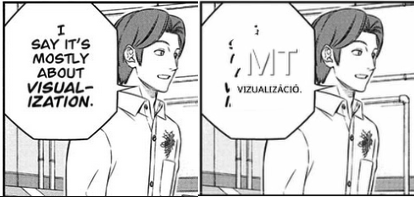
2. This is a text removal bug. I'm going to try to fix this very soon.
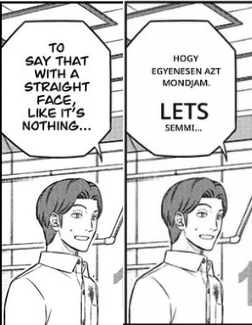
3. Yes, the font might look easy to OCR, but the RapidOCR model is unfortunately really struggling with the separation of spaces here. I have just updated the model to the newest English model, it will be used by default in the next version. I also noticed that 'AH. GOTCHA.' failed to translate - if you use the classic DeepL model here, you will get the exact same result. So in that case, it is a DeepL model issue. The 'next-gen' model works just fine. For the next version, I have added an argument to the DeepL translation request that will prefer the next-gen models by default. This should improve translations by quite a margin for DeepL!
4. This would be some sort of OCR issue. Not entirely sure what's going wrong here. The second pic below here is misplaced I assume..?
5. In these specific images, the issue is angled text. It is not supported at all at the moment, not for OCR and not for rendering. It is an addition that requires quite a bit more thought than I initially had in mind.. so it may take a while before I introduce support for that.
6. This is again a DeepL model issue. It translates to 'MI VAN!?' with the next-gen model. Hopefully that's correct, and as stated above, the next-gen model will be used in the next version! :)
Yep, the 'Too many requests' error is a bit of a headache and something I need to figure out for other API's that are used through Custom API.
The reason it is flashing like that on your recording is because it is impossible to use the Automatic mode with WGC if I do not constantly hide/unhide it to a recording device (in this case, new screenshots!). That solution does not work at all for DXGI, that's why it is always hidden from recordings. Hence why I added the 'Stream Friendly' mode.
1. Yep, this is a text removal issue. I will be improving/adding new algos, and likely add some user-configurable values to fix edge cases.
2. ^ ditto
3. These are all OCR model issues. As stated above, the new English model will be included in the new version, however, it is not perfect and will also cause translation errors.
4. The first pick is the same as above. The second pic is also the same, but the font is specifically an issue here, the SO is picked up as 5O, 50, S0 instead of just alphabetical characters 'SO'.
5. Again, angled text.
6. Same as previous 6.
7. OCR issue. This specific example is massively improved with the new model. There is also a box detection issue here that I will expand upon below.
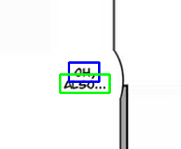
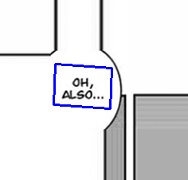
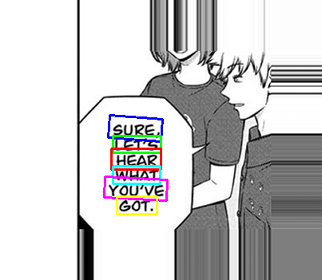
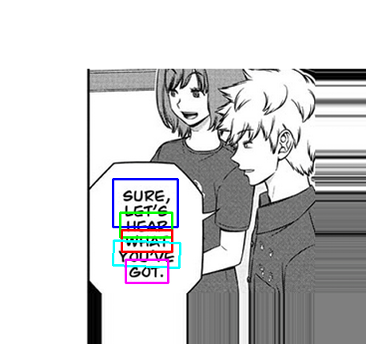
In these two examples, we have a box detection issue that happens sometimes. All independent text lines should be in their own box for best possible recognition. In these cases, we have some boxes that expand over several lines, which is very problematic.
I will try the specific English box detection model later to see if this isn't a problem with that model. If so, I will add it. The reason it is not already added is that the current model being used thus far has worked very well for all languages, and it would just take up unnecessary space.
MangaOCR is much slower than RapidOCR mainly due to the sheer size of the Manga model. It is not optimized for speed (but I did all I could to trim it down, without losing quality..). In the future, if I ever get enough money, I will create my own models that have a good balance of speed and quality for this app's purpose.
I have not been able to reproduce the last bug you mentioned.. Could you please make a short video of the process?
Fyi, if you weren't aware. When you do debugging like this - try to use the LanguageSwap hotkey so you can see if the OCR is recognising the text correctly or not. It helps a lot to figure out if it is an OCR or a translation issue.
Again, thank you very very much for all of this. You're a hero! :)
*Edit* Forgot to say - Use the CPU for MangaOCR. I think I should disable the GPU selection completely for this, because it is excruciatingly slow on my old 980 Ti.
*Edit 2* Again, forgot to say.. To temporarily fix the text removal issues, try zooming in! Should fix the problems (apart from the Stream Friendly one). You can hold CTRL + scroll up and down in the browser to zoom in/out.
*Edit 3* I tried the older model that is specifically made for English box detection. In this case it works really well, but I am not prepared to set it as default just yet. It may very well be so that it does a lot worse in other scenarios. You can download it from here. Just go to RapidOCR and then import it into the 'Detection' section and select it for use.