

Hey this looks amazing and I just snagged the tool! I'm having some trouble with the setup on Mac though, I read the SETUP.txt file, but I don't see any .app folder to group together with the assets folder. When I run the application, it doesn't respond and I need to force quit it. Any chance you know what's happening here?
265 days ago(+1)
Hey there, mate! Can you send me a screenshot of how your directory looks like when you unzip the mac file?
265 days ago(+1)
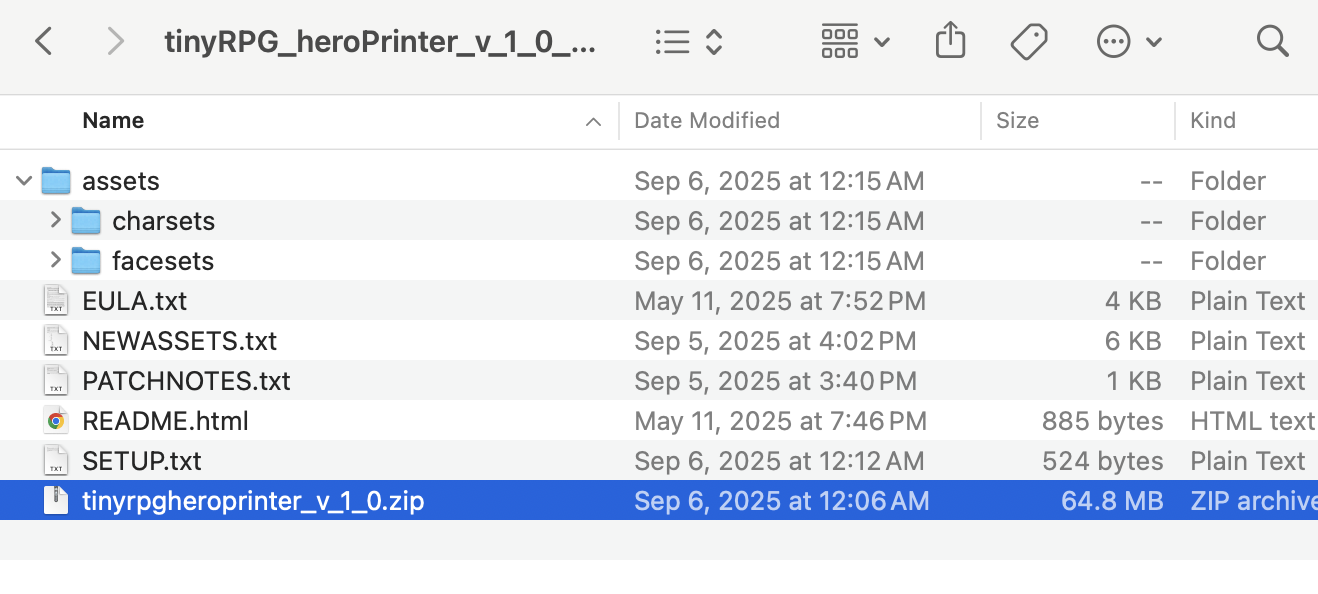 Yep! Here it is right after downloading and unzipping. This is showing hidden files and folders as well.
265 days ago (+1)
Oh yeah, I should probably repack that while on linux or emulating mac, because windows will consider the .app as a folder instead of a .app.
Extract that tinyrpgheroprinter_v_1_0.zip that you have selected to the same folder you currently are, then move everything to your applications folder.
Try to run twice it and let me know the results. Load it, if it freezes, force quit, try again. I am guessing it will still not respond, mac is a bit of an oddball and there are plenty of possible issues. But worry not, we will figure out which one it is.
265 days ago(+1)
Thanks for your help with debugging! I tried it twice and it didn't respond both times unfortunately
265 days ago(+1)
Looks like I need to update my macOS version to update Xcode, I'll get back to you when I try that
265 days ago (+1)
Ugh, I feared that.
Hold that thought, let us try other courses of action before it comes to that because I know how things like to break after an update. Let me run a debug version of the app on another emulated Mac and see if I can find anything weird going on.
265 days ago(+1)
That's okay, I was due for an update anyways. I have the latest Xcode version now and it's still freezing on launch if that narrows it down more.
265 days ago (+1)
My mate, I believe I fixed the issue. It was probably related to path building while under certain versions of mac - instead of throwing the usual error for files not being found it was just freezing. I am uploading a hot fix right now - not sure if it will be a permanent fix since I would like a more elegant solution.
Nonetheless, you will notice that your asset folders will be inside the app, so right click on the .app, select Show Package Contents, navigate to /Contents/MacOS, there is your assets folder. If you ever want to add new stuff or edit what is already in there, that is the path. Whenever you update something, just reload the tool since the textures are saved on the RAM.
If you have any other issues, please, don’t refrain from reaching out and let me know. I am now worried that a few MacOS versions might have performance issues. If that is your case, please, give me some info on your OS version. Thank you so much for your patience! Uploading the hot fix in a few.
EDIT: Hot fix is now online.