
On Sale: GamesAssetsToolsTabletopComics
Indie game storeFree gamesFun gamesHorror games
Game developmentAssetsComics
SalesBundles
Jobs
TagsGame Engines

Hi there! Thanks for playing and your feedback.
The controller icons should swap on the fly depending on what input method you're using. When I test it, it changes betwee  keyboard, XBox gamepad, and PS4 controller for example. Is that not the case for you?

Also, I'm not sure I understand the rest of your comment. The name of the moves are displayed on screen, there shouldn't be any controller buttons. Could you share a screenshot so I could get a better understanding of what the issue is? Are you talking about the battle screen or the input remapping screen?
By including a keybinder into the game, I assume that you wanted players to have a built-in alternative to profiler programs, like JoyToKey. The keybinder you provided doesn't trip on its own configurations, so it's stable, and it's also very flexible. For those reasons, I felt completely safe testing with controllers that are much weirder than official Xbox and PS ones - more along the lines of N64 and Gamecube.

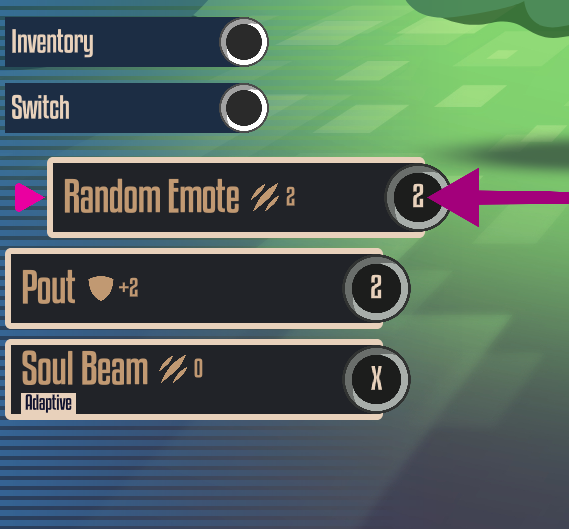
Those ones will work just fine. However, I'll still see images of Xbox buttons. I don't expect games to let me choose each individual button image, but being able to see the names of moves (rather than button images) would be nice (even though it will raise the game's learning curve). I think it would allow the flexibility of your HUD system to "catch up" the flexibility of your keybinder.

Oh, that's cool! I didn't know it even works with those older controllers. Thanks for testing and letting me know :)

I'm still not sure I understand "names of moves instead of button images", sorry. I assume with "moves" you mean the tricks that Animons can perform during battle which don't show any gamepad icons (at least not intentional)?


Do you mean these or something else? Would you like an option to disable controller icons in the UI in general?

(+1)

I put 3 images together to show what I mean. Use this link:

https://www.conflexgames.com/918034

Realistically, I'm okay with this game not including this functionality, but if you decide to use it in a later game, I would love to see it.
I'm of the mindset that PC games don't need to include keybinders, except ones that require delicate analog movement.

Ah, gotcha! Sorry, I was so stuck on the word "moves" from Pokémon that I didn't compute haha. Thanks for making the images.

I could whip something up. Should be doable as I'm already reusing an object that takes care of button prompts. 

Regarding the keybinders, it's an important accessibility features for players with physical disabilities that rely using different controllers. Remapping inputs enables them to play the game. So I'd say every game needs it, actually :)

The reason PC games don't need built-in keybinders is that profilers already work in a nearly universal way. I say "nearly" because there are rare instances where a game will obstruct a profiler. On conflexgames.com, you can download a special version of JoyToKey, which was specifically redesigned, to be easy to look at in a living room. MS Windows and Steam were designed to used at a desk, but not living rooms. Steam does have a Big Picture Mode, but it's not as serious as the kinds of menus you'd see in N64 and PS1 games. This other version of JoyToKey is modelled on console menu designs.

Ah, I see what you mean. I misunderstood.

For Steam, I had to offer either Steam input remapping via their API or make my own to get the controller support and Steam deck verified tag so I just opted to do it in-game.