
On Sale: GamesAssetsToolsTabletopComics
Indie game storeFree gamesFun gamesHorror games
Game developmentAssetsComics
SalesBundles
Jobs
TagsGame Engines
(3 edits)

13.4 Bug Report incoming!

  1. Motion Inherit Stretch:
    1. I'm not sure this one is a bug. For clarity I'm going to call a horizontal stretch Squish and a vertical one Stretch.
      I've noticed it works like this: Left to Right and Down to Up cause a Stretch and the oposite movements cause a Squish effect (and the other way around when setting negative strength values).
      In a way, I find that effect weird for horizontal movements. I kind of expected it to do the same deformation when moving either left or right. But I also like the effect it has when moving vertically, I guess it resembles gravity in some way.
      Whether it's a bug or intentional, I'd like to be able to make one axis "symmetrical" (as in doing the same effect when moving left or right/up or down) if possible.
    2. When using this feature, child layers get slightly misaligned temporarily when the deformation is being applied. I've got the feeling it has something to do with how the Stretch effect stores the coordinates, like it needs more resolution, maybe (I exaggerated the settings and applied inherited rotation to be able to take this screenshot showing the misalignment. It's way more subtle/barely noticeable with normal settings).

      This doesn't happen with Stretch off.
  2. VSync/FPS Limit:
    When trying the new FPS limit I've found some performance issues with Vertical Sync.
    I use two screens, a main 120hz monitor and a second 60hz one (I run RahiTuber on this one). If I turn on VSync, the FPS get limited to 60 as expected and the GPU goes down, but the CPU usage stays the same. It only goes down to normal levels if I turn it off and manually limit the frames per second to 60.
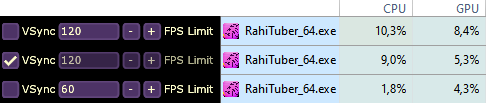

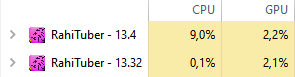
    I did an experiment with no layers (to be sure of the bare performance) and VSync turned on in both 13.32 and 13.4 and... Yeah, something about it is eating the CPU now:
I'll update you if I notice anything else, for now I'll be squishing parts, I'm loving this feature hehe

(2 edits)

Thanks for this info and the detailed reports! 

Hopefully these won't be causing people too many issues until i fix them. The vsync one is strange because i literally didn't change the vsync code 🤔

The horizontal squishing is intentional, and it's based on where the pivot is in relation to the sprite center. If there's more "weight" on one side, thats the side that will lag behind.

However, currently with a centered pivot point, it does just pick the left side. I could definitely add something that when the X pivot is at 50%, horizontal stretch is symmetrical.

To be honest the misalignment isn't noticeable in a normal use case, but while playing with more exaggerated values I started seeing it and I cranked it all up to see what it was 😂

The one that was annoying was the VSync because it worked perfectly before and at first I didn't understand why the CPU usage was so high all of the sudden. Oh also, in 13.32 and before, VSync On used to limit the frames to 60 in both my monitors and now it goes to 120 in my main, but I don't know if that's related and helps tracking the issue.

Oh that makes sense, I felt it was intentional. It would be great!

Vsync has no guarantee of frame rate, only that it aligns with your monitors refresh rate - so if it can fit two frames in before your monitor refreshes, I think it does that. 

The difference between this and the previous version is that previously, when vsync was enabled, I was also limiting the FPS to 60. I removed that in case people have high-refresh-rate monitors and want to see it at 120fps.

I'm using SFML for the rendering side of things, so i might need to take a deep dive into their implementation to find out why this has suddenly gone wrong...

Oh, so that's why it didn't go up to 120 before!

I've been investigating and it seems like it's a driver problem (NVIDIA in my case) and not a SFML one. Turning off "Threaded Optimization" in NVIDIA Control Panel solved it. I guess that's a partial win 😅

Going off on a slight tangent, I've noticed the FPS determine the physics movements and I came across this article that might be helpful to make them consistent 

I hope all of this helps!

thanks very much!

Hey, great catch ! Thanks for sharing. I was opening the Demo model on two versions of rahituber, with stock settings, and seeing 10x CPU use on the newer version seemed crazy ! Threaded Optimization on Nvidia CPL reduced the difference to expected numbers. Perhaps that info would fit nicely in the "known issues" post @rahisaurus ?

Thanks, I'll add that ^^

(+1)

I think I finally found the cause of this error and fixed it! https://rahisaurus.itch.io/rahituber/devlog/950908/update-2025-05-23-v1392

(3 edits)

Awesome! I think Stretch has this bug too (I peeked at the code and I saw that lines 4117 and 4118 in LayerManager.cpp still use floating point precision for stretch, but I don't know if that's it), but with that turned off it looks like it's indeed fixed! Woohoo!

(+1)

The switch to double precision didn't actually do anything, but thanks for letting me know that stretch still has the issue. I'll look into it!

Oooh, my C++ is pretty basic and when I saw that part of the commit changes I thought that was it haha. I'm glad to help!