

There is really no good reason why the search features works the way it does. In the browser it works perfectly and not being able to find what you are looking for often renders the client unusable.
Not a problem.
From a UX perspective the case is as follows:
"When I am searching I expect to find an overview of results with images and descriptions just like I would on the web page. Instead I am provided with a confusing list of results with nothing to put the results into context, except when they are individually hovered. A list that doesn't seem to provide the same results as the main search feature. In addition; hitting 'enter' does not either bring me to an overview of results, as it usually would, but instead brings me to the first result of the search."
- The main problem with this is that it is inconsistent with what users have grown to expect from search field behaviour. Items listed below a search bar are in the most usual cases meant to serve as suggestions and not as the actual results of the search.
- Additionally it is inconsistent with already learned behaviour from the website, which we can relatively safely assume people use more than the client.
Please excuse my initial post that was written in frustration. I am like many others very grateful for the platform you provide and greatly appreciate all the effort you put into it.
Keep up the good work.
I got an example.
I want a game called "see no fear", i type it up, i click enter, https://cool-username-on-itch.itch.io/fun-fun-fun-fun-fun-fun-fun-fun-fun opens up.
I want this:
 Not this:
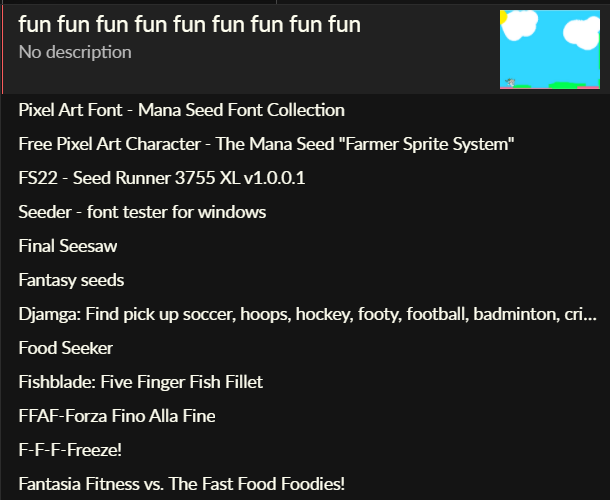
I tried to search up "UZG 2", the game's name is literally just "UZG 2 (BETA)" and yet none of the results give me what I want, and instead give me some random ahhh song from a year ago.
Was hyped about hearing the app search was being updated to match the website, until I saw that this was posted 4 years ago.
Gonna assume that's not gonna happen, then. Ripperoni.
I'm really hoping you will consider changing the app search code to work like how it works on the site. It is unironically the biggest reason keeping me from using the client more often.
This still does not return even partially correct results! I have searched for multiple games that I originally downloaded and all I keep getting are horror themed homosexual VNs. For example, I searched for MurMur, Harem Hotel, Eturnum, Corrupted Kingdoms, Lucky Paradox, etc, etc... NONE return any of the games, yet they are ALL on your site.
Could you consider simply removing the "display: none" on .index_page .index_sidebar .game_search in the stylesheet as a short term workaround? It does seem that search works in the box that appears when you do this.
I am sure that this is costing itch users - I'd have moved over to another site if I didn't know I could get the game I want on the website.
The search box on the app doesn't work, as other people described in the thread (namely it fails to actually search). In my case I typed "spacechem" into the only visible search box in the app. I simply cannot get it to perform the search - pressing enter shows me a seemingly random game. Other people have posted screenshots of the issue in this thread.
All I noted was that I could perform a search in the app by reenabling the search box. The "index_page .index_sidebar .game_search" is a CSS selector that refers to the search box that has been hidden from the sidebar in the app.
That said, it appears this has been repeatedly reported as broken, eg https://github.com/itchio/itch/issues/3095
This still happens to me when searching for "Psycutlery", no results have anything to do with it. The only way I found to play this game on the app is the following
The app is literally unusable in most cases, there's no way I'm going to use it on a daily basis to play games.