

Hello Eli! I have a question: does your self variables can store text? I have some trouble with this and I'm trying to figure out why it's not working as I want to.

Show almost everything from database using escape codes! · By
I'm using plugin command and put "$gameActors.actor(2).name()" as value to get name from Actor 2 (which is how player can name a chest box). The escape code is supposed to show over event as a name, which works quite well for default (not self) variables. But tried to show the value in message window, too, but still no luck - the self variable always show 0. Oh, and what's probably matter: it's for spawned events. Not the one that's on the map from the beginnning.
It is always better if you show screenshot of what are you doing instead of just saying...
1 - Now, that plugin command you mentioned, it is from my Self Variable plugin?
2 - Did you try to use the escape code for self variables in a show text command on a default event to see if it works? That is important because we can compare using it on regular events and the spawned events. If it works on normal events, then probably is a thing with the spawn event plugin.
3 - What spawn event plugin you are using?
Hello!
1. Yes, it's your Self Variable plugin:
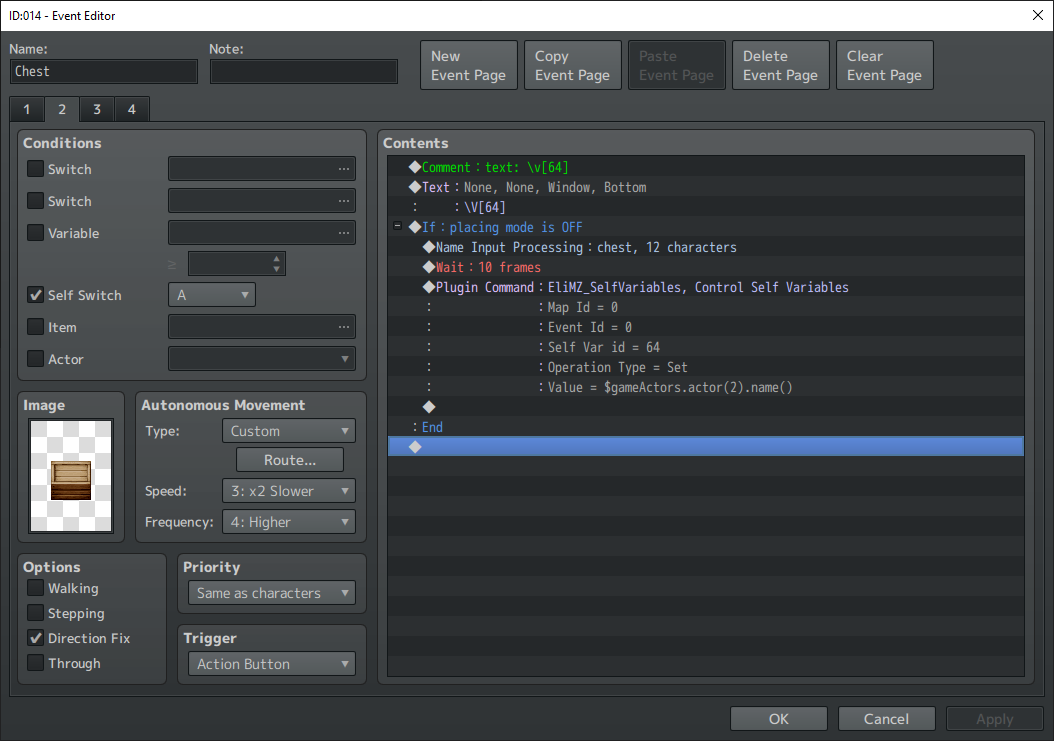
2. Tried it, also didn't work. Both "over event" and in message using escape code. Like it display "0" instead of string, too. (this allowed me to conclude that selfswitch does not store text values, but maybe I am wrong)
3. For spawning I'm using DSI-Event Spawner.
Hi there!
i confirmed the problem. I will take a look to fix that. But for now, you can use the default variable command, that if the Variable is a Self Variable, it will be applied to the self variable:
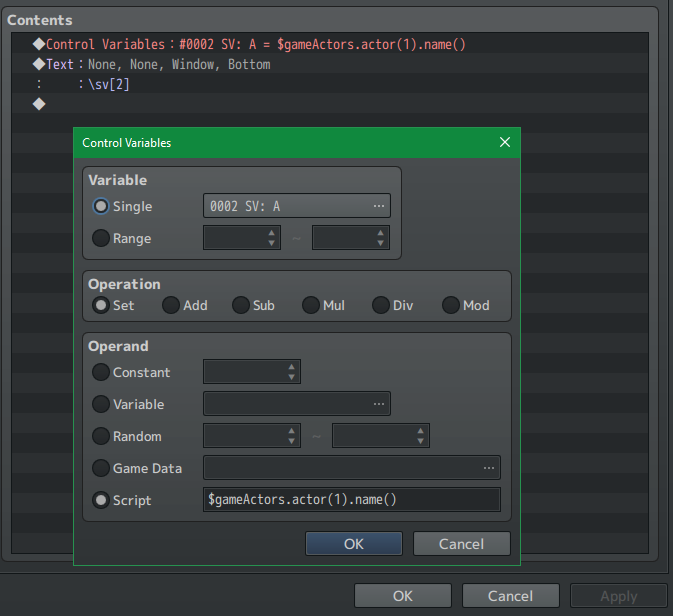
hmm... strange. That definitelly works for me.
Hello! Thank you for your fixes. Using this for text above events: https://sanghendrix.itch.io/easy-text-icon-on-events-rpg-maker-mz-plugin
Still have no idea how can I display my self variables above the events T_T Eli, maybe you could write a simple plugin that can display text above events, including your escape codes and self variable codes? That would be perfect... (I'm just so tired of this).
Well this plugin is paid, so I can't take a look into the code.
But there are several other plugins around that can make any text above events. Maybe you can try them.
I do plan on doind that kind of plugin, for a long time ago haha. Don't know when I will do it then. But I let you know if I did. For now, I guesss you either need to change the way you want to show the text above the event:
1 - Not using self variables
2 - Using another self variable plugin that is compatible with sang hendrix
3 - Using another event label/text plugin that is compatible with my self vfariables
Yeah I really need it to be compatible with self variables, so only 2 and 3 is an option.
Can you recommend something? Honestly, I haven't seen many plugins that do this.
Actually, only the one from Visustella worked properly for me, but it conflicts with other plugins, so I don't use theirs.
Would keep an eye on your plugins, maybe one day I'll find the "text above events"... :)