Gear up for the Celeste 6th Anniversary Challenge! · By Maddy Makes Games
hey
this may sound stupid but im trying this on a chromebook (hp chromebook 14a) with linux
and it just boots to a black screen
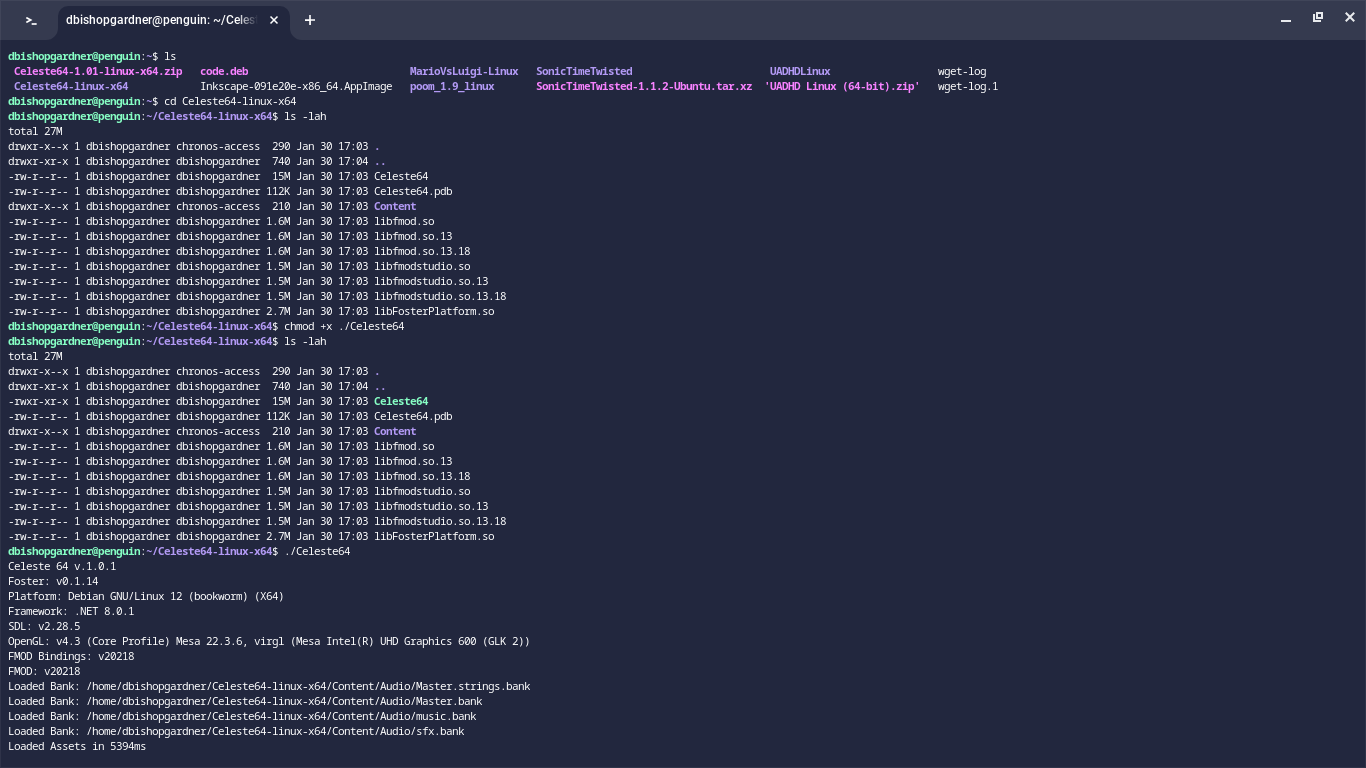
this is the terminal
thanks for the help
buh bye
i'm actually having the exact same problem! haven't found a solution yet either though :/
Unfortunately I don't have an obvious fix for you right now, but if it was an OpenGL bug it should show some kind of error, but it's not. If you press confirm (C on keyboard, A on controller) can you also hear the menu?
Why is Mesa VirGL driver used? Are you running the game in a virtual machine (Qemu)? Ohhhh... Chromebook :/
Edit: if you're desperate, maybe try the software renderer:
$ LIBGL_ALWAYS_SOFTWARE=true ./Celeste64
For what is worth, it's working fine for me on Fedora 39 (nvidia).
I'm having this same issue on the Linux partition on my Chromebook. Did you ever find a solution?
best solution afaik is to use software rendering like BloodScourge suggested, which can be enabled by running
export LIBGL_ALWAYS_SOFTWARE=true
Thank you, that did it!