Indie game storeFree gamesFun gamesHorror games
Game developmentAssetsComics
SalesBundles
Jobs
Tags

You must be 18+ to view this content

Five Nights With Fatties: A Second Course may contain content you must be 18+ to view.

Are you 18 years of age or older?

or Return to itch.io

Bug Report Thread Sticky

A topic by Poppu created Jun 29, 2022 Views: 5,992 Replies: 130
Viewing posts 1 to 20 of 44 · Next page · Last page
Developer(+1)

Hello Everyone!

We know there are likely to be many bugs that we missed! So please if you find any post them in this thread so they can easily be tackled one by one! These will be released in small patches throughout the next coming weeks!

Please Don't!

  • Ask about character mechanics here.
  • Ask for features here.

Thank you all!

(+1)

Every time Pink Fury gets into the room, I get crushed by a character with big badonkadonks and die after Fury's animation is done. This so far has only happened when she alone gets inside the room. (I am on night 3 btw)

I've also noticed this. Get filled with burgs, then a blue shirted big tittied lady crushed me

Hi, I'm pretty curious about this "secret character" you and Godzillaman have described. I've tried to replicate the conditions you described, yet have been unsuccessful, likely because the earliest patch I have installed is 0.2. 

Could you describe her in more detail, or even try to encounter her again and record her for me?

Is this her?

Developer

This will be in tonights 0.2 patch. 

Hi, I'm pretty curious about this "secret character" you've described. I've tried to replicate the conditions you described, yet have been unsuccessful, likely because the earliest patch I have installed is 0.2. 

Could you describe her in more detail, or even try to encounter her again and record her for me?

Is this her?

Did you run out of power or something during that time?

If you run out of power, Senator Leiko comes in and jumps you (she’s essentially this game’s equivalent of Freddy when you run out of power). Unless the other characters catch you before she does, their animations won’t get interrupted.

Developer

Bug Fix Patch 0.1 - 30/06/2022, 12:28AM

  • 'Date Night' Minigame burger fix.
  • Cruxia difficulty adjusted.
  • Cruxia showing on everyone's interview is now fixed.

There will be a patch tomorrow with the release that contains:

  • Rarity adjustments (Help the rare character show less).
  • Balance adjustments.
(1 edit)

When the Graphical Preset in the Settings is changed, the Audio level reverts back to 50

Ex: if the GP is on High and the Audio is at 33, clicking the right arrow changes the GP to Low, but the Audio back to 50.

Edit: This only occurs if the GP is changed before the Audio change is applied.

Developer

This should be in Bug Patch 0.2! Thanks for bringing it to our attention! 

Custom Night can be clicked on and accessed despite being labeled as locked. Naturally, it contains many spoilers.

Developer

Hey hey, how did you do this one?
Tried to repeat it but Extras is locked until after the end credits.

I clicked Play, and scrolled down to Custom Night, then clicked that.
This was after I clicked Reset Data in the Settings menu, so it might be only after a fresh install.

Developer

Thank you!

This will be in tonights 0.2 patch. 

I can't play the first night it crashes on me before i can get into the game

Developer

Hello,

Sorry to hear about this. We've had these reports prior but they seem to be older systems. What sort of Hardware, are you running on so I can get a better idea? 

A intel Core i7

Developer

What is your OS and GPU?

Windows 11 intel Iris Max

(1 edit) (+1)

I'm kind of experiencing this issue as well.

The menu works fine, but it's when I try to start off the interview when the loading screen freezes, and I can't do very much of anything.

I also try starting off the shift and the loading screen freezes, but the dialogue to toggle the flashlight begins despite the loading screen being frozen.

game crashes every time i try to launch the introduction shift :(

Developer

Hey,

Sorry to hear about this. We've had these reports prior but they seem to be older systems. What sort of Hardware, are you running on so I can get a better idea? 

It's a pretty new HP Spectre laptop, intel core i7, iRISx Graphics card...what else  would help you to know?

Developer

What's the OS, mainly trying to find common ground on the issue so i can research it and hopefully find a patch for it! 

definitely windows, not sure what version - bc it's a 2020/2021 laptop, i will assume relatively up to date!

Acer Aspire 3 Laptop running Windows 10. I'm having the same problem; I looked through the Player.log to see what the issue was. Most of the messages were displayed multiple times, with 448 being duplicated a hundred times or so.

 - 

The referenced script on this Behaviour (Game Object 'Main Camera') is missing! 

(Filename:  Line: 334)

 - 

Material VHS doesn't have _Stencil property

UnityEngine.DebugLogHandler:LogFormat(LogType, Object, String, Object[])

UnityEngine.Logger:Log(LogType, Object, Object)

UnityEngine.Debug:LogWarning(Object, Object)

UnityEngine.UI.StencilMaterial:Add(Material, Int32, StencilOp, CompareFunction, ColorWriteMask, Int32, Int32)

TMPro.TextMeshProUGUI:GetModifiedMaterial(Material)

TMPro.TMP_MaterialManager:GetMaterialForRendering(MaskableGraphic, Material)

TMPro.TextMeshProUGUI:get_materialForRendering()

TMPro.TextMeshProUGUI:UpdateMaterial()

TMPro.TextMeshProUGUI:Rebuild(CanvasUpdate)

UnityEngine.UI.CanvasUpdateRegistry:PerformUpdate()

System.InternalCancelHandler:Invoke()

UnityEngine.Canvas:ForceUpdateCanvases()

UnityEngine.UI.ScrollRect:LateUpdate()

(Filename: C:\buildslave\unity\build\Runtime/Export/Debug/Debug.bindings.h Line: 39)

 - 

d3d11: failed to create 2D texture shader resource view id=987 [D3D error was 80070057]

(Filename:  Line: 537)

sadly despite the new patch, the crash is still happening - i can do the induction interview, but as soon as I try the shift, a loading screen will appear, and then it will crash

Where would I find the new patch?

I'm still dealing with the issues of the loading screens freezing whenever I try to do the induction shift either through the interview or through the shift.

Developer

As stated in the patch notes, we're still investigating the crashing issues. Patch 0.3 was just general fixes. We have some asset optimisations coming in patch 0.4 but are unsure if this will address the issue people are having. It's hard for us to fix this quickly as all our systems run the game as intended so we ask kindly for patience 🙏

Understood. Take all the time you need.

When I clicked Introduction, it would show the loading screen before freezing then crashing the application. Then, when I tried to play the shift instead, it would show the loading screen and proceed but it would stay stuck on the loading screen, telling me to turn on the flashlight before crashing again. 

Developer

Hello,

Sorry to hear about this. We've had these reports prior but they seem to be older systems. What sort of Hardware, are you running on so I can get a better idea? 

Welp found a few bugs and issues so far

1: This is one that happened in the demo as well and it's where the office elements are clickable while in cams, not sure if it can be fixed but managed to isolate how it happens and it seems anything that forces the player out of cams (so Milkmean attacking, Suki attacking, Pinkfury's jumpscare, etc.) causes this to proc.  My guess is that the game thinks the cams are still open after being forced out and reopening the cams just confuses the system.  Now admittedly this isn't the most high priority bug since it's a minor inconvenience but still worth noting.

2: Milkmeans seems to be missing her game over? I've lost to her a few times and each time it's this BE girl so I'm not sure if I'm just unlucky in getting one of these rare girls to show up or if it's an actual bug.

3: I noticed Suki's gameover isn't fully at resolution as a small part of her head bounces off screen, and her feet aren't visible in it.

4: The first mini-game just doesn't seem to work at all, outside of the very first burger it seems if a burger isn't visible at al on the table it constantly glitches out and has Milkmean just walk into the player and proceeds to soft-lock.

5: Custom night is just, on my end and I see many other peoples, can just straight be scrolled down to and accessed.  As a bounce off of this, on my end I can even access the gallery mode from here by clicking on the X on the side underneath challenges in the custom night.

And that's it so far as bugs and general issues go that I've currently encountered. will post again/update if I find more on my end

Developer (1 edit)

For 4, try updating the game, that was fixed in patch 0.1 as stated above. 

For 5 can you explain? I'm not sure what you mean by this.

Thanks!

(1 edit)

will try updating and see what that does for it sure,  Yup update solved that.

for 5: even though the custom night is locked it can still be accessed just by clicking it.  So even though it says it's locked it can still be accessed.  As for the gallery select, you know on the side of the custom night menu where it has the play night, night challenges, and the x box that says back? well turns out selecting back will cause the game to jump to the extras menu instead of taking the player out of the custom night menu is what I mean, hopefully I'm making sense.

Developer

Ah I understand, yes got it!

Will be in patch 0.2!

Also an extra aside on my end with balance adjustments, I do feel night 4's difficulty just spikes.  On my end Cindy keeps getting me and for me it's that her wing flap audio is too low, I am mildly hearing impaired so a lot of the general game approach sfx are too low for me and it feels like utter luck on my end whenever I've actually stopped anybody.

Developer (1 edit)

I myself struggle with those issues so i do understand, It is very hard to balance it perfectly with everyone in mind. Though tweaks even if little should be altered here and there so hopefully it'll help in someway. Maybe down the line I can add some more assistance for audio in the settings, but that will be a bit later on

(2 edits)

Yeah, the game is incredibly frustrating and stressful by Night 4, and I have to assume the nights after it are even worse. It's not fun at all to instantly fail because you spent three seconds not staring at the flappy demon girl or the streamer. Not interested in playing a fetish game that gives me this much of a headache to deal with.

Not sure if this qualifies as a bug, but the audio mixing might need another pass?  Even with headphones, the only dialogue I can reliably parse is from the phone; the interview tapes are nearly unintelligible and even the end credits theme has drowned-out vocals.

Achira doesn't seem to "finish off" the player, but I'm guessing she may just be intended as a force multiplier?

Developer

The audio is something we're happy with at this point. It's had a lot of balancing to many different audio devices. Though there is likely to be minor tweaks here and there, overall won't be wildly different. I am not sure what to recommend as we've tried to account for a wide range of audio balance. 

Developer (1 edit)

Bug Fix Patch 0.2 - 30/06/2022, 6:00PM

  • Cruxia Interview Balance altered.
  • Patched the settings of the game.
  • Fixed the early Custom Night issue.
  • Balances to Milkameans Pink Fury.
  • Rareity fix for secret character.
  • Increased the audio of Cindys wing sound.
  • Fixed Milkameans jumpscare not showing.
  • More tweaks and balance adjustments. 

Future Patches

  • Will be looking at the office elements clickable while in camera issue for the next patch. 
  • More balances.
  • Suki screen adjustments.
  • Optimisations.
  • Polish to the loading screens to stop audio continuing. 
  • Some more context clues to more confusing elements of interviews.

Hey there, I just beat 12x20 mode but wasn't awarded a third star. Is the third star's unlock conditions tied to something else? (I have also completed every previous challenge preset in challenge mode)

Developer

Heck, I will look into this. 

Did you launch them all at 20 by setting individually or did you click potluck in the challenge modes? 

So first I clicked on Potluck mode, ran and failed multiple times. Each time after I failed, I would simply head right back to the Custom Night and without touching anything at all. I'd simply hit Play. Since the game mode saves any settings that were set prior to starting the previous Custom Night. Was I supposed to be going and clicking the Potluck option every single time?

Developer

Yeah I will look into this! It was more to see how it happened so I can visualize why it might not have given you it, It will be my focus for the next patch! Sorry about the inconvenience, I'm just hoping that its more to do with the star code than anything else!

As always your attention to addressing these bugs is appreciated! I guess the main thing I would be curious about after this is, if it were fixed, would I need to redo Potluck mode again? Or would the star be automatically triggered and unlocked after a hypothetical update?

Developer

If it's something I accidentally missed, then you would have to complete it again. (Alternatively I can load your save file and alter it for you) But if its an issue with just the star not showing then it should fix itself! Im hoping its the second one aha

Fingers crossed, but if not, we'll figure something out ^^

To update on my side of things, I can now confirm that I started up the game fresh; went into Custom Night mode, selected Potluck, and clicked nothing else besides Play to start it up. Completed it on the first try of that session and still got no third star, so there definitely seems to be something tied to the star unlock trigger.

Developer

Yeah the issue should be now fixed in patch 0.3

Yup ^^ can confirm it's fixed and even got the third star on initial start-up. Thanks again, Poppu!

Not sure if this is a bug but I have tried to beat the demons minigame but the first section with the laser shooting eyeballs there is a chance if you get stuck in the sides before the end of the sequence the box will shrink you into the eyes laser and take damage even if you avoided everything else.

Developer(+1)

I will look into this for the next patch, thanks for bringing it to my attention! 

This might just be me but whenever I try to start night one and the loading screen finishes, the game freezes for a second and then the night starts with the loading screen still there. 

Hey, Avian from Poppu.
Would you mind helping us identify this issue by giving some of your PC specs? We're attempting to find a connection between yourself and other users who have reported this bug so we can find a fix for it. 
The loading bug is a known issue so far but it'd be great to have your help with identifying the cause of it.
Thank you.

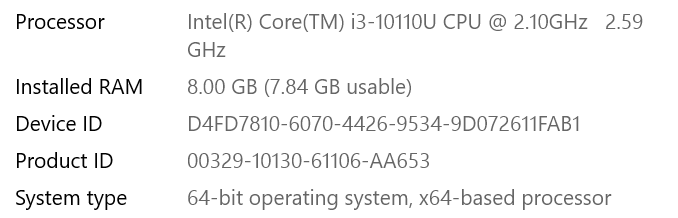
Here's the info I can find

Processor Intel(R) Core(TM) i5-10210U CPU @ 1.60GHz   2.11 GHz

Installed RAM 8.00 GB (7.83 GB usable)

Device ID 989FBAD0-7B96-4128-A41A-1449B107A988

Product ID 00325-81473-86022-AAOEM

System type 64-bit operating system, x64-based processor

It runs on windows 10 also (Not sure if that's important but might as well be safe) 

(1 edit)

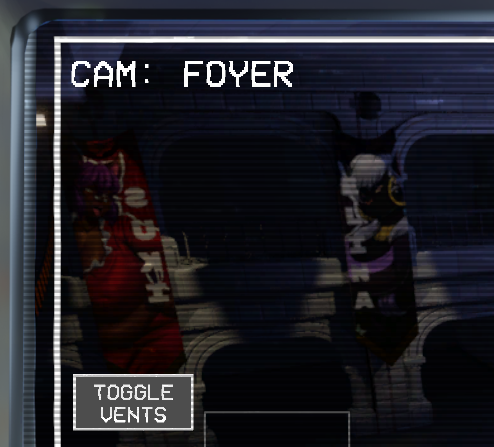
I don't know what's doing this for me but I seem to have an issue where I'm unable to see alot of stuff. Like I can't see what's on the camera's all it displays is my office. one of the buttons on the doors is on the wrong side and it took me a while to find where it actually was. One of the food items in the interview straight up didn't show up for me making me confused on what i was supposed to do for a while and so on.


Also during the non interview shifts i have like a 1/5 chance of getting into the level and about a 4/5 chance of the game crashing on me.

Developer

Ah yeah this ones a first, a lot of people who have the loading issues dont get past that. 

I believe this is down to some issue, I originally thought hardware but that doesn't seem to be the case anymore. May I ask your CPU, GPU and OS? Trying to collect data on similar occurrences so I can try find what's causing this for people!

It's not a typical bug so I assume theres something causing an issue somewhere in that realm!

Here you go, admittedly it ain't exactly a gaming laptop, but I assumed at first that it'd work with how smooth the level ran at first. I think I lowered the graphical settings as well to see if it'd fix my issues but it didn't seem to do anything.

Developer

Thank you! I'll try find similar specs to test on! Its a very confusing issue so bare with me, might take a little longer to fix than other bugs. Is this windows 10 or 11? 

Windows 10 version 1909

Developer

Thank you!

Minor update on me situation, I just got my gaming PC back from the shop and booted up the game on it and. I'm seeing alot more stuff in the game than I was on the PC i was using before. Like the difference is night and day.

The demon lady who shows up every hour doesn't show up anywhere on any cameras at all. I cannot beat night 2, this game is not a half hour playthrough -_- I can already tell but it is well made 

(1 edit)

She only shows up in a specific spot in one of two specific rooms when she disappears. This isn't a bug, she IS there. I can't go into exact detail because that's not what this thread is for but remember she's a shapeshifter, so she won't look exactly like herself but she'll still be black and red.

This is not a bug. The character you're talking about moves very quickly, your main defense against her is simply to close the door she appears on as soon as you can.

(1 edit)

I think they're referring to Cruxia, since they're specifying they can't beat night 2 and talking about them showing up every hour. Regardless, you're right it's still not a bug.

Yeah, I think that's who they're referring to.

Well, that or finding her on the cameras before she gets to your door.

Cruxia?

What you're experiencing isn't a bug; that is her actual mechanic. The whole ordeal with Cruxia is a huge game of "Hide and Seek" in which you have to find her on your cameras before she gets into your office. I can't go into further details as it would be too much of a spoiler for those who haven't experienced the game yet but here are some things to take note of: Cruxia moves very fast and she's a shapeshifter with the exception of the colors of black and red.

I can't seem to play the game. I'm able to open it and everything seems to run smoothly, but trying to open the introduction interview consistently  causes the game to freeze and crash. Trying to load up the introduction shift has a bit more luck as it seems to load in but the screen remains frozen on the loading screen and the game only plays a looping voice line and I can't do anything except alt-f4 the game. 

Hey, Avian from Poppu here.

This is a bug we fortunately know about and are working on for the next patch. 

Thank you for the feedback.

Only encountered a single bug during my playthrough all the way up to night 6, sometimes when Suki gets into the room and her minigame is triggered, it often happened that even if I did beat her minigame and she went away, the little screen that pops up during said minigame would still remain there in place even after she was gone, it would remain even if I went to look into the hallways (Can't remember if it also showed up while watching the cameras), it would only go away whenever I restarted the night over again.


I believe this might happen if you complete the minigame too fast, at least for me it would occasionally appear whenever I completed it before Suki could get a second pump in.

Developer

Bug Fix Patch 0.3 - 01/07/2022, 7:20PM

  • Fixed the trigger for the custom night potluck star not showing. (If you completed custom night prior I am very sorry!) 
  • Replaced the final credits music.
  • Fixed an issue where the first attack on Cruxia's Minigame would always damage you at the end.
  • Added a new Setting to allow particles to be disabled. 

Future Patches

  • Still investigating the office elements clickable while in camera issue.
  • Plans to tweak certain characters like Suki to make them more prominent. As well as tweaking Thorne and Achira. 
  • Suki screen adjustments.
  • Optimisations and performance settings for lower machines (Like particle disabling) 
  • Polish to the loading screens to stop audio continuing. 
  • Some more context clues to more confusing elements of interviews.
  • Still looking into the crashing issues for those who have it.
  • Further audio settings. 
  • Replacing the compressed ending cutscene. 

SO uhhh, as i try to get to the interview of night 3 it sends me back to the starting menu

Have you been accidentally clicking on the back button?


That might likely be the case.

Viewing posts 1 to 20 of 44 · Next page · Last page