




Indie game storeFree gamesFun gamesHorror games
Game developmentAssetsComics
SalesBundles
Jobs
TagsGame Engines

samontab

59
Posts
45
Followers
A member registered Oct 05, 2022 · View creator page →

Creator of

Recent community posts

Hi hardworking323,

Thanks for the detailed description of the issue.

I see where the issue is. Basically Private Transcriber Pro uses optimised x86_64 instructions to speed up the transcription process. Since ARM doesn't have those instructions, it just crashes.

There might be support for Windows on ARM in the future, but it is low in the priority, so it's basically an unsupported platform at the moment.

Hi vbanci, 

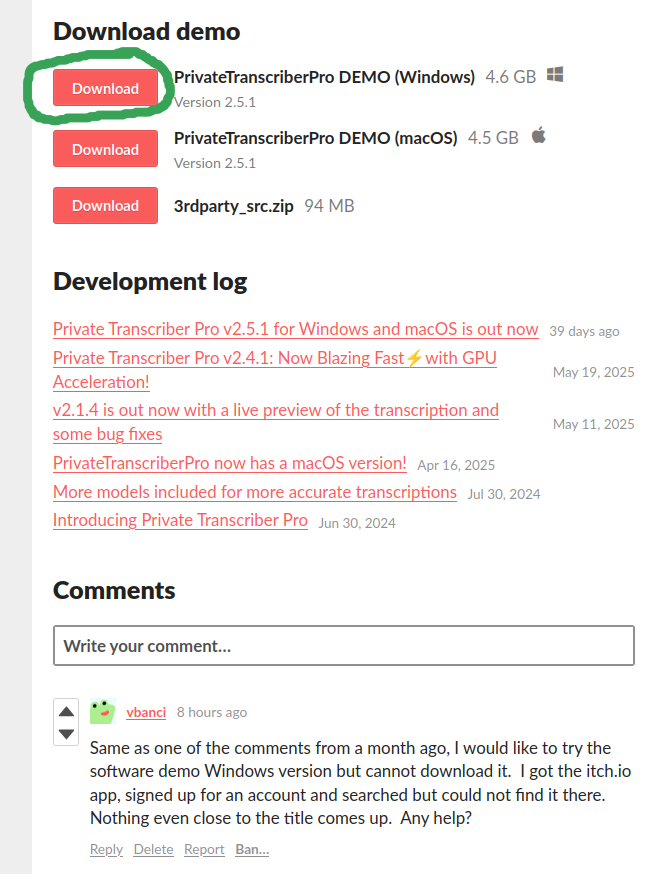
You can simply click on Download right here, no need to search for anything else...

Here's a screenshot of where to click:


Hi Faboineag,

The files are hosted at itch.io, which are not managed by me. Here is a post from them explaining what you can do if you're having issues with the downloads: https://itch.io/post/597689

I hope this helps.

Hi ultracolathompson,

Sometimes the model gets confused if there are other sounds as well. Some things you could try are basically choosing a different model (select one that is more accurate or one that is faster), and also you could split the input into smaller sections, specially at the times that it is getting these issues.

Hope that helps!

As mentioned before, I've just released v2.5.1, which allows you now to choose the language manually.

Hi Mirko66,

I've just released v2.5.1, which adds the ability to manually choose the language of the input audio. This should fix the issue when the automatic language detection doesn't work properly.

Great, thanks for the link cmbruse.

I will add that format in a future version.

Hi jairoaf,

I've just released v2.5.1, which adds the ability to manually set which language the audio is in. This should help you when the automatic language detection doesn't work properly. Note that it does only work with one language per input file.

Hi michellekrollerlaw,

I've just released v2.5.1, which fixes the issue you were having in macOS.

Hi michellekrollerlaw,

Thanks for bringing this to my attention.

I just tested this on my macOS machine with Sequoia 15.5 and you're absolutely right!. 

This is curious as I recently published v2.4.2 to fix another GUI issue on macOS and it was definitely working fine then. 

Anyway, I will fix this issue for the next release which should be coming soon!

Hi soulrider4ever,

You can use the Windows version in Linux with wine

wine ./PrivateTranscriberPro.exe


Hi cmbruse,

I am not familiar with the NVivo program, but if there is any other standard output that would be useful, then I could have a look at it.

Hi jairoaf,

Yes, the automatic detection uses the start of the audio and sometimes it might guess incorrectly.

I am preparing a new version that will allow the user to select the language manually as well, so it should fix this issue. 

Hi ultracolathompson,

If you experience some of those issues, probably the simplest way to fix it is to select a different model, either a more accurate or a faster one. 

Hi Jairoaf,

Thanks for the nice words.

Yes, it should be able to translate French. You can download the demo and see how it works. At the moment it automatically detects the language, and in a new version it will allow you to manually specify the language as well in case there is any issues with the automatic detection.

Normal text is already supported. You have the option of saving the result as either subtitles (.srt) or normal text (.txt). You can also test this in the free demo.

Download the free demo and see how it works for you!

Hi yahyayasin,

Yes, Indonesian should be fine. You can always download the free demo and see how it performs with your files.

Hi frymeapples,

There's no subscription, you pay once and get to use it forever, with free updates as well.

Both versions, macOS and Windows, are included in the price. You can run them on any number of computers you have.

The best way to test how long it takes is to simply test with the free demo. You can download it for macOS and Windows. The demo basically does the same as the full version, but the output is changed once it finishes, every other line of the transcription is changed to a demo sentence.

Hi Mirko66,

Good catch, I just tested this on macOS 15.5 and you're right, it doesn't open the dialogs (seems to be a bug in the underlying GUI library, Qt).

I just uploaded an updated version for macOS that fixes this (v2.4.2).

Hi Mirko66,

Yes it can be done.

I will add this on the next update, thanks for mentioning this.

Thanks for the nice words f0gbank!

Hi Knightchampion,

I haven't tested it with that particular card, but it should work with most modern ones. The easiest way to check would be to run the demo with the GPU option set.

Hi abadhernan,

Thanks for your kind words, and for taking the time to report this bug. I will have a look at it and get it fixed for the next release!

Hi chadrocco,

At the moment it only works with a text prompt. Maybe in a future update I will introduce an image as input as well.

Hi abadhernan,

Thanks for that great suggestion, that would be very useful indeed.

Nice illustrations. It would be useful to have some options always available, like healing yourself with magic or similar actions, instead of having to wait for it to appear randomly.

Hi AlejoOdgers,

Thanks for your purchase!

The first thing that I would do in your case is to test with a smaller video or audio, one that is one minute for example. Just drag and drop it and see how long it takes your system to transcribe it. Most probably it will take longer than that one minute since the CPU is from 2015, so it will be much slower than a more modern machine. 

Now that you know how long it roughly takes (for example double the time, or ten times, whatever it is), you will be able to get a rough idea of how long it would take on your machine to transcribe that file of 1 hour 20 minutes.

Usually I would recommend using the GPU option, but for a machine that old, probably it will cause more problems than what's worth. That's one of the reason why I added this option, to be able to skip the GPU if there are any issues. So, try it without the GPU, that's the most reliable way.

Now, after you have an idea of how long it would take, run it, and leave it there doing its thing. You can check that the application is working properly by opening up the Task Manager. You will see the name of the application and the CPU usage. You can open the Task Manager in Windows by pressing Ctrl + Shift + Esc.

I would leave it overnight running, because my guess is that it would need a few hours to process a file that is 1 hour and 20 minutes. Modern machines need about the same amount as the input, so a decade old machine would need quite a bit more.

Thanks Adeptus7!, glad you found it useful.

Thanks for testing it.

It looks like they fixed this bug only for Windows Server 2016 and not for Windows 10, as they used a flag "QT_WIN_SERVER_2016_COMPAT", which seems that it is not defined or used in Windows 10 (the zip file I uploaded actually contains the fix but as you know, it didn't solve the issue in Win10, if you run that in Windows Server 2016 it should work).

Anyway, I went ahead and compiled Qt v6.7.3 (latest version of the 6.7 branch) for you, which doesn't contain SetThreadDescription at all in the source files. Therefore, it should work. Have a look and see if this one works for you. I uploaded it as Qt6.7.3.zip.

Thanks for the detailed message.

This is something that comes from the model itself, so I will have a proper look at it. Maybe I will need to expose some extra settings that will be available as "Advanced settings" to make it work properly. 

Hi AlexData-Hawkhill,

Yeah, the GPU enabled version is much faster. Glad you got this update.

In terms of the translation, it actually doesn't work exactly like that. The model itself basically only does transcription to the same language. The model just has a "bonus" feature that allows direct translation from audio to English, no intermediary text to translate.

Having a full translation from any language to any other language is outside the scope for this app. If there's interest, I could publish an independent app that does full translation of subtitles and text from any language to any other one, which would complement this app.

Hi Mariusas,

Thanks for the detailed request.

This affects only people running old versions of Windows 10 (my Windows 10 test machine doesn't have this issue for example).

This will be fixed in the next version of Qt, which is not yet released.

But for now I compiled the latest source code of Qt for Windows which should solve this issue and made it available for you to download. Just get the Qt_fix_old_win10.zip file and overwrite all the files. You should do the same for the full version if you have it.

Hopefully this works for you!

Hi AlexData-Hawkhill, new version, v3.1.4, with support for macOS is just released!

Thanks!

Hi wtinjalanugraha.

Just released v3.1.4 which comes with support for macOS and maximum size is larger, as requested!

Thanks firefox66 for those great suggestions!

Hey Kijkeenolifant, version 2.4.1 is just released, which includes GPU acceleration for much faster transcriptions. Check it out!

v2.4.1 just released, which includes GPU acceleration.

Hi AlexData-Hawkhill,

Thanks for bringing this up.

I'm doing a rewrite of this app that will allow me to do a macOS version, as well as adding GPU support.

While doing that I will make sure to keep the model loaded in memory to save time in generating the next images.

Hi AlexData-Hawkhill,

This app should work on most modern CPUs. Very old CPUs would still work but they will take too long to generate an image though.

In terms of RAM, it really depends on the size of the image you're generating, but I would say 16GB is a reasonable minimum.

No need to have extra space on your HDD, other than just the needed to download the app. There's nothing extra that the app creates other than images, which are very small in size.

I have planned to add GPU support for this app, as well as a macOS version. Still busy with other apps, so it will take some time.

Hi AlexData-Hawkhill,

Thanks for the kind words.

I will integrate GPU support in the next update, so it shouldn't be too long.

The app keeps the transcription in memory. In theory I could add an "autosave" of the transcription if the app is interrupted for any reason, before exiting. I could add this as well for the next update.