Indie game storeFree gamesFun gamesHorror games
Game developmentAssetsComics
SalesBundles
Jobs
TagsGame Engines

ntpr

14
Posts
99
Followers
1
Following
A member registered 69 days ago · View creator page →

Creator of

Recent community posts

I understand, and thank you. It was just my idea that it might be simple. Of course, I can't see 'behind the curtain,' so I don't know how you decided to manage the color RAM in your program. I realize it can be challenging, and if everything is working fine, it’s often better to leave it as is rather than mess with it—especially if only a few people would see it as a benefit.

I wish you a great rest of your Saturday 🙂, and thanks again for the answers.

yes and thank you. it will really help me a lot if I decide to go to tileset 2x2.

Thanks! It’s great to see someone play it as well as you do :) I didn't even know about that shortcut at the end! :D Great gameplay!

(4 edits)

Thanks for the answer. Yes, exactly—the ability to color the map using 'per map cell.' The charset, screen RAM, and color RAM aren't tied together in any way, so I can use a single character anywhere on the screen and assign it any color at its position in the color RAM. 0-7 for hires; 8-15 for multicolor. I don't see any reason why this should be RAM-intensive; the RAM itself never changes. One character, one color (11).

Yes, I considered using 1x1 tiles, but then a problem arises: I’d have to—pointlessly, in my opinion—duplicate characters in the tileset just for the sake of the color on the map. Technically, I really don't see an issue why map coloring couldn't be free and not tied to a specific character or tile. Any character on the map should be able to have any color (0-15). Or am I wrong? :) Besides, if I use a 1x1 tileset, it’s basically just another redundant table for the map and extra code for map rendering, all just because I can't directly define the color at a specific map location without defining a character or tile first. The option to change the color (11) for a cell on the map as needed shouldn't have any impact on memory usage. It’s just changing a value at the exact same location in the map data. However, I don't know how you have it technically implemented in the software.
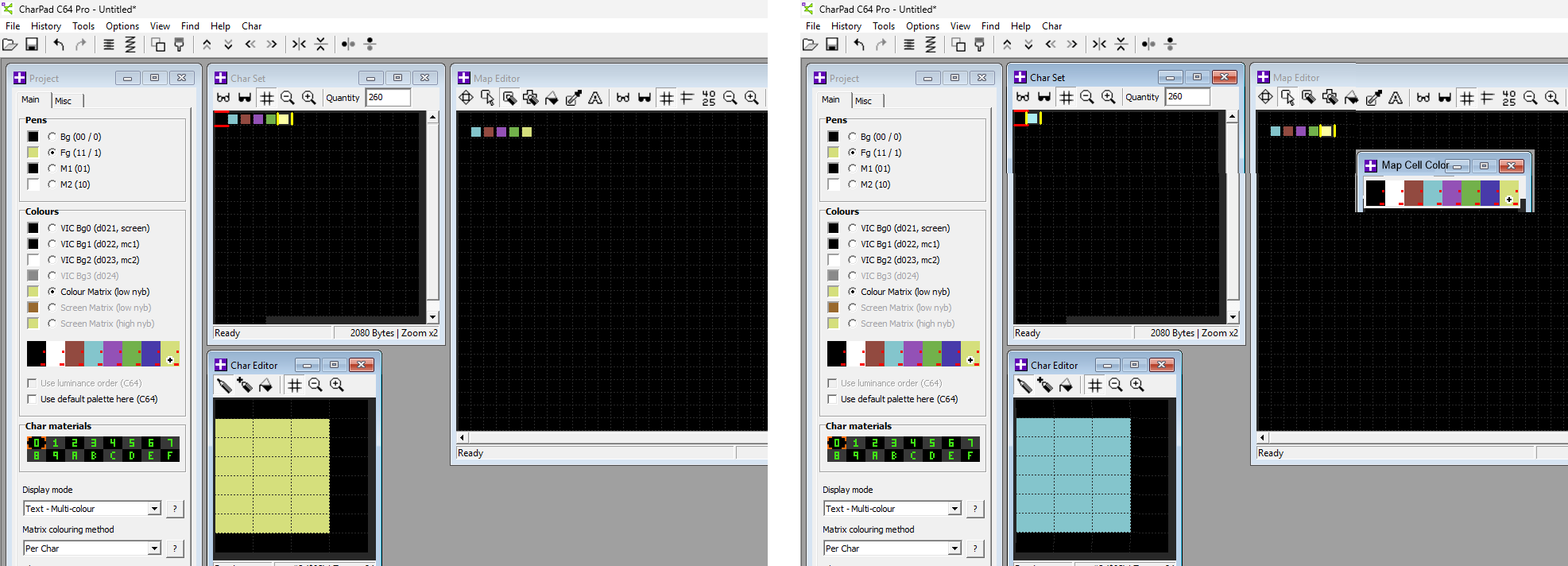

On the left is the current state. Each block requires a separate character just for the sake of the color. On the right, it would be enough to have the option to color the selected map cell from the palette. It’s nothing more than changing a value from 0-15 in memory, where some value must already exist anyway.
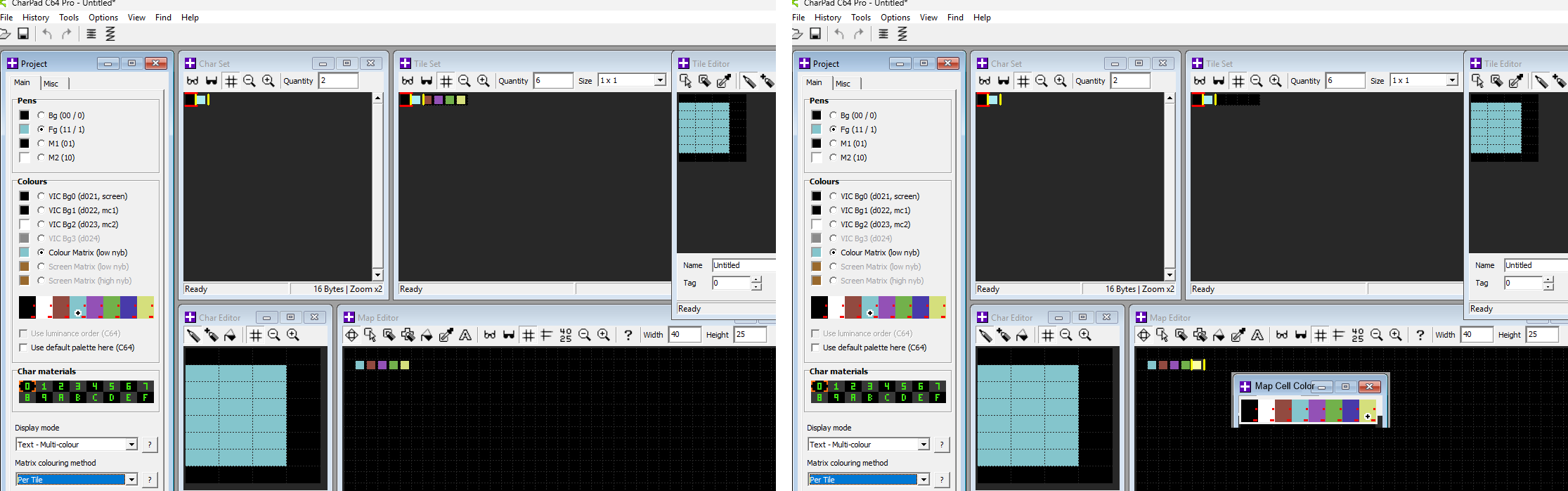


A 1x1 tileset, or any other format for that matter. On the right is the current state. Yes, a single character is used if compression is involved, but the tileset still generates redundant copies of the same character just to handle different colors. On the right, it would be enough to simply color a selected cell from the palette. Basically, the same rules apply as without a tileset, since color (11) can be any value from 0-15 in every cell on the map. I don't believe that locking the color (11) to a character or a tile is necessary.

The C64 has no 'one color per character' restriction ;) Of course, that's assuming we aren't talking about standard text mode.

(2 edits)

I’ll repeat myself again ;) but I have to, because these utilities are fantastic! And thank you for making them exist. However, during development I ran into something that I’m really missing and that limits me a bit. Nothing serious, but it would help me push the development to a higher level.

The first thing is that there’s no option to switch the map editor into a “colorize mode” and simply change the color of a character directly on the map without having to duplicate the character in the charset just because of color. 256 characters isn’t a lot and every single one is important, so having this option—being able to change the character’s color directly on the map—would be perfect. I have a cube that uses the same character but can have 3 colors. Because of that, I have to use 3 characters instead of one.

The second thing is that if I want to use a tileset, I haven’t found a way to “assemble” a tile from characters I’ve already created. So again, an option to switch the tile editor into a “build mode” and somehow easily mark, for example in a 2×2 tile, a specific cell and simply copy a character from the charset into it. Right now I have to draw every new tile from scratch, which drastically reduces the number of available characters. For two 2×2 tiles I use up 8 characters, but if I had the option to assemble tiles, I might only need 4 characters and by combining them I could create visually different tiles. I’m not sure if you get what I mean :)

A simple character‑set animation editor would be a great bonus.

Thanks!

Thanks!

Thanks and have fun!

Thanks!

Thanks for playng! ;)

Thank you for the feedback. Yes, it seems that some players are struggling a bit with the controls. It’s a little unusual, but it is a part of the difficulty. From the very beginning, the entire game engine was designed and built on a grid-based system. This means that every movement—not just the player’s—is aligned to the grid.

If you move to the right and try to jump (press fire) mid-movement, the jump will not execute. It’s all about getting used to it and planning ahead. If you want to jump while moving in a certain direction, you must press and hold fire. As soon as the player completes the current movement, they will jump in the next one; then you can release the button.

When jumping on vines, always press fire first and then the direction (hold fire and just tap the joystick in the desired direction). Once you get the hang of this, the game becomes much easier and less frustrating. You’ll be able to complete the whole game without much trouble.

(1 edit)

Exactly! :) and thanks.

Thanks! I have to see your stream! When and where?

thank you so much for these tools. they are perfect and I like to use them. but I want to ask if you are not considering the possibility of adding a character animation editor for CharPad. something simple, where I specify a character and then a table of characters whose data would be written to the selected character at a defined speed. it would help me a lot in creating animated graphics using characters.