
Indie game storeFree gamesFun gamesHorror games
Game developmentAssetsComics
SalesBundles
Jobs
TagsGame Engines
(4 edits)

Thanks for the answer. Yes, exactly—the ability to color the map using 'per map cell.' The charset, screen RAM, and color RAM aren't tied together in any way, so I can use a single character anywhere on the screen and assign it any color at its position in the color RAM. 0-7 for hires; 8-15 for multicolor. I don't see any reason why this should be RAM-intensive; the RAM itself never changes. One character, one color (11).

Yes, I considered using 1x1 tiles, but then a problem arises: I’d have to—pointlessly, in my opinion—duplicate characters in the tileset just for the sake of the color on the map. Technically, I really don't see an issue why map coloring couldn't be free and not tied to a specific character or tile. Any character on the map should be able to have any color (0-15). Or am I wrong? :) Besides, if I use a 1x1 tileset, it’s basically just another redundant table for the map and extra code for map rendering, all just because I can't directly define the color at a specific map location without defining a character or tile first. The option to change the color (11) for a cell on the map as needed shouldn't have any impact on memory usage. It’s just changing a value at the exact same location in the map data. However, I don't know how you have it technically implemented in the software.
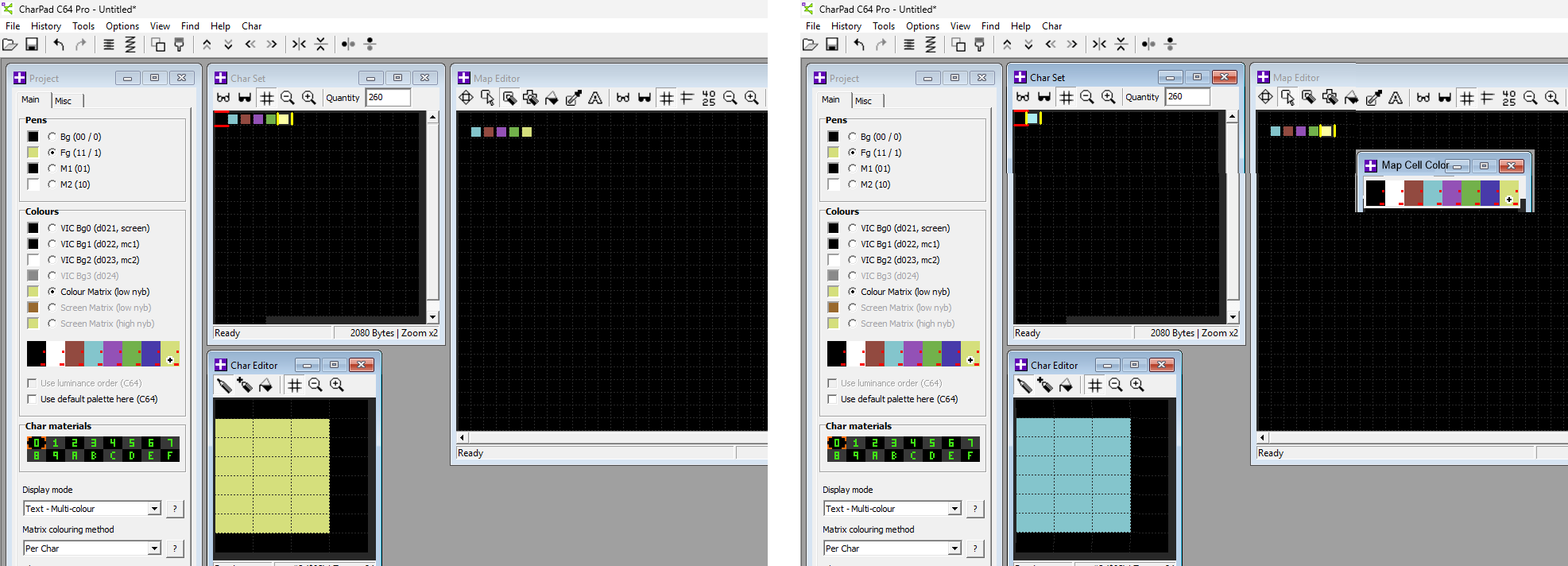

On the left is the current state. Each block requires a separate character just for the sake of the color. On the right, it would be enough to have the option to color the selected map cell from the palette. It’s nothing more than changing a value from 0-15 in memory, where some value must already exist anyway.
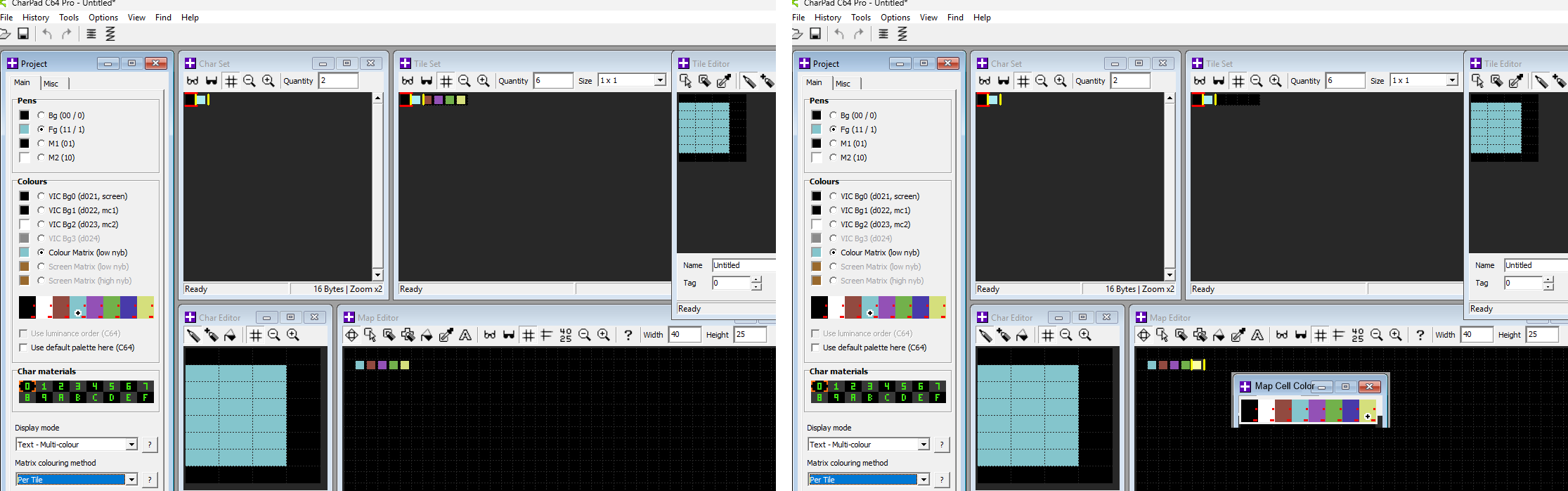


A 1x1 tileset, or any other format for that matter. On the right is the current state. Yes, a single character is used if compression is involved, but the tileset still generates redundant copies of the same character just to handle different colors. On the right, it would be enough to simply color a selected cell from the palette. Basically, the same rules apply as without a tileset, since color (11) can be any value from 0-15 in every cell on the map. I don't believe that locking the color (11) to a character or a tile is necessary.

The C64 has no 'one color per character' restriction ;) Of course, that's assuming we aren't talking about standard text mode.

Did you find the Char Brush tool ok?

yes and thank you. it will really help me a lot if I decide to go to tileset 2x2.

(1 edit)

I will have a proper and careful read through your previous post and reply but right now is not really the time (my Saturday eve is about to begin!).

I would say though, as simple as it may seem (on the C64), adding a whole new matrix-colouring method into CharPad is considerably less simple than you (people) might imagine.

CharPad is itself a very complex system that already supports 5 display modes (the peculiarities and complexities of each one) and 3 matrix colouring methods (15 configurations right there, all of which need to be considered for most ops), untiled and tiled projects in 250+ different shapes/sizes, tens of different transformation ops and conversions between modes/methods, interactive image import and general file imports/exports etc etc etc.

All of these things (hundreds of C# and C++ classes) all need to be painstakingly reworked in order to add the one thing you need.

It is months of work, potentially a year or more to make perfect something that perhaps 4 people have asked about in the last 20 years.

The result? an even more complicated piece of software to use and maintain, financial gain for us? little to none I would say.  

I'm not even saying "No", I guess I'm saying "Why would we bother?"

Answers welcome! :)

Enjoy your weekend.

I understand, and thank you. It was just my idea that it might be simple. Of course, I can't see 'behind the curtain,' so I don't know how you decided to manage the color RAM in your program. I realize it can be challenging, and if everything is working fine, it’s often better to leave it as is rather than mess with it—especially if only a few people would see it as a benefit.

I wish you a great rest of your Saturday 🙂, and thanks again for the answers.

(1 edit)

No worries, it is a 100% valid and reasonable enquiry.

The reality though is "months of work for a human being" which ultimately would bring very little reward (for our business or for the majority of our users).

It is really the "system-wide integration" of a new matrix colouring method into CharPad (its whole eco-system) which is too painful.

A far simpler project however would be a separate app that takes a CharPad project as input and allows the very thing you are seeking, allowing the user to paint/colourize the colour RAM and export the (colour) data.

This could then just be dropped into your game and used, the input project might be designed in CharPad using "per map" matrix colouring to keep the charset usage to a minimum before you use the new app to colourize it.

I will have a think about that one :)

+ also please check out the existing CharPad (binary/text) export option...

'Export Colour Map (per map char cell, CmLo)'

It may be capable of providing the data you require, albeit not quite as conveniently as you desire.

(3 edits)

Hi, it's me again :) Probably the first major issue that's complicating work in the program is copying while having multiple editors open. Sometimes it works fine, but other times I have to press Ctrl+C up to 20 times to successfully copy content from one editor to another.

What I can't figure out, though, is how to export character colors for the tileset. I've decided to try switching to 2x2 tiles, which would allow me to enlarge the map. Since I want to maintain the level of detail, I'll need more than 256 tiles. But in the end, that doesn't even matter, because even with 256 tiles, I can't find the color export anywhere when the editor is set to 'matrix colouring method - per char'. Does this mean that a color export doesn't exist? I have the table showing which characters each tile consists of, but I'm missing the information about which colors each tile consists of.

Of course, I can export the color map separately, but for a map size of 280x120 characters (a 140x60 tileset), the data takes up an incredible 33kb! It would be great if there was an option to export a color table in the exact same way as the character export for tilesets works now.

Edit: Waaait a second... 'Export Character Set Attributes (L1)' is what I need, isn't it? And if that's the case, I'm a total idiot, because it would have saved me an enormous amount of memory. Actually, I don't even have to switch to a 2x2 tileset then, and I can still enlarge the map, because I no longer need to keep a complete color RAM for the entire map in memory. Oooooh. Sorry, I'm still learning.