Thanks for the feedback!
A member registered Aug 11, 2024 · View creator page →
Creator of


Play SFX with one line — no nodes required

Simple API for messaging between scripts, scenes, Threads

Makes Godot Threading easy and fast
Recent community posts
itch.io Community » General » Release Announcements · Created a new topic GDScript Time-Saving Bundle
Hi!
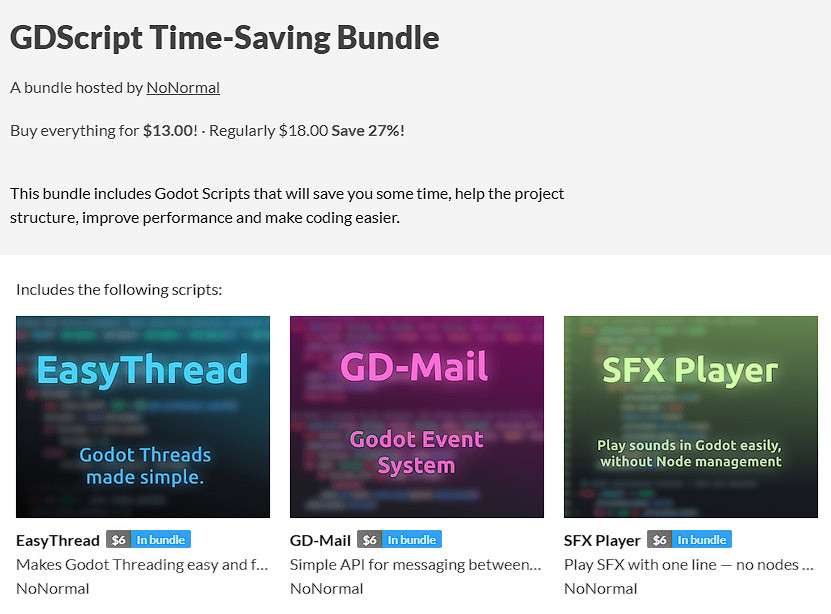
I have recently released a bundle for Godot that contains scripts that are supposed to make coding easier and faster (atleast that's what I use them for myself). Here is a quick overview of the included scripts:
- EasyThread - Simplifies Threading, has thread pools
- GD-Mail - Event system, communication between scenes, scripts and threads
- SFX Player - A one-liner to play sound effects
However, the goal of this post isn't to only promote (purchases would be appreciated :) ), but to also get some feedback. If you have some time, could you please give me some feedback on the bundle, or just answer the following questions? (What is the first thing you noticed when you clicked on it? What is the most interesting script of them, or the one that would be the most useful? How much would you pay it for?)
Thanks for reading!
Link: https://itch.io/s/172508/gdscript-time-saving-bundle
(IGNORE THIS, THIS IS HERE BECAUSE ITCH DOESNT ACCEPT THE BUNDLE LINK AS AN ITCH.IO LINK) EasyThread by NoNormal
Hi! Thanks for having an interest of reading this.
I have just published a Godot 4.4+ script, that can simplify using Threads, so you don't have to learn the specific implementation details, only a rough idea. It includes a simple "run" function that runs a Callable in a Thread - but in a specific way, so that Godot doesn't complain. It also has a thread pool system, that can run one function on a set of data, but on multiple threads. That can for example make loading files much faster, as the work is split across multiple cores.
If you have any ideas on what to add, please let me know.
Link to the page: https://nnrmal.itch.io/easythread
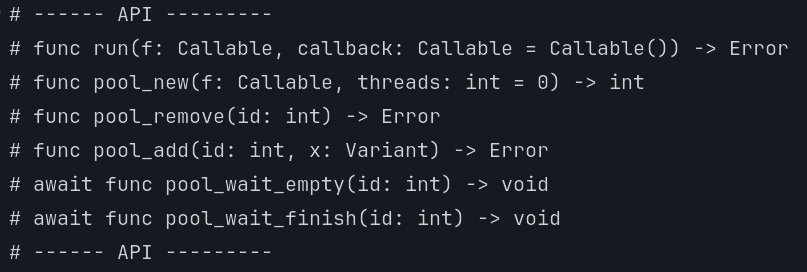
Here are the functions included: