On Sale: GamesAssetsToolsTabletopComics
Indie game storeFree gamesFun gamesHorror games
Game developmentAssetsComics
SalesBundles
Jobs
TagsGame Engines

expandacus

5
Posts
3
Followers
7
Following
A member registered Apr 18, 2016 · View creator page →

Creator of

Recent community posts

I’ll try to respond based on what I remember and what I can access from my phone.

# In terms of the audio system. I’m glad it works and it supports multiple types of audio that improve the experience so I’m happy for developers who make good stuff that functions well. I most appreciated that the music transitions based on gameplay. I did hit an edge case I think where I was in a wind storm for a brief moment which caused the fast paced music to go through a lengthy transition in/out while I was in normal gameplay - I was worried it was stuck but I was glad it resolved itself. However in writing this comment I accidentally caused the game music to loop on my iPhone while in a different tab on Firefox, but hey it helped me consider the music while commenting and mobile web audio is… a pain, and it’s unity so… some things are out of the developers hands - not using unity is an option but I understand the appeal. Anyways I’d say it works very well considering.

# In terms of the music itself, I’ll share my opinion but I’m not skilled as a musician or audiophile. Basically I like the intro music, I would like the gameplay music to be better but it was a good loop, I think they are simple but effective, I like the discernible instruments, the music improves the experience imo. again I’ll share some thoughts in case you’re interested…

I find the intro is the better sounding section. The elements match each others tone and timing. The music there reminds me of old school games especially ominous segments of rpgs. I like the occasional Morse code, it adds and doesn’t distract. Those parts set up the experience well I feel. It can be improved certainly but maybe one simple thing would be to make the very beginning stand out more with a unique intro before beginning the loop or incorporate something assertive to the beginning of the loop ? It’s currently a cold open which isn’t neccesarily bad but I recall feeling a bit odd about it. like the intro to the original spelunky is similar and has no music (https://yancharkin.itch.io/spelunky-classic-hd) but when the music finally comes in it starts out strong. I’m gonna reference super Mario world twice. this first one has an awesome short startup tune you may have heard https://m.soundcloud.com/bruno32/castle-theme-super-mario

the gameplay music has the harder job of filling a much longer segment while maintaining interest and having atleast one other more intense version. I think the constant howling wind detracts from the music so id like it to take a backseat and rise only occasionally. the tone is a bit confusing, it felt strange coming from the intro to the gameplay so maybe there’s a more appropriate style, following the tone of the intro maybe something like the adventuring music of those old school rpgs. If you prefer this style maybe it could be improved in terms of progression and variety. The music changes and varies but I’d appreciate some periods of rest as a listener and player, and then a clear progression towards a clear and satisfying peak or twist. I enjoy the super Mario world underwater theme as a short and simple waltz, https://m.soundcloud.com/weegee85-emeraldsans3/underwater-theme-super-mario

Thanks for your work and taking an interest in my feedback. I hope it is received well, if not I apologize.
I enjoyed this game even though I didn't think I would. It created anticipation and uncertainty which I heard is key to a good movie, however the ending was disappointing because I had barely realized it was over before it went to credits. It's unfortunate to end on that note after methodically exploring the desert for so long. Oh well I still liked that the experience wasn't complicated while having a variety of elements. Thanks for making it and posting it.

(4 edits)

I made a script called "ScrollToChildComponent.cs" you can attach it to a gameobject that has children and it will allow the player or a programmer to cycle through the children in hierarchy order. My goal was for it to be flexible and there are options you can tweak to make it work for different setups like horizontal instead of vertical or ascending versus descending. In the future you can add a script that looks through a folder for songs and adds a child ui object for each song then this script will automatically scroll through them in the manner you determine. It's a first pass though and I'm not pleased with the mouse scrolling but it wasn't working well for me in Osu either so I think it's my touchpad in combination with my basic approach

I posted it to pastebin.com as they are a site I'm familiar with for sharing code snippets. I'll post the public variables of the script here for some validity and so you can see some of the options, there are other ways to share if needed this is just my preference. The link is https://pastebin.com/2D3TcEHM and the password is "e4eacZjTRC"

// Scrolls (translates) to the child at 'scrollIndex'
public class ScrollToChildComponent : MonoBehaviour 
{     
    // Public Variables
    // The child index
    public int scrollIndex = 0; 
    // Scroll Options 
    public bool wrapAround = false; 
    // Input Options 
    public bool inputEnabled = true; 
    public bool reverseInputDirection = false; 
    public float mouseScrollSensitivity = 8; 
    public int keyboardLeftRightMultiplier = 0; 
    public int keyboardUpDownMultiplier = 1; 
...

Below is some guidance on adding the code to your project and a basic example on how to use it so you aren't totally lost.

Adding the Script

You may need guidance on turning that blob of text into a script in unity, if you already know how and you get no errors you can skip to the part labeled "A Basic Example".

1) open a basic text editor like (notepad for windows, TextEdit or BBEdit for Mac)

2) copy the code into the empty file

3) save it as "ScrollToChildComponent.cs" in your project's assets folder 

You can right-click on the assets window in unity and select "show in explorer" to see where the folder is.

Did it Work?: Open the console in Unity by selecting Window>General>Console or pressing ctrl+shift+c. If you see any red messages that means an error occurred, hopefully this doesn't happen but if it does we can chat somehow but first consider the common mistakes below.

Common Mistakes

1) The name of the file must match the name in the code: "ScrollToChildComponent". In code it appears on line 5:

public class ScrollToChildComponent : MonoBehaviour

2) It must be a C# file (file extension ".cs").

3) It's contents must match the code I give you or you may have errors. If you have programming ability you may change things after getting it working the first time.

A Basic Example (Vertical Scrolling)

Once you have the file please try testing it out on a basic example. (Warning: This is just an example, you should look into better ways of constructing UI but the script should be flexible to those needs. Let me know if it doesn't work as you need.)

1) Add a canvas to your scene if you dont already have one

2) add an empty gameobject as a child of the canvas (in hierarchy: right click on canvas>create empty)

3) add the ScrollToChildComponent script to it

4) add a new image to the empty game object and set its width and height to your liking (in hierarchy: right click on the gameobject>ui>Image)

5) Click the image and duplicate it (ctrl+d) then use the move tool (W) and place the new copy beneath the previous one.

6) Repeat step 5 until you have a good number of images (5-7) you should be able to just duplicate and move one after the other.

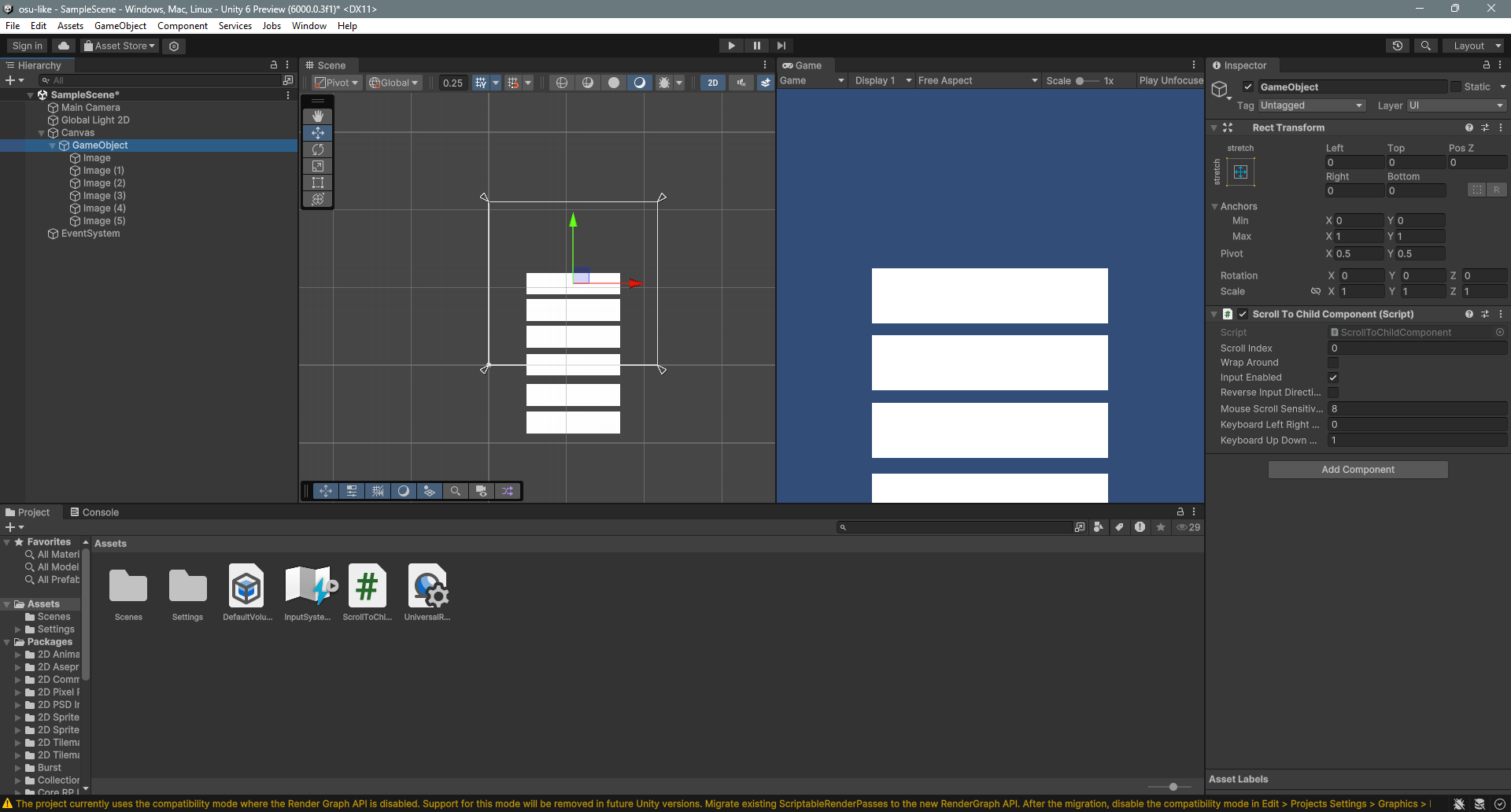
7) Click on the empty game object so you have the script's options available, at this point you should have something like I have below.

8) You can press play and use the up/down keys or mouse/touchpad scroll to scroll up and down.

If the mouse scroll direction is inverted from your preference you can make the mouse scroll sensitivity negative (default is 8, lower means less sensitive, higher means more sensitive, zero means disabled, negative means invert). You can also turn on "wrapAround" to make the scrolling wrap back to the beginning or end when you reach the limit.

Remember this is a very general purpose component, it will scroll in the order determined by the hierarchy, you can place the children anywhere really, horizontally, diagonally, in a circle, you just have to use the options such as "wrapAround" "reverseInputDirection" and know you can use negative values to flip the directions of just the keys or the mouse to make them work how you like. Atleast thats the goal. Thanks for reading I hope it works for you, please tell me how it goes.

(1 edit)

do you know your project startup type? not sure what unity offers currently but its basically 2d or 3d.

edit: would you want something like a script to make an osu song select?

What version of Unity?