

Indie game storeFree gamesFun gamesHorror games
Game developmentAssetsComics
SalesBundles
Jobs
TagsGame Engines

Elushis

50
Posts
3
Topics
258
Followers
A member registered Dec 17, 2014 · View creator page →

Creator of

Recent community posts

(1 edit)

Edit: Cloud LLM now available on the Steam version.

Hey, thank you for picking up CielChan on Steam, I really appreciate it!

The Steam version is fully local only (as noted on the store page and discussion boards), so it doesn’t support cloud-based LLMs or API keys, as these were requested to be removed by Steam during the review process. The itch/website version (Plus) does include external API support.

Send me an email at gaming@elushis.com and I’ll send you an itch key for the Plus version.

Thank you also for the suggestions. I’ll keep working on improving response times for lower-end PCs, interruption handling, and adding additional local Russian voice and language support where possible.

Thank you again for your feedback and support! I’m considering setting up a Discord soon and will share it here and on Steam when/if I get it up and running.

Hey everyone! Here’s a quick FAQ to help you get started and smooth out common issues while getting familiar with CielChan.

Model Controls

Q: How do I make Ciel face me again?

A: Double-click the model to instantly re-face and recenter her.

Q: How do I enable the high-quality TTS from the trailers?

A: In Settings, turn on Enable Kokoro TTS and choose your language. Set your app language first, then enable Kokoro, since changing app language can switch TTS back to the default voice.

Q: Is there a fast way to reset the model/chat position?

A: Yep. Use the Recenter option in Settings to snap everything back into place. You can also resize the chat and reposition the model into the center at anytime by pressing the respective top symbols on top of your chat window.

Customization

Q: Can I load custom VRM models?

A: Yes. Use the model load options. Steam users can also use Workshop support.

Steam Workshop

Q: Does Workshop support install/apply/publish flows?

A: Yes. Once Steam is fully initialized in-app, refresh your Workshop list and use Install / Apply / Publish.

Memory & Chats

Q: What is “Retrieval” in Settings?

A: It’s long-term memory (MemPalace), used to recall past conversations and project context.

Q: What does “Auto Sync Chats” do?

A: It automatically syncs your chat history into Memory Palace while you use the app.

Q: What file format is used for chat imports?

A: JSON files (role/content format). Auto Sync uses session-based JSON history.

Q: Replies feel repetitive after lots of imports. What should I do?

A:

Turn off Auto Sync temporarily

Re-import cleaner chat data

Turn Auto Sync back on

Q: Is there a full reset option?

A: Yes. Reset All clears preferences, memory files, and chat history.

Vision Features

Q: Vision isn’t responding. Why?

A: Make sure Vision is enabled in Settings and your selected model supports vision.

Q: What is “Use Small Vision Model”?

A: A lighter, faster vision option for lower-end systems.

Live / Messaging / Bridge Integrations

Q: What are bridges?

A: Bridges connect CielChan to external platforms so she can read events/messages and respond in-context.

Q: How does Presence (webcam) work?

A: Presence lets Ciel use webcam context as an input signal (when enabled/available) to improve situational awareness and reactions.

Q: How does the Telegram bridge work?

A: It lets you message Ciel remotely through Telegram and receive replies even when you’re away from your computer.

Q: How does the Twitch bridge work?

A: It listens to Twitch chat/events and forwards relevant messages to Ciel for live responses.

Q: How does the TikTok bridge work?

A: It connects TikTok live/chat events similarly, feeding messages into Ciel for interactive replies.

Q: How does the Game bridge work?

A: It links supported in-game signals/events to Ciel so she can react based on gameplay context.

Performance & Behavior

Q: Why do I get “Still loading, please wait…”?

A: The model or tools are still initializing. Give it a moment, then try again.

Q: Why can’t I chat while Book Reader is speaking?

A: Book Reader playback takes priority. Pause or stop it to resume chatting.

Voice / TTS

Q: Can I quickly toggle TTS on/off?

A: Yes. Voice/TTS can be toggled anytime in Settings, including provider options.

If you run into issues, please include:

What happened (symptoms)

Steps to reproduce

Model/provider used

Whether Retrieval / Auto Sync were enabled

Hey everyone! Here’s a quick FAQ to help you get started and smooth out common issues while getting familiar with CielChan.

Model Controls

Q: How do I make Ciel face me again?

A: Double-click the model to instantly re-face and recenter her.

Q: How do I enable the high-quality TTS from the trailers?

A: In Settings, turn on Enable Kokoro TTS and choose your language. Set your app language first, then enable Kokoro, since changing app language can switch TTS back to the default voice.

Q: Is there a fast way to reset the model/chat position?

A: Yep. Use the Recenter option in Settings to snap everything back into place. You can also resize the chat and reposition the model into the center at anytime by pressing the respective top symbols on top of your chat window.

Customization

Q: Can I load custom VRM models?

A: Yes. Use the model load options. Steam users can also use Workshop support.

Steam Workshop

Q: Does Workshop support install/apply/publish flows?

A: Yes. Once Steam is fully initialized in-app, refresh your Workshop list and use Install / Apply / Publish.

Memory & Chats

Q: What is “Retrieval” in Settings?

A: It’s long-term memory (MemPalace), used to recall past conversations and project context.

Q: What does “Auto Sync Chats” do?

A: It automatically syncs your chat history into Memory Palace while you use the app.

Q: What file format is used for chat imports?

A: JSON files (role/content format). Auto Sync uses session-based JSON history.

Q: Replies feel repetitive after lots of imports. What should I do?

A:

Turn off Auto Sync temporarily

Re-import cleaner chat data

Turn Auto Sync back on

Q: Is there a full reset option?

A: Yes. Reset All clears preferences, memory files, and chat history.

Vision Features

Q: Vision isn’t responding. Why?

A: Make sure Vision is enabled in Settings and your selected model supports vision.

Q: What is “Use Small Vision Model”?

A: A lighter, faster vision option for lower-end systems.

Live / Messaging / Bridge Integrations

Q: What are bridges?

A: Bridges connect CielChan to external platforms so she can read events/messages and respond in-context.

Q: How does Presence (webcam) work?

A: Presence lets Ciel use webcam context as an input signal (when enabled/available) to improve situational awareness and reactions.

Q: How does the Telegram bridge work?

A: It lets you message Ciel remotely through Telegram and receive replies even when you’re away from your computer.

Q: How does the Twitch bridge work?

A: It listens to Twitch chat/events and forwards relevant messages to Ciel for live responses.

Q: How does the TikTok bridge work?

A: It connects TikTok live/chat events similarly, feeding messages into Ciel for interactive replies.

Q: How does the Game bridge work?

A: It links supported in-game signals/events to Ciel so she can react based on gameplay context.

Performance & Behavior

Q: Why do I get “Still loading, please wait…”?

A: The model or tools are still initializing. Give it a moment, then try again.

Q: Why can’t I chat while Book Reader is speaking?

A: Book Reader playback takes priority. Pause or stop it to resume chatting.

Voice / TTS

Q: Can I quickly toggle TTS on/off?

A: Yes. Voice/TTS can be toggled anytime in Settings, including provider options.

If you run into issues, please include:

What happened (symptoms)

Steps to reproduce

Model/provider used

Whether Retrieval / Auto Sync were enabled

Most issues should be resolved now. Build has been updated. 

Please download new updated build from the main page.

Phasma Tool community · Created a new topic V1.0.0

Hello everyone,

A new update was released which unified all tiers into the one build. I have noticed a few lingering issues from the merge in regards to some of the templates and will be improving them for parity with the original versions ASAP.

Thanks for trying out Phasma!

(1 edit)

--V0.0.2 Patch Notes--

Added footstep/walking sounds

Removed original background song and replaced with more ambient sound

Improved code to clean up spawned platforms as player is ascending

Added notification sound when points increase

Improved Vault Jump/Pressing Jump while Climbing will launch player upwards

--End Patch Notes--

Thank you!

(1 edit)

Cheers! Thank you very much and I appreciate the suggestions.

I agree with music. Will be changing it. For now, it's actually a track I composed for another title. The setting of this VR game was initially more desert themed, but I haven't settled on a new musical theme for the games updated cloudy aesthetic yet present in this official build.

In regards to textures, I've tried a few variations. Anything too flat would tend to warp, and not give the impression of actually climbing. I will definitely continue refining though.

If you haven't used your double jumps/jump there is a special mechanism to help with ledges. 

You can press jump when holding onto a ledge and let go of the ledge to propel yourself up and over with a specific programmed move for ledges. It's a little finnicky though still. I have a physical movement I do as well to handle ledges. I literally launch my arms down and catapult up with force, using the characters momentum to launch up.

Thank you very much for the purchase and the comments! I will update the build again soon.

(1 edit)

Controls:

Left Trigger - Sprint

Grip/Grab/Climb - Grip Button on Left/Right Controller

A - Jump/Double Jump/Slow Time

Right Analog Stick - Snap Turn Camera

Most movements in the game will come down to your own decisions. The game is simple to start, but, with practice, players can begin navigating the level with much more advanced styles of movement.

(1 edit)

Patch Notes - v1.0.1 (PAID ONLY)

  • New Feature (Beta):
    • Introduced an in-engine button for generating custom personas.
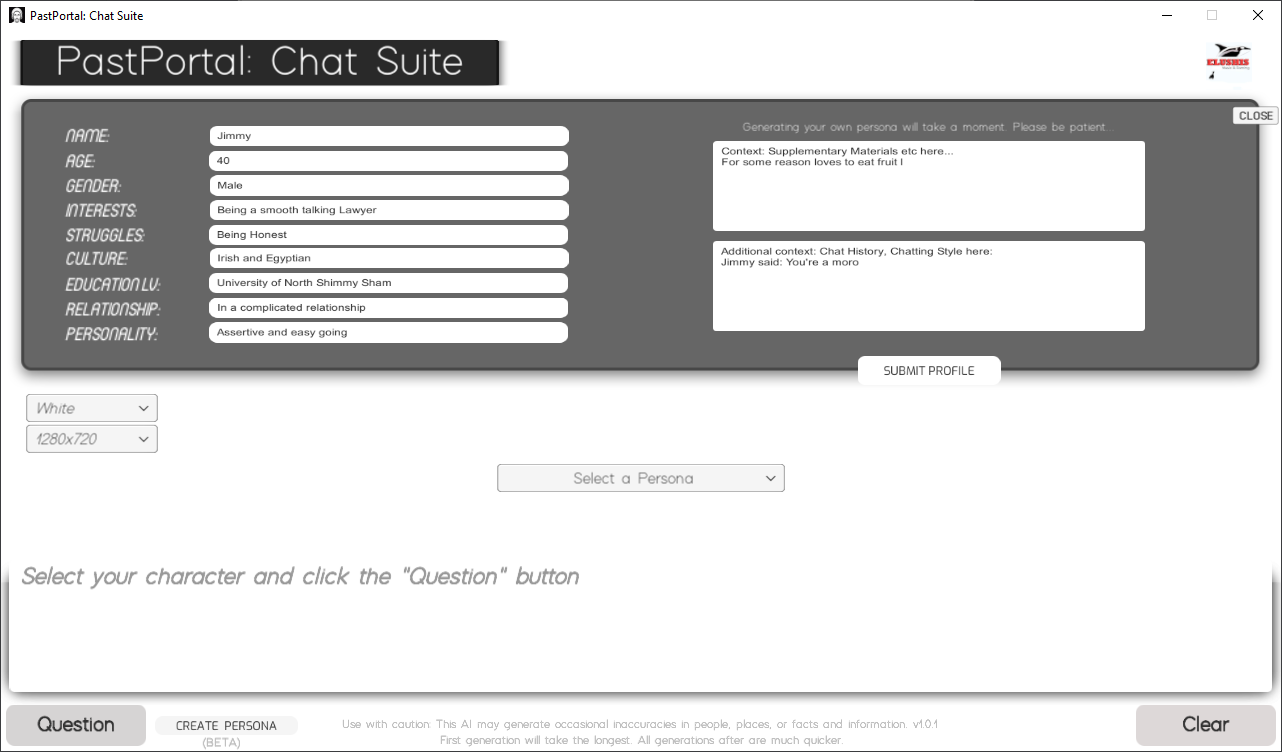
    • The AI technology is now utilized to assist in custom persona personality generation, enhancing the uniqueness of each custom persona character.
  • Improvements:
    • Text alignment fix applied to disclaimers.
  • Bug Fixes:
    • Addressed various minor issues to enhance the user experience.

Please download the new version from the main paid product page. 

Thank you!

Patch Notes - v1.0.1

  • New Feature (Beta):
    • Introduced an in-engine button for generating custom personas.
    • The AI technology is now utilized to assist in custom persona personality generation, enhancing the uniqueness of each custom persona character.
  • Improvements:
    • Text alignment fix applied to disclaimers.
  • Bug Fixes:
    • Addressed various minor issues to enhance the user experience.

Please download the new version from the main product page. 

Thank you!

Hello everyone,

A huge welcome to each and every one of you! It's truly exciting to have you all here as part of the journey for "PastPortal: Chat Suite."

Thank you!

This community board is a space for you to share your generations, experiences, provide feedback, ask questions, and connect with other enthusiasts. Whether you've stepped into riveting conversations with Cleopatra, shared a witty dialogue with Shakespeare, or encountered someone from a world purely of imagination, we want to hear about it!

🚀 Future Updates

As the developer behind PastPortal, I'm committed to making the experience richer, more diverse, and even more engaging. Here's a sneak peek into what's on the horizon:

  1. More Personas: Dive deeper into history and fiction with an expanded roster of figures to engage with.
  2. Enhanced AI Capabilities: Continuous improvements to ensure more realistic and diverse conversations.
  3. Community-Requested Features: This is where YOU come in. Got an idea? Share it here, and it might just become a reality.
  4. Advanced Custom-Persona's: Already in development and due for release soon.

It's also crucial to address any bugs or issues. If you stumble upon any, please report them in the designated thread so they can be tackled promptly. Thank you for being a part of the PastPortal community! Feel free to share your generations online with #PastPortal #PastPortalChat #PastPortalGens

Just made a small change on Itch's end. Hopefully should be working now.

Can anyone else confirm if this is the case with the itch.io launcher? Thank you for letting me know. I haven't checked in a while but I'll look into it.

The game should still be available to download normally through the website still though.

Indeed. Apologies! Hopefully should be okay.

Hey! Sorry for delayed response. Only saw this comment while browsing the page. Did you happen to fix this in the end?

If you're part of a crew still, can you try just exiting the ship by the ladder on the bottom? This should hopefully break whatever loop that has occurred/cancel crew membership, so that you can continue playing. Maybe register your home/bed again where you can in-between the crew run.

Let me know how you go.

Route Me Mail and Delivery Co by Elushis (itch.io)

After The End: The Harvest by Elushis (itch.io)

Isolation Story by Elushis (itch.io)

Mutiny Island by Elushis (itch.io)

Thank you for organizing. Heart truly goes out to all affected. I have some family/friends in both UKR and RUS at the moment.

Assistance will always be needed in times like these for those unfortunately affected. An independent Ukraine is the ideal outcome. From both RUS and NATO.

In progress. Ran into a few issues. Sorry about the delay! 

If you have Proton the game can be launched with that in the meantime.

(1 edit)

Hi again! Just wanted to share a small update on this particular issue. I tested the game on a GTX 1650 this week and had something similar occur.

The game would work but then occasionally seem like it would drop to 0 FPS, but you could still clearly hear the character moving/game environment if you continued to press buttons. Changing the resolution to 1920X1080 within the games option menu on the title screen fixed it up.  Just posting in-case this works for someone else as well.

Edit: Adjusting the settings in the Nvidia GFX Panel also helped.

Hey! Sorry to hear but thank you for posting. Based on what you described I'm not sure but I'll try my best to help. Is the game launching in full-screen for you? Does this happen on the title screen or only once you've started a file? When is the exact moment? 

Try pressing F4 to take the game out of full-screen, Maybe you could try changing the resolution in the game options menu, if the title screen is available/working for you. I'm not expecting this to work but you never know with these kinds of things.

I haven't tested the game on the RTX 3000 series but I'm currently using a RTX 2070 with no issues when trying to play the game. Hopefully we can figure out what's going on! Is there some sort of setting on the Nvidia panel you may have toggled that could be conflicting or something along those lines?

This is awesome! Thank you so much. Really glad that you enjoyed the game!

You're right. There was no warning that I had noticed, but, I imagine it would be written somewhere on the site or the terms though. 

I believe/think? the reason that the site permits it, is because the developer payout is still what is being advertised, while the itch.io fee is sort of a tax on top and is being displayed as its own separate warning before the player purchases the game.

(1 edit)

I actually had no idea about that. I'm so sorry! This is the first time the game has had the 90% discount anywhere online. Thank you for letting me know. Edit: And thank you for picking up the game!

Hey! Thank you for the suggestion. Glad you're enjoying the game but I do apologize about your issue. It is something I would like to improve when I can. In the meantime, you can increase the speed that the text displays by double tapping/holding the Talk/Interact button.

No worries. Cheers!

They sink once your feet touch sand, or rocks that you can stand on in the water. They can occasionally sink when disembarking in the water but usually they will allow you to jump off, have a swim/collect some items and then jump back on. Just don't touch the land. Big Ships like the Frigate or Galleon can be used freely and will not sink on disembark. They can still get stuck on land though so make sure to make the Big Ships your home so that you respawn and can keep using it without buying a new one.

Hi! Not a virus and nothing to worry about. Left over file which helped handle Steam Achievements. This has now been removed in the latest build V1.4.4. Thanks!

(5 edits)

Hey! Thanks for posting these. Will have them fixed ASAP. Sorry for delay in response. Never saw any notifications for these.

Just curious. Did you use Cheats so that you could have BED as an item? From memory, those were removed from the game and can only be used with cheats. Unless I've just forgotten who you can get one from. 

EDIT- Found the issue. You were not supposed to be receiving a bed once you bought the land title. I also fixed it so that if you already have the bed as a separate item, you should be able to remove it freely now in the next build. Will upload soon. Based on your interactions with the house builder, the price/sequence can be a little different. It seems in one of the branches, the player would still receive the BED as an item. Other issues posted have been fixed also.

Hi! The game was available for free to all just before it hit Steam Early Access. The itch build has now been updated to reflect the Steam version and has also now become paid. Bundle owners should be able to download the game/updates without having to buy again so please check out and download the latest build and let me know your thoughts.

I take it both builds run with lag for you? Would you mind sharing your specs please.

(1 edit)

Hey again. So I've been looking into what might be causing this and haven't been able to replicate the crash yet.

Do you by any chance remember what bed you were using?

EDIT: Had you also placed any decorations?

(1 edit)

Unfortunately, the only customization visually is an outfit which you receive once completing the game. Originally you were supposed to be able to choose between a female or male but ultimately it had to be scrapped. Maybe in the future but no guarantees. I think there's a clip of the female pirate in the very first trailer released.

I'm going to plug my other game for a second though (forgive me) just in case you'd be interested in the future...you can't choose gender but there's a ton of visual armor/clothing options. Including dresses.

You can play an old free prologue/demo here:

After The End: APOLLO (PROLOGUE)

https://elushis.itch.io/aftertheendapollo

Full game here: (Tons of armor/clothing to mess around with)

After The End: The Harvest

https://store.steampowered.com/app/386140/After_The_End_The_Harvest/

Really glad you're enjoying Mutiny Island. Thank you!

Hey kaeldrak. Thank you heaps for posting the bug + screenshot. I'm not sure if I'll be able to look into it today but I'll have it fixed by the end of the weekend. These sequences are dreams. This is now the second report I've received of some of the dream sequences having issues. 

Your game will have been saved when you rested regardless though so no progress would be lost.

Awesome! Glad it's playable now. I made a few changes which aren't present in the Steam build. I updated the NW.JS files as well as a few other small things. Steam Achievements are operating through an older version of NW.JS so I'm suspecting that it was causing some conflicts when the game is running stand-alone on itch. I will try and fix up the Full-Screen difference between the two versions soon. I just wanted to see if I was on the right track in diagnosing/fixing the issue. Any other issues please let me know!

Just uploaded the new build. Please download the file that says: Mutiny Island 1.4.3 (LAG FIX BUILD).zip

Run Game.exe instead of NW.

Please let me know how you all go.

Hi! Sorry for the issue but thank you for sharing. I have just uploaded a new build. Please try downloading that one and let me know if it improves your situation.

I think I may have figured out a solution. I will upload the updated build in the next hour. Please let me know if this fixes or even improves the situation for you.

I think I may have figured out a solution. I will upload the updated build in the next hour. Please let me know if this fixes or even improves the situation for you.