Indie game storeFree gamesFun gamesHorror games
Game developmentAssetsComics
SalesBundles
Jobs
TagsGame Engines

dabzy1978

13
Posts
1
Topics
1
Following
A member registered Mar 07, 2021

Recent community posts

Well, I've pretty much got in what I wanted now... So the fun starts now... Documentation! :/ OMG

Like anything in this sort of setup, it was the part I was always dreading really, nearly 1000 functions to document!!! :/

I've got a bit of a plan, because the closer I was getting to the end, the more this was crossing my mind, anyway, I cannot do this manually to cover online docs, and docs in the IDE, and then maintain them... So, I'll build a little python script to pull out the info on function names, parameters and return types... This will be easy because these are in the DECLS file.

I'll then put them in their own function TOML file, so, we have that... Then... I'll create a code-gen editor where a) I can edit the TOML markup (field based) and save them, and then b) I'll have myself a little Export bit where I can parse it and turn it into HTML files for the IDE docs!

And another beauty is I can probably get Visual Studio's Co-pilot to write up the main descriptions for the docs... It might come in handy there, save me hordes of work! :D

Dabzy

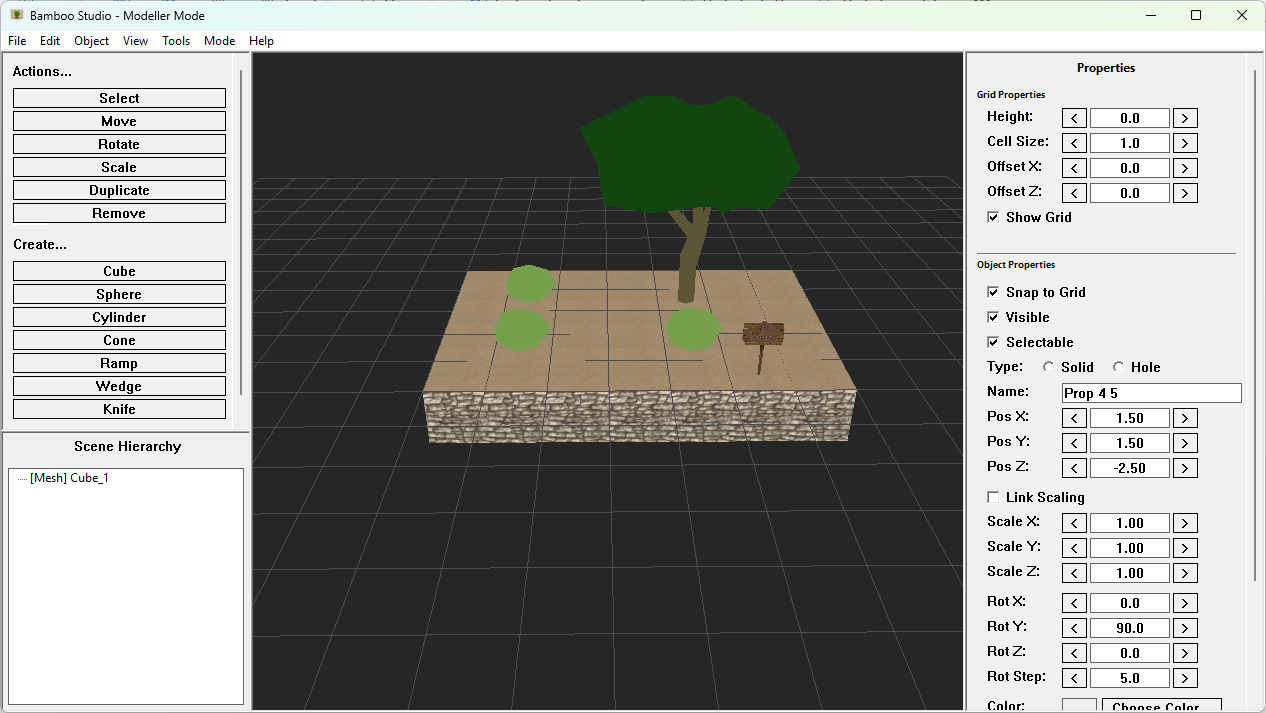
Well, to anyone really... The function set pretty much makes it perfect for a modeller, even windows styleeee  as in, my GUI system called BGI (Bamboo Gizmo Interface), I have a 3D canvas in there, because I do plan to make my own little tools when needed:

; 3D Multi-Canvas Test - Render multiple 3D scenes in BGI window canvases
; Demonstrates independent canvas rendering at different resolutions
; Uses b3dBindEntityToCanvas() for efficient per-canvas entity filtering
Import "BBRuntime64Ext.decls"
Include "../../BBR_INCLUDE.bam"
Function Main()
Print "BambooBasic 3D Multi-Canvas Test"
Print ""
;Show/Hide debug
b3dShowConsoleOutput(False)
; Initialize 3D graphics system FIRST (bgiCreateCanvas3D needs the 3D device)
Print "Initializing 3D graphics..."
b3dGraphics3D(1, 1, BBR_WINDOW_MODE_HIDDEN)
; Initialize BGI system
bgiInitBGI("Arial", 12)
; Create main BGI window (larger to fit multiple canvases)
Local mainWindow:Int = bgiCreateWindow("3D Multi-Canvas Test", 1100, 1000)
; Create THREE 3D canvases with DIFFERENT resolutions
Print ""
Print "Creating 3D canvases at different resolutions..."
; Canvas 1: 256x256 (top-left)
Local canvas1:Int = bgiCreateCanvas3D(10, 10, 256, 256, mainWindow)
If canvas1 = 0 Then
Print "ERROR: Failed to create canvas 1!"
Return False
EndIf
Print "Canvas 1 created: 256x256 (ID: " & ToString(canvas1) & ")"
; Canvas 2: 512x512 (top-right)
Local canvas2:Int = bgiCreateCanvas3D(280, 10, 512, 512, mainWindow)
If canvas2 = 0 Then
Print "ERROR: Failed to create canvas 2!"
Return False
EndIf
Print "Canvas 2 created: 512x512 (ID: " & ToString(canvas2) & ")"
; Canvas 3: 768x384 (bottom, wider aspect ratio [strected])
Local canvas3:Int = bgiCreateCanvas3D(10, 550, 768, 384, mainWindow)
If canvas3 = 0 Then
Print "ERROR: Failed to create canvas 3!"
Return False
EndIf
Print "Canvas 3 created: 768x384 (ID: " & ToString(canvas3) & ")"
; Create THREE separate cameras (one for each canvas)
Print ""
Print "Creating cameras..."
Local camera1:Int = b3dCreateCamera()
b3dPositionEntity(camera1, 0, 0, -5)
b3dCameraClsColor(camera1, 80, 50, 50)  ; Red tint
Local camera2:Int = b3dCreateCamera()
b3dPositionEntity(camera2, 0, 0, -5)
b3dCameraClsColor(camera2, 50, 80, 50)  ; Green tint
Local camera3:Int = b3dCreateCamera()
b3dPositionEntity(camera3, 0, 0, -8)
b3dCameraClsColor(camera3, 50, 50, 80)  ; Blue tint
;Overlay set up
Print "Setting up canvas overlays...~n"
Local font:Int = b2dLoadFont("consolas_18_2.png","consolas_18_2.txt")
Print "Font: " & ToString(font) & "~n"
; Load test images
Print "Loading test images..."
Local imgBomb:Int = b2dLoadImage("BigBomb.png")
Local imgCrate:Int = b2dLoadImage("crate.png")
Local imgLeaves:Int = b2dLoadImage("../../Extended/Overlay/leaves.png")
Print "BigBomb image: " & ToString(imgBomb)
Print "Crate image: " & ToString(imgCrate)
Print "Leaves image: " & ToString(imgLeaves) & "~n"
; Create THREE different meshes (one for each canvas)
Print "Loading meshes..."
Local sphere:Int = b3dLoadMesh("sphere.glb", BBR_ONE_SLOT, BBR_NO_TEXTURE_UV, 0)
b3dScaleEntity(sphere, 1.2, 1.2, 1.2)
b3dSetEntityColorFX(sphere, 255, 100, 100)  ; Red
Local torus:Int = b3dLoadMesh("torus.glb", BBR_ONE_SLOT, BBR_NO_TEXTURE_UV, 0)
b3dScaleEntity(torus, 1.5, 1.5, 1.5)
b3dSetEntityColorFX(torus, 100, 255, 100)  ; Green
Local helmet:Int = b3dLoadMesh("helmet.glb", BBR_ONE_SLOT, BBR_NO_TEXTURE_UV, 0)
b3dScaleEntity(helmet, 1.8, 1.8, 1.8)
; Create shared directional light
Print "Creating light..."
Local light:Int = b3dCreateLight(BBR_LIGHT_DIRECTIONAL)
b3dLightColor(light, 255, 255, 255)
b3dRotateEntity(light, 45, -90, 0)
b3dLightIntensity(light, 1.0)
b3dAmbientLight(30, 30, 30)
; Load toon shader (shared by all meshes)
Print "Loading toon shader..."
Local toonShader:Int = b3dLoadEntityShader("ToonShader.hlsl")
If toonShader = 0 Then
Print "ERROR: Failed to load toon shader!"
b3dEnd()
Return False
EndIf
; Configure toon shader
b3dSetEntityShaderFloat(toonShader, "useFlatNormal", 0.0)
b3dSetEntityShaderFloat(toonShader, "toonLevelsParam", 3.0)
b3dSetEntityShaderFloat(toonShader, "rimPowerParam", 3.0)
b3dSetEntityShaderFloat(toonShader, "rimIntensityParam", 0.5)
b3dSetEntityShaderFloat(toonShader, "rimColorR", 1.0)
b3dSetEntityShaderFloat(toonShader, "rimColorG", 1.0)
b3dSetEntityShaderFloat(toonShader, "rimColorB", 1.0)
; Apply shader to all meshes
b3dEntityShader(sphere, toonShader)
b3dEntityShader(torus, toonShader)
b3dEntityShader(helmet, toonShader)
; Load CRT screen shader (post-process effect for canvases)
Print "Loading CRT screen shader..."
Local crtShader:Int = b3dLoadScreenShader("CRT.hlsl")
If crtShader = 0 Then
Print "ERROR: Failed to load CRT screen shader!"
Else
; Configure CRT shader parameters
b3dSetShaderFloat(crtShader, "scanlineIntensity", 0.5)
b3dSetShaderFloat(crtShader, "scanlineCount", 100.0)
b3dSetShaderFloat(crtShader, "vignetteStrength", 0.3)
b3dSetShaderFloat(crtShader, "curvatureAmount", 0.02)
b3dSetShaderFloat2(crtShader, "screenResolution", 512.0, 512.0)
; Apply CRT shader to Canvas 2 (middle canvas, larger size)
bgiApplyCanvasScreenShader(canvas2, crtShader)
Print "CRT shader applied to Canvas 2"
EndIf
; Load TextSheen shader (per-draw text shader)
Print "Loading TextSheen text shader..."
Local sheenShader:Int = b2dLoadTextShader("../../Extended/Overlay/TextSheen.hlsl")
If sheenShader = 0 Then
Print "ERROR: Failed to load TextSheen text shader!"
Else
; Configure TextSheen shader parameters
b2dSetTextShaderFloat(sheenShader, "0", 0.5)   ; sheenPosition (middle)
b2dSetTextShaderFloat(sheenShader, "1", 0.3)   ; sheenWidth
b2dSetTextShaderFloat(sheenShader, "2", 1.5)   ; sheenIntensity
Print "TextSheen shader loaded (will be applied per-draw)"
EndIf
; Load ImageGlow shader (per-draw image shader)
Print "Loading ImageGlow image shader..."
Local glowShader:Int = b2dLoadImageShader("../../Extended/Overlay/ImageGlow.hlsl")
If glowShader = 0 Then
Print "ERROR: Failed to load ImageGlow image shader!"
Else
; Configure ImageGlow shader parameters
b2dSetImageShaderFloat(glowShader, "0", 2.0)    ; glowIntensity
b2dSetImageShaderFloat(glowShader, "1", 1.0)    ; glowRadius
b2dSetImageShaderFloat3(glowShader, "2", 1.0, 0.8, 0.2)  ; glowColor (orange)
Print "ImageGlow shader loaded (will be applied per-draw)"
EndIf
; Bind each entity to its respective canvas
Print "Binding entities to canvases..."
b3dBindEntityToCanvas(sphere, canvas1)  ; Sphere only renders in canvas 1
b3dBindEntityToCanvas(torus, canvas2)    ; Cube only renders in canvas 2
b3dBindEntityToCanvas(helmet, canvas3)   ; Torus only renders in canvas 3
; Create UI labels (positioned to the right of canvases)
Local labelTitle:Int = bgiCreateLabel("3D Multi-Canvas Demo (Shaders)", 810, 20, 250, 25, mainWindow)
Local labelCanvas1:Int = bgiCreateLabel("Canvas 1: TEXT Shader (TextSheen)", 810, 60, 250, 20, mainWindow)
Local labelFPS1:Int = bgiCreateLabel("FPS: 0", 810, 85, 250, 20, mainWindow)
Local labelCanvas2:Int = bgiCreateLabel("Canvas 2: SCREEN Shader (CRT)", 810, 120, 250, 20, mainWindow)
Local labelFPS2:Int = bgiCreateLabel("FPS: 0", 810, 145, 250, 20, mainWindow)
Local labelCanvas3:Int = bgiCreateLabel("Canvas 3: IMAGE Shader (Glow)", 810, 180, 250, 20, mainWindow)
Local labelFPS3:Int = bgiCreateLabel("FPS: 0", 810, 205, 250, 20, mainWindow)
Local labelInfo:Int = bgiCreateLabel("Each entity bound to specific canvas", 810, 250, 250, 60, mainWindow)
Local labelControls:Int = bgiCreateLabel("Arrow keys: Rotate Sphere (Canvas 1)", 810, 320, 250, 40, mainWindow)
Local labelFocus:Int = bgiCreateLabel("Focused Canvas: None", 810, 440, 250, 20, mainWindow)
; Create buttons
Local btnToggleShader:Int = bgiCreateButton("Toggle Toon", 810, 360, 150, 30, mainWindow)
Local btnToggleCRT:Int = bgiCreateButton("Toggle CRT (C2)", 810, 400, 150, 30, mainWindow)
Local btnQuit:Int = bgiCreateButton("Quit", 810, 440, 150, 30, mainWindow)
Print ""
Print "Multi-canvas test ready!"
Print "Using b3dBindEntityToCanvas()"
Print ""
Print "Shader Demo (each canvas shows different shader type):"
Print "  Canvas 1 - TEXT SHADER: Per-draw TextSheen on BAMBOO text"
Print "  Canvas 2 - SCREEN SHADER: CRT post-process effect"
Print "  Canvas 3 - IMAGE SHADER: Per-draw ImageGlow on leaves.png"
Print "  All 3D meshes - Toon entity shader"
Print ""
Print "Controls:"
Print "  Arrow Keys - Rotate sphere (Canvas 1)"
Print "  Torus and helmet auto-rotate"
Print "  Toggle Toon button - Enable/disable entity toon shader"
Print "  Toggle CRT button - Enable/disable CRT screen shader on Canvas 2"
Print "  ESC or Quit button - Exit"
Print ""
Local rotation1Y:Double = 0.0
Local rotation1X:Double = 0.0
Local rotation2:Double = 0.0  ; Auto-rotation for torus
Local rotation3:Double = 0.0  ; Auto-rotation for helmet
Local shaderEnabled:Int = True
Local crtEnabled:Int = True  ; CRT shader starts enabled on Canvas 2
Local running:Int = True
; Sheen shader animation
Local sheenPosition:Double = 0.0
Local sheenSpeed:Double = 0.0015
;Mouse variables when inside canvas areas
Local cmx2:Int, cmy2:Int
Local cmx3:Int, cmy3:Int
; Track focused canvas (only update label when focus changes)
Local lastFocusedCanvas:Int = 0
; Main loop
While running
; Handle keyboard input
sysUpdateEvents()
Local eventMsg:Int = bgiGetEventMessage()
Local eventSource:Int = bgiGetEventSource()
; Handle BGI events
If eventMsg = BGI_EVENT_COMMAND_CLOSE Then
running = False
Print "Window closed"
ElseIf eventMsg = BGI_EVENT_COMMAND_CLICK Then
If eventSource = btnToggleShader Then
shaderEnabled = 1 - shaderEnabled
If shaderEnabled Then
b3dEntityShader(sphere, toonShader)
b3dEntityShader(torus, toonShader)
b3dEntityShader(helmet, toonShader)
Print "Toon shader enabled"
Else
b3dEntityShader(sphere, 0)
b3dEntityShader(torus, 0)
b3dEntityShader(helmet, 0)
Print "Toon shader disabled"
EndIf
ElseIf eventSource = btnToggleCRT Then
crtEnabled = 1 - crtEnabled
If crtEnabled Then
bgiApplyCanvasScreenShader(canvas2, crtShader)
Print "CRT screen shader enabled on Canvas 2"
Else
bgiClearCanvasScreenShader(canvas2)
Print "CRT screen shader disabled on Canvas 2"
EndIf
ElseIf eventSource = btnQuit Then
running = False
EndIf
EndIf
bgiFlushEvent()
; Get canvas-relative mouse coordinates for Canvas 2 and 3
; Returns -1 if mouse is outside canvas bounds
cmx2 = bgiGetCanvasMouseX(canvas2)
cmy2 = bgiGetCanvasMouseY(canvas2)
cmx3 = bgiGetCanvasMouseX(canvas3)
cmy3 = bgiGetCanvasMouseY(canvas3)
; ESC is global - works anywhere
If inpIsKeyHit(VKEY_ESCAPE) Then running = False
; Manual rotation for sphere (Canvas 1) - ONLY when Canvas 1 has focus
If bgiGetFocusedCanvas() = canvas1 Then
If inpIsKeyDown(VKEY_LEFT) Then rotation1Y = rotation1Y - 2.0
If inpIsKeyDown(VKEY_RIGHT) Then rotation1Y = rotation1Y + 2.0
If inpIsKeyDown(VKEY_UP) Then rotation1X = rotation1X - 2.0
If inpIsKeyDown(VKEY_DOWN) Then rotation1X = rotation1X + 2.0
EndIf
; Update focus label (only when focus changes)
Local currentFocus:Int = bgiGetFocusedCanvas()
If currentFocus <> lastFocusedCanvas Then
If currentFocus = canvas1 Then
bgiSetGizmoText(labelFocus, "Focused Canvas: Canvas 1 (Sphere)")
ElseIf currentFocus = canvas2 Then
bgiSetGizmoText(labelFocus, "Focused Canvas: Canvas 2 (Torus)")
ElseIf currentFocus = canvas3 Then
bgiSetGizmoText(labelFocus, "Focused Canvas: Canvas 3 (Helmet)")
Else
bgiSetGizmoText(labelFocus, "Focused Canvas: None")
EndIf
lastFocusedCanvas = currentFocus
EndIf
; Update sheen shader animation
sheenPosition = sheenPosition + sheenSpeed
If sheenPosition > 1.2 Then  ; Go past right edge
sheenPosition = -0.2  ; Restart from left
EndIf
b2dSetTextShaderFloat(sheenShader, "0", sheenPosition)
; Auto-rotation for cube and torus
rotation2 = rotation2 + 1.0
rotation3 = rotation3 + 0.5
; Update mesh rotations
b3dRotateEntity(sphere, rotation1X, rotation1Y, 0)
b3dRotateEntity(torus, rotation2, rotation2, 0)
b3dRotateEntity(helmet, 0, rotation3, rotation3 * 0.5)
; ---------------
; RENDER CANVAS 1 (256x256, Sphere)
; ---------------
b3dSetRenderTargetCanvas(canvas1)
b3dSetActiveCamera(camera1)
b3dCls3D()
b2dSetCanvasFilter(canvas1)
; Draw "Canvas 1" label without shader
b2dDrawText("Canvas 1", 10, 10, 0, font)
; Draw "BAMBOO" in centre WITH per-draw TextSheen shader
b2dSetColor(255, 255, 255)  ; White color for sheen effect
b2dDrawTextEx("BAMBOO", 128, 110, True, font, sheenShader)
b2dSetColor(255, 255, 255)  ; Reset to white
; Draw regular images without shaders
b2dDrawImage(imgBomb, 10, 200)
b2dDrawImage(imgCrate, 150, 180)
b2dClearCanvasFilter()
b3dRenderWorld()
bgiFlipCanvas(canvas1)
; ---------------
; RENDER CANVAS 2 (512x512, Torus)
; ---------------
b3dSetRenderTargetCanvas(canvas2)
b3dSetActiveCamera(camera2)
b3dCls3D()
b2dSetCanvasFilter(canvas2)
b2dDrawText("Canvas 2", 10, 10, 0, font)
; Draw regular images without shaders (CRT screen shader applied to entire canvas)
b2dDrawImage(imgCrate, 50, 400)
; Only draw bomb at mouse position if mouse is over this canvas
If cmx2 >= 0 And cmy2 >= 0 Then
b2dDrawImage(imgBomb, cmx2, cmy2)
EndIf
b2dClearCanvasFilter()
b3dRenderWorld()
bgiFlipCanvas(canvas2)
; ---------------
; RENDER CANVAS 3 (768x384, Helmet)
; ---------------
b3dSetRenderTargetCanvas(canvas3)
b3dSetActiveCamera(camera3)
b3dCls3D()
b2dSetCanvasFilter(canvas3)
b2dDrawText("Canvas 3", 10, 10, 0, font)
; Draw leaves WITH image glow shader
b2dDrawImageEx(imgLeaves, 300, 150, glowShader)
If cmx3 >= 0 And cmy3 >= 0 Then
b2dDrawImage(imgCrate, cmx3, cmy3)
EndIf
b2dDrawImage(imgBomb, 650, 300)
b2dClearCanvasFilter()
b3dRenderWorld()
bgiFlipCanvas(canvas3)
; Update FPS displays for all canvases
bgiSetGizmoText(labelFPS1, "FPS: " & ToString(bgiGetCanvasFPS(canvas1)))
bgiSetGizmoText(labelFPS2, "FPS: " & ToString(bgiGetCanvasFPS(canvas2)))
bgiSetGizmoText(labelFPS3, "FPS: " & ToString(bgiGetCanvasFPS(canvas3)))
Wend
; Cleanup
Print ""
Print "Shutting down..."
b3dFreeEntityShader(toonShader)
b3dEnd()
Return False
EndFunction

 Very cute! :) hehehe

Dabzy

(1 edit)

Oh, and a new video... Basically I've been adding surface creation, vertex manipulation commands and brushes... So, with what I have, I re-created the classic Blitz3D "castle" example skybox code in BambooBasic... The video is here:

And this is the code (Fully commented):


; BlitzBasic Castle Skybox
; Build skybox using mesh/surface functions, like the example in Blitz3D
Import "BBRuntime64.decls"
Include "../../BBR_INCLUDE.bam"
Function Main()
    Print "BlitzBasic Castle Example-Styleee Skybox"
    b3dShowConsoleOutput(True)
    ; Initialize 3D graphics
    b3dGraphics3D(1280, 720, BBR_WINDOW_MODE_WVC)
    sysSetAppTitle("BlitzBasic Castle Example-Styleee Skybox")
    b3dAmbientLight(200, 200, 200)
    ; Create camera
    local camera:Int = b3dCreateCamera()
    b3dCameraRange(camera, 0.01, 1000.0)
    b3dPositionEntity(camera, 0, 5, 0)
    b3dCameraClsColor(camera, 0, 0, 0)
    ; Create mesh (like Blitz3D CreateMesh)
    local skybox:Int = b3dCreateMesh(BBR_ONE_SLOT, BBR_TEXTURE_UV, 0)
    b3dLockMesh(skybox)
    ; Using padded textures (260x260) with 2-pixel edge padding on each side
    ; To minimize seams, sample from pixel 2.5 to 257.5 (slightly inward from padding)
    ;
    ; UV Calculation for different texture sizes:
    ; If original texture is NxN and padded texture is (N+4)x(N+4):
    ;   uvMin = 2.5 / (N+4)
    ;   uvMax = (N+1.5) / (N+4)
    ;
    ; Examples:
    ;   256x256 -> 260x260: uvMin = 2.5/260 = 0.00961538, uvMax = 257.5/260 = 0.99038462
    ;   512x512 -> 516x516: uvMin = 2.5/516 = 0.00484496, uvMax = 513.5/516 = 0.99515504
    ;   1024x1024 -> 1028x1028: uvMin = 2.5/1028 = 0.00243210, uvMax = 1025.5/1028 = 0.99756790
    ;
    ; Adjust these values to fine-tune seam visibility vs texture alignment
    local uvMin:Double = 0.00961538
    local uvMax:Double = 0.99038462
    local brushFront:Int = b3dCreateBrush()
    local tex:Int = b3dLoadTexture3D("environ/padded_sky_BK.jpg")
    b3dBrushTexture(brushFront, tex)
    local surf:Int = b3dCreateSurface(skybox)
    local v0:Int = b3dAddVertex(skybox, surf, -1.0, +1.0, -1.0, uvMax, uvMin)
    local v1:Int = b3dAddVertex(skybox, surf, +1.0, +1.0, -1.0, uvMin, uvMin)
    local v2:Int = b3dAddVertex(skybox, surf, +1.0, -1.0, -1.0, uvMin, uvMax)
    local v3:Int = b3dAddVertex(skybox, surf, -1.0, -1.0, -1.0, uvMax, uvMax)
    b3dAddTriangle(skybox, surf, v0, v1, v2)
    b3dAddTriangle(skybox, surf, v0, v2, v3)
    b3dPaintSurface(skybox, surf, brushFront)
    b3dFreeBrush(brushFront)
    ; Left face (using _LF.jpg like Blitz3D)
    local brush:Int = b3dCreateBrush()
    tex = b3dLoadTexture3D("environ/padded_sky_LF.jpg")
    b3dBrushTexture(brush, tex)
    surf = b3dCreateSurface(skybox)
    v0 = b3dAddVertex(skybox, surf, +1.0, +1.0, -1.0, uvMax, uvMin)
    v1 = b3dAddVertex(skybox, surf, +1.0, +1.0, +1.0, uvMin, uvMin)
    v2 = b3dAddVertex(skybox, surf, +1.0, -1.0, +1.0, uvMin, uvMax)
    v3 = b3dAddVertex(skybox, surf, +1.0, -1.0, -1.0, uvMax, uvMax)
    b3dAddTriangle(skybox, surf, v0, v1, v2)
    b3dAddTriangle(skybox, surf, v0, v2, v3)
    b3dPaintSurface(skybox, surf, brush)
    b3dFreeBrush(brush)
    ; Front face (using _FR.jpg like Blitz3D)
    brush = b3dCreateBrush()
    tex = b3dLoadTexture3D("environ/padded_sky_FR.jpg")
    b3dBrushTexture(brush, tex)
    surf = b3dCreateSurface(skybox)
    v0 = b3dAddVertex(skybox, surf, +1.0, +1.0, +1.0, uvMax, uvMin)
    v1 = b3dAddVertex(skybox, surf, -1.0, +1.0, +1.0, uvMin, uvMin)
    v2 = b3dAddVertex(skybox, surf, -1.0, -1.0, +1.0, uvMin, uvMax)
    v3 = b3dAddVertex(skybox, surf, +1.0, -1.0, +1.0, uvMax, uvMax)
    b3dAddTriangle(skybox, surf, v0, v1, v2)
    b3dAddTriangle(skybox, surf, v0, v2, v3)
    b3dPaintSurface(skybox, surf, brush)
    b3dFreeBrush(brush)
    ; Right face (using _RT.jpg like Blitz3D)
    brush = b3dCreateBrush()
    tex = b3dLoadTexture3D("environ/padded_sky_RT.jpg")
    b3dBrushTexture(brush, tex)
    surf = b3dCreateSurface(skybox)
    v0 = b3dAddVertex(skybox, surf, -1.0, +1.0, +1.0, uvMax, uvMin)
    v1 = b3dAddVertex(skybox, surf, -1.0, +1.0, -1.0, uvMin, uvMin)
    v2 = b3dAddVertex(skybox, surf, -1.0, -1.0, -1.0, uvMin, uvMax)
    v3 = b3dAddVertex(skybox, surf, -1.0, -1.0, +1.0, uvMax, uvMax)
    b3dAddTriangle(skybox, surf, v0, v1, v2)
    b3dAddTriangle(skybox, surf, v0, v2, v3)
    b3dPaintSurface(skybox, surf, brush)
    b3dFreeBrush(brush)
    ; Top face (using _UP.jpg like Blitz3D)
    brush = b3dCreateBrush()
    tex = b3dLoadTexture3D("environ/padded_sky_UP.jpg")
    b3dBrushTexture(brush, tex)
    surf = b3dCreateSurface(skybox)
    v0 = b3dAddVertex(skybox, surf, -1.0, +1.0, +1.0, uvMax, uvMax)
    v1 = b3dAddVertex(skybox, surf, +1.0, +1.0, +1.0, uvMax, uvMin)
    v2 = b3dAddVertex(skybox, surf, +1.0, +1.0, -1.0, uvMin, uvMin)
    v3 = b3dAddVertex(skybox, surf, -1.0, +1.0, -1.0, uvMin, uvMax)
    b3dAddTriangle(skybox, surf, v0, v1, v2)
    b3dAddTriangle(skybox, surf, v0, v2, v3)
    b3dPaintSurface(skybox, surf, brush)
    b3dFreeBrush(brush)
    ; Bottom face (using _DN.jpg like Blitz3D)
    brush = b3dCreateBrush()
    tex = b3dLoadTexture3D("environ/padded_sky_DN.jpg")
    b3dBrushTexture(brush, tex)
    surf = b3dCreateSurface(skybox)
    Print "Created DOWN surface: " & ToString(surf)
    v0 = b3dAddVertex(skybox, surf, -1.0, -1.0, -1.0, uvMin, uvMin)
    v1 = b3dAddVertex(skybox, surf, +1.0, -1.0, -1.0, uvMin, uvMax)
    v2 = b3dAddVertex(skybox, surf, +1.0, -1.0, +1.0, uvMax, uvMax)
    v3 = b3dAddVertex(skybox, surf, -1.0, -1.0, +1.0, uvMax, uvMin)
    b3dAddTriangle(skybox, surf, v0, v1, v2)
    b3dAddTriangle(skybox, surf, v0, v2, v3)
    Print "Painting DOWN surface with brush"
    b3dPaintSurface(skybox, surf, brush)
    b3dFreeBrush(brush)
    Print "Welding vertices..."
    b3dWeldVertices(skybox, 0.001)
    b3dUnlockMesh(skybox)
    Print "Created 6 surfaces, now scaling and flipping mesh"
    
    ; Scale and flip mesh like Blitz3D (ScaleMesh 100,100,100 + FlipMesh)
    b3dScaleEntity(skybox, 100.0, 100.0, 100.0)
    Print "Flipping mesh..."
    b3dFlipMesh(skybox)
    Print "Mesh flipped"
    ; Set full-bright rendering (bit 0 = fullbright) + disable backface culling (bit 4 = 16)
    b3dSetEntityRenderFlags(skybox, 17)  ; 1 + 16 = fullbright + no culling
    Print "Set entity render flags to 17 (fullbright + no culling)"
    ; Position skybox at origin (will update position in main loop to follow camera)
    b3dPositionEntity(skybox, 0, 0, 0)
    Print "Skybox will follow camera position (but not rotation)"
    ; Create a ground plane for reference
    local ground:Int = b3dCreateGrid(BBR_ONE_SLOT, BBR_NO_TEXTURE_UV, 0, 100, 100, 10, 10)
    b3dPositionEntity(ground, 0, 0, 0)
    b3dSetEntityColorFX(ground, 50, 100, 50)
    ; Create a cube for reference
    local cube:Int = b3dCreateCube(BBR_ONE_SLOT, BBR_NO_TEXTURE_UV, 0)
    b3dPositionEntity(cube, 0, 2, -10)
    b3dScaleEntity(cube, 2, 2, 2)
    b3dSetEntityColorFX(cube, 200, 100, 50)
    Print ""
    Print "Controls:"
    Print "  Arrow Keys - Move camera"
    Print "  W/S - Pitch camera"
    Print "  A/D - Turn camera"
    Print "  ESC - Exit"
    ; Main loop
    While Not inpIsKeyHit(VKEY_ESCAPE)
        sysUpdateEvents()
        ; Camera movement
        If inpIsKeyDown(VKEY_UP)
            b3dMoveEntity(camera, 0, 0, 0.5)
        EndIf
        If inpIsKeyDown(VKEY_DOWN)
            b3dMoveEntity(camera, 0, 0, -0.5)
        EndIf
        If inpIsKeyDown(VKEY_LEFT)
            b3dMoveEntity(camera, -0.5, 0, 0)
        EndIf
        If inpIsKeyDown(VKEY_RIGHT)
            b3dMoveEntity(camera, 0.5, 0, 0)
        EndIf
        If inpIsKeyDown(VKEY_A)
            b3dTurnEntity(camera, 0, -0.5, 0)
        EndIf
        If inpIsKeyDown(VKEY_D)
            b3dTurnEntity(camera, 0, 0.5, 0)
        EndIf
        If inpIsKeyDown(VKEY_W)
            b3dTurnEntity(camera, 0.5, 0, 0)
        EndIf
        If inpIsKeyDown(VKEY_S)
            b3dTurnEntity(camera, -0.5, 0, 0)
        EndIf
        
        If inpIsKeyDown(VKEY_Q)
            b3dMoveEntity(camera, 0, 0.5, 0)
        EndIf
        If inpIsKeyDown(VKEY_Z)
            b3dMoveEntity(camera, 0, -0.5, 0)
        EndIf
        ; Rotate cube for visual interest
        b3dTurnEntity(cube, 0.5, 1.0, 0.3)
        ; Update skybox position to match camera (but not rotation!)
        b3dPositionEntity(skybox, b3dEntityX(camera), b3dEntityY(camera), b3dEntityZ(camera))
        ; Render
        b3dCls3D()
        b3dRenderWorld()
        b3dFlip3D()
    Wend
    b3dEnd()
    Return False
EndFunction

Very powerful feature really! :)

Dabzy

This is what I have now,  basically, the old one, very PHP'y, though, this will be updated eventually with something else really, more inline! :)

BambooBasic, well, as it happens, that BASIC->Transpiler thing... Which is here:

BambooBasic download | SourceForge.net   <--- 12 years old now... OMG!!! :D

Anyway, while I was writing that, I never had a final name for it, but, on a holiday to New York, I walked past a shop that sold Newcastle Brown Ale, it's Blue Star logo was in the window (And being from the North-East of England, that of course caught my eye), underneath it, outside on a table, there was some plants... "Lucky Bamboo" plants... And, well "BambooBasic" popped straight into my head! :D

So, I've ultimately took the name of it and moved it to this, I find it fitting, bamboo is a building material, it can be used for all sorts, like scaffolding.. It's traditional so to speak... So, totally fits in lovely what I have now. :)

I know a lot of BASIC's like to have that "Jazz hands" type naming  convention, to grab attention... But, I like BambooBasic, seems warmer! :)

Dabzy

It's for me really, I'm building it for myself... Too many BASIC languages of late have dropped by the way side, some engines just don't do what I want, or they are getting old... I was helping test LibSGD, Mark Sibly's last project he was working on before he passed away, I built an IDE to work with Blitz3D and LibSGD, but obviously, his project just stopped. I had a transpiler that converted BASIC to PHP, it worked great, but, not suitable for a game language. So, after he passed away, during Christmas and beyond, I updated a lot of my tools so they would work for game programming, I had an old DX9 lib I used, and well, I got that in, but then... It's old now, so started implementing that into DirectX12... No easy task, but, got my head around it, and, well, kept on going! :D

So yeah... All in all, it's for me, if other people want to use it, it will be available, and it will be great to see... But it's not a worry to me, I do this as a hobby see! :D Hehehe

And I've learnt so much from it too... Like, I was never a big "3D" developer, 2D mostly, but, this has forced me to understand all the concepts, the fundermentals and as such... That's priceless too! :)

The proof will be in the pudding when I finally make something "concrete", but, that's a few months away once I get it all Bristol fashion! :)

Nah, not really too complicated in itself, it  leans on Blitz3D/Plus and a bit of BlitzMax thrown in... Both for syntax and the runtime. The IDE has a few bells and whistles on, nothing ground breaking, and it's definitely not another Unity, but, testing this myself and seeing what it can do, it does shine a torch against it running wise, some bits I'm really proud of! :D lol

Anyway, just got to keep plugging away! ;) 

It's getting harder, with the size of the engine now... I had to have a fortnight away from it because it was just getting so cumbersome implementing things... But, I defo think I have the "brunt" of it in, and, apart the geometry manipulation stuff, I'll be moving on to brushes etc etc 

Then, I'll have a bit of a beta release (Set up it's own forum and such), so if you want to be added, I'll give you a shout when I'm at that point... At the minute, there probably is a bit of dev bias going off, so ideally, to tune it, it needs to be tested by others too... Others break things, which is nice! :P hehehe

Hey hey... I'm the author of BambooBasic, thanks for the nice comments... If your interested... Bit of an update here if your interested: Bamboo Basic Update... - SyntaxBoom

[quote]

Hope I haven't ruined your day Dabzy

[/quote]

Nope, I'm sure I can shoe-horn the updates into Launchpad! ;) hehehe

(1 edit)

Bought this product, which is good, but disappointed it does not contain the "Candyland" theme as described, so, for anyone else, be aware this download is not fully compatible with similar products from the author if you are looking at using them altogether. There is not 5 themes in the download, only 4!

(1 edit)

Hey Ron, how you keeping... Hope all is well? :)

Nah, I'll let it slide matey, was just interested in seeing how/if it worked, and in any case, I've had fun with Swift in the Playground of Apples Developer tools, and found it, well, alright actually, little oddities, but, yeah, got meself a book now, this one:

Apple Game Frameworks and Technologies

Getting a bit tired of these multi platform things now, so, going to move some code over and do it natively instead... It's actually more easier learning a new language (And more fun) then mucking about with some of these multi-platform shenanigans, install this, install that, edit this file, add this to path, add a new environment variable blah blah blah! ;)

Anyway, nice to hear from you, stay safe me auld fruit! :)

Dabz

Big Sur states application needs updating for it to run...

Tech spec: Big Sur, Mac Mini 2020 M1

Dabz