Indie game storeFree gamesFun gamesHorror games
Game developmentAssetsComics
SalesBundles
Jobs
TagsGame Engines

Calandiel

51
Posts
5
Topics
109
Followers
5
Following
A member registered Nov 13, 2018 · View creator page →

Creator of

Recent community posts

Gleba generates reasonable realistic planets by default, but if you want more control over the layout of landmasses and placement of mountains, you may want to use the crustmap and platemap imports.

This thread is a very short tutorial for beginners describing how to get started.  Let us know if you run into any issues!

1. Make a black and white image (say, 1000 by 500) pixels where white pixels are continental crust and black ones are oceanic crust

Here's an example:
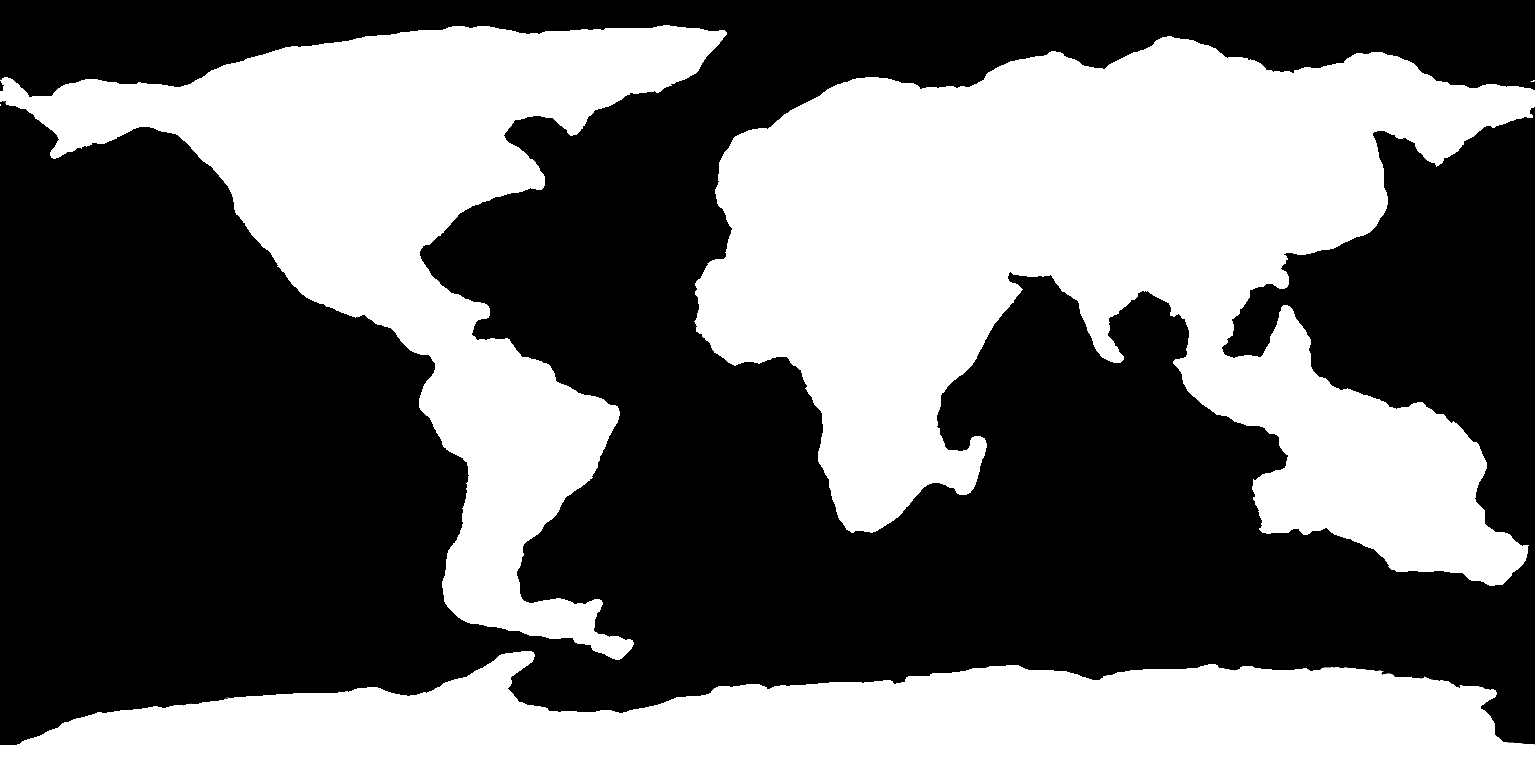
One important thing to keep in mind is that the map represents *continental crust*. Not coastlines, or landmasses. As such it shouldn't contain volcanic island arcs or hotspot island, but *should* include shallow parts of the continental shelf that would otherwise be underwater.

If you want the generated world's coastlines to adhere more closely to the crustmap, you can try lowering "sea level increase since LGM" (last glacial maximum).

2. Save the image as a png

3. Make an image of tectonic plates, with each plate represented by a single unique color. You can choose any colors you want, as long as you stick to the rule that a single plate gets a single (unique) color.

Here's an example:
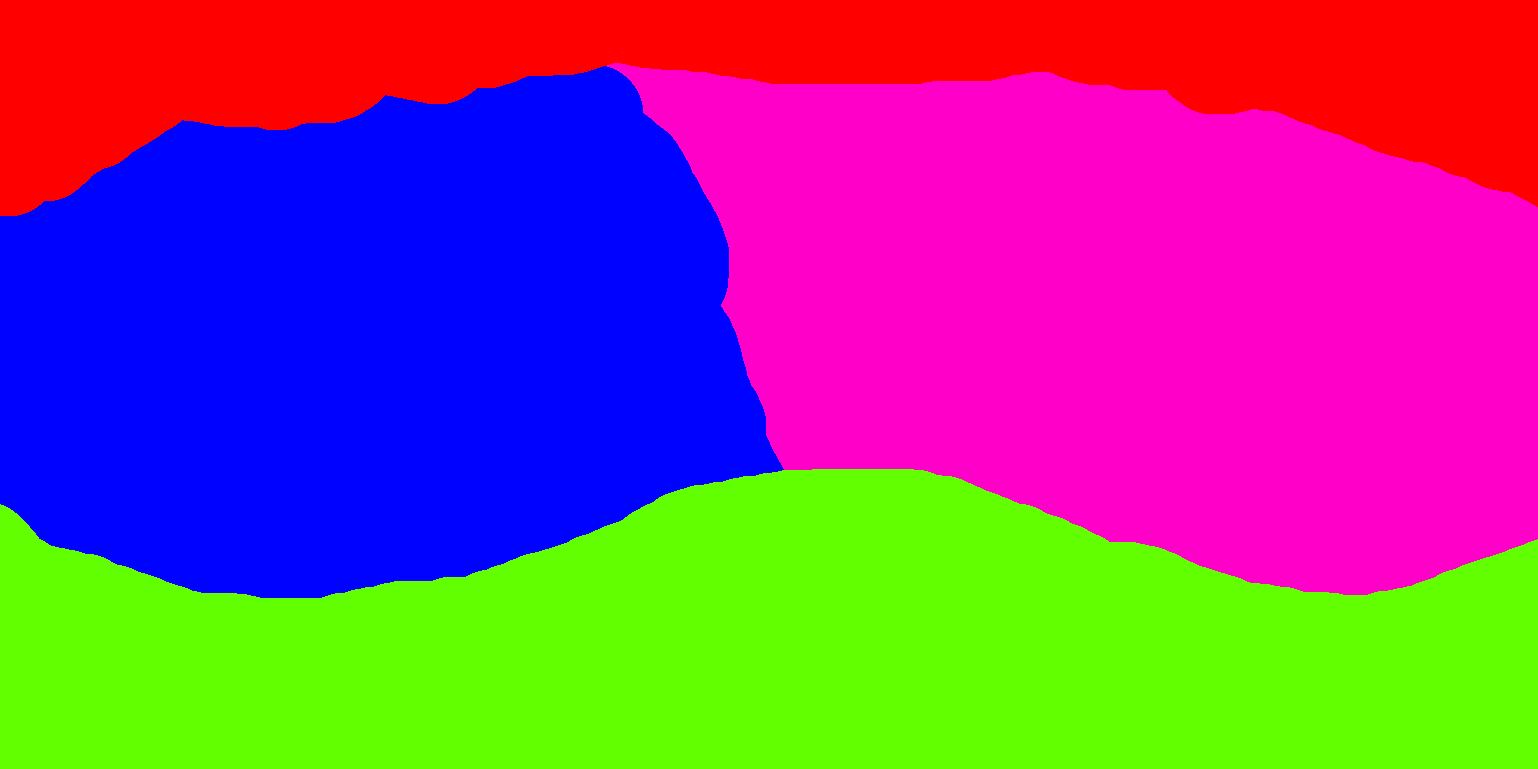
It is *essential* that each plate gets *exactly* a single, unique color. You need to make sure that edges between plates have no aliasing, smoothing, or any other brush effects that some image editing software add automatically.

Here's an example of a correctly formed boundary between two plates:



If your map fails to load, it is very likely because you didn't ensure these crisp, sharp, pixel perfect plate boundaries. Each unique shade of color gets interpreted as a different plate so if your brush is smooth, each individual pixel on the boundary would get interpreted as a tiny 1 pixel large plate, which is almost certainly not what you want.

4. You can also (but dont need to) specify movement direction of plates by placing black (rgb of 0, 0, 0) and white (rgb of 255, 255, 255) dots on them.  The plate will move in the direction from the black dot to the white dot.

Here's an example:
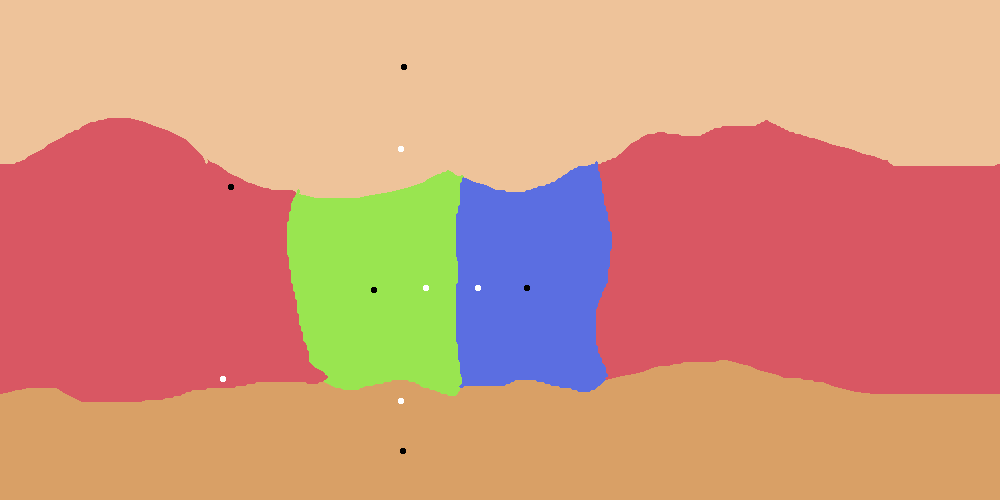

The size of the dot doesn't  matter as long as they are fully surrounded by a single plate. To ensure correct behavior, place no more than a single pair of dots per plate. You should also prefer placing them closely, as to avoid possibly counterintuitive consequences of the curvature of Earth. The exact speed of the movement depends on the distance between dots *relative* to all other distances between dots. As such, there's no reason to place them very far apart.

5. Save the image as a png

6. Load the platemap and the crustmap in Gleba, using the buttons in the menu with world parameter sliders

And that's about it! Gleba will now generate a world roughly in the shape that the files prescribe.


Now, here's a list of common issues you may run into:

1. If you don't get orogenies or other plate boundary features, you need to make sure that the boundaries of the crust align with the boundaries of the plates. Gleba checks for boundary types (such as continental collisions) only within the immediate vicinity of the boundary. Do not try to manually move crust back to account for flexural forces of the collision. Place the crust along the boundary of the plate and let Gleba do it for you.

(1 edit)

On Windows, Gleba saves map exports to: 

AppData\Roaming\Godot\app_userdata\gleba\user_data\cache<br><br>

You can also find it via:

%APPDATA%\godot\app_userdata\gleba\user_data\cache

iirc, a global forest ^^' And a completely different result from Gleba

Hi! I was hoping to keep this thread free of questions and just for game ideas, but to answer, click on a tile on the map, and then on the magnifying glass icon on the tile inspector. Keep in mind however that the 3d mode is very much under development and more in a tech demo stage ^-^

Sorry for the confusion, it's nothing that complicated ^-^

In this context, world topology is just the shape of the graph of tiles and their neighborhoods.

Basically, my algorithms work more or less the same regardless of whether tiles are hexagons with 6 neighbors each, squares with 4 neighbors, squares with 8 neighbors, an irregular voronoi graph, or something even more exotic.

Hi!

I started this project a year or so ago, but the vast majority of it was in various experiments and what I would call "engine work". Not going into technical details but this project is doing a lot of weird things that afaik not many other games do (like having most algorithms be world topology agnostic so that things like tile shape and neighborhoods can be easily swapped and compare with each other).

When it comes to "simulation" coding, I spent around a month and a half on it, after which I spent a month and a half working on 3d rendering. first person control, game physics, and UI.

The current goal is to get more feedback on world generation algorithms and incorporate it while I work on combat and spawning animals in the 3d world. In an ideal world there'll be a tiny open world rpg tech demo by the end of the year and after that I'll be working on procedural generation of societies, settlements, and dialogue.

Hi Pedro, long time no see! Good to see you're still around ^-^

I'll do my best to make it as fun as I can

Gleba (v0.1.2) community » General · Created a new topic Game Ideas

For all your idea sharing needs!

Most of it has been open source for over a year: https://github.com/Calandiel/SongsOfFOSS
The parts that aren't are in the process of being ported to an open source license.

(1 edit)

I think there's some misconception here. SotE 's funding ran out but the game is still under development by the community. We open sourced it under the GPL license ( https://github.com/Calandiel/SongsOfGPL )

It takes 1-3 minutes to generate a planet with your high performance computer precisely because the planet generation system isn't bad (in the sense of accuracy). SotE runs a tectonic simulation, calculates fluxes of magma heat, runs multiple climate simulations at different timescales, runs erosion simulations, figures out watersheds and lake placements by running a physical simulation of water movement and drainage, generates soils using a physically based bedrock erosion model while also coupling it to the water movement simulation, generates glaciers along with their movements, runs a plant growth simulation and so on.

And that's just a short summary, each of these steps is much more detailed than just doing the simplest thing possible (to give an example, if you pay close attention to oceanic plates youll see that as they get older they get denser, leading to deeper oceans on average at one edge of the plate)

Calculating all of that is a *ton* of work and that's why world gen takes a long time. 1-3 minutes sounds about right. On my laptop it used to take 5-7 minutes to run full world generation.

As for the game, assuming you're talking about the version from itchio, there isn't any. At that point in development it was only a world generator.

Source for all of the above: I coded around half of SotE if measured by lines of code. 

Well, I don't check on itch io often but I am here now. If you're still around, we can chat ^^

It's a Goldberg polyhedra

(1 edit)

What do you find "bad" about SotE? To my information it's the most accurate planet simulation you can run on a consumer device, provided you have 8 GB of RAM (which is more than normal, it was benchmarked against median computers as per Steams hardware survey: https://store.steampowered.com/hwsurvey )

Splendid! I send you an email, let's discuss everything there ^^

Hello! ^^

I'm not sure what would be the best way to reach out as I don't use Twitter so I'll try my luck here.

I want to ask, do you take commissions? I've noticed you have a Patreon account but I'd be interested in having a bunch of old school textures made. I've been using your texture packs for prototyping and I've come to like them so much I'd actually prefer using them for the final product. Only problem being, they don't cover everything I'd need.

If you do take commissions, do you perhaps have an email address for business related queries? I'd like to know the rate and discuss some other details. For example, I would prefer if any textures I'd potentially ask for were made publicly available like your other texture packs. Not sure if that'd work with you.

Best regards,

Calandiel

2 comments · Posted in 2 comments

OwO

Ah. I haven't had a chance to test the game on any kind of multi monitor setup (I work on it on a laptop). If you're on our Discord server, could you send me a DM? I'd send you a recent version of an in-development build, I'm curious if the issue persists in the latest iterations of the game.

Interesting. It's the first time this was reported. I wonder if it's perhaps the Unity version 0.2 was using slowly getting outdated. Thanks for the report, I'll look into fixing it for 0.3

I'm not sure if it's referring to some of the latest videos by Solitarian showcasing our 3d world renderer, but if it is, Demian told me to remove it for the foreseeable future.

While cultural "evolution" is more or less necessary to accomplish our goals, biological evolution isn't planned. At best there will be a sort of tech tree for various plant cultivars or breeds of domesticated animals but I doubt that's what you meant.

It's a video game so I highly doubt that will ever be a thing. Simulating all imaginable planets isn't a goal for us.

Sorr, it likely will never be supported. Changing the world size would make the climate model hopelessly inaccurate.

It's a false positive. You'd need to add the launcher to a list of exceptions.

The launcher is open source if you'd like to read what it's doing before adding it as an exception: https://github.com/Calandiel/sote_launcher/blob/main/loader.c

in 0.2, w/s/a/d + mouse wheel

Could you provide more information? What version of the game is it exactly? When does the error happen? Right after double clicking the exe? Does it render the launcher or the main menu at all? What's your operating system? Have you tried running it again to see if it's a persistent issue? Most versions of SotE (including the latest 0.2) have two executables in their zip file. You have to use the one with Launcher in name. Additionally, on some systems, it may ask for administrative privileges, on others it may require them but fail to ask.

I'm not sure how that'd work.

I looked at geojson on wikipedia:

https://en.wikipedia.org/wiki/GeoJSON

and it seems to be a data format for storing lines, polygons and points on a globe.

What exactly are you expecting from such feature?

They'll be re-enabled in the next update -- the way they worked wouldn't fit 0.3 because it'll only contain the stone age

I think you may be confused. This method is more or less already what SotE is doing. We stopped using a GCM after the Patreon-only release of version 0.1

Yeah, well. Placing whole biomes by hand and placing them by providing monthly figures for temperature and rainfall with code are not exactly the same task.

We still need to retune climate tho.

I skimmed over it and I think this is actually roughly how climate in sote works currently, but the constants are not tuned.

+ I think we exposed climate defines in the latest release

I'll give a more throughout reply in the coming days, it's 2 am in my timezone at the moment

No. I mentioned it at the end of the post:

"(with exception of treemapping, it's a bit too slow to use all over the place)"

I used my admin powers to fix it

(1 edit)

I'll keep this short because the subject isn't that complex either.

At the moment, we're using pie charts for data visualization, like so:


However, we could instead use waffles, like this chart:


or this one:


They have less dead space but they may be more difficult to read and only show percentages rounded to the nearest integer. They also have a bit different aesthetic.

Which one would you prefer? Or perhaps there is some yet different graph you'd suggest for the main data visualization tool (with exception of treemapping, it's a bit too slow to use all over the place)?

To give an update, we went with static territories/provinces.

They'll be on average the size of irl Luxemburg (the country, not the city).

Sorry for a late reply. Corona got in the way of development and we haven't been paying enough attention to our media.

To answer your question, here is the list of currently planned (playable) races:

https://sote.miraheze.org/wiki/Races

In general, we won't be limiting you to "civilized" peoples only. You will be able to play as (organized) tribes of hunter gatherers or nomads.

World gen is close to being finished (tho it still needs bugfixing and parameter tuning) and it's a hobby/passion project so I think we'll be fine ^^'

As a word of clarification.

The article you linked is actually also the one on which our currently preferred economic model is based (in a modified form to allow good quality to be taken into account).

However, keeping a market on each tile is impossible due to RAM constraints. I mentioned cities/settlements in my post above for a reason. We can have about 20k entities storing pops per million tiles. These cities then have territories from which they can extract resources (through farming, mining, fishing, woodcutting, foraging, hunting and other means). Rural population is stored on a separate list on those entities.

I'm under impression some people see tiles as our equivalent of provinces from Paradox' games. They're not. Settlements are. Tiles act as dynamic pixels to define environment for settlements so that things like available resources and farming rates can be determined.

It's not just pathfinding but also any other type of cache we may come up with (as well as them being the same as regions used to store animal data). If they could be redrawn, we'd lose out on these optimizations.