

Sorry I missed this post. Let's see...
Is the inspector working in renpy itself? Did you get all working properly except the connection to the editor?
What OS are you using?
I can't reproduce that, so I need more information which may help me knowing what's wrong.
What are you doing when you place the rpe file? Are you only reloading? Are you restarting renpy? Does this happen when you remove the rpe and only reload renpy without restarting renpy?
Do you have any code that tries to do something with layers which runs before init -5?
Do you have a non-updated version of ActionEditor3 (it had a bug which caused issues).
If you can send me a simplified version of the VN which also fails, that works too (you can replace all images with the same image as placeholder, if you prefer)
I didn't test this but I'd assume it works:
A workaround you can try is making a new function that does that for you.
def says(who, what):
return renpy.say(who, speechPauses.add_speech_pauses(what))
If you are using tooling that is calling renpy.say directly, you can consider replacing renpy.say() function but renpy also uses that function, so that can lead to duplicated pauses.
If you tell me the specific situation you are dealing with, I may come up with a compromise for you that won't be as hard to work with.
Didn't I? WOW it's been so long!
It's been my main job and I'm doing commissions as my 2nd job and this time they haven't been ren'py commissions. Then I'm KO but I had opportunities but I didn't remember. Sorry. I'll try to do Monday or Tuesday. I have a commission finishing this weekend.
Sorry I didn't write anything. I genuinely forgot.
I'm hopping to have another ren'py commission so I have an excuse to continue my GuiManipulate too.
Ok. So,
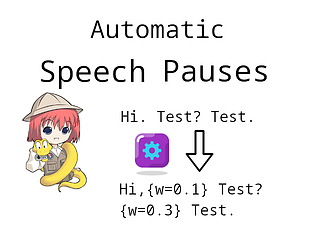
Relative pauses requires the text speed to not be maxed out. It's relative to the pause between each character. If the pause is 0 (the text speed is maxed out), then there's no possible pause because the multiplication to make it relative results in 0.
Try reducing the text speed in the preferences. You can see at 0:56 on the bottom left of the preferences screen.
I consider this is a UX problem and not a bug. What do you suggest for me to fix it? Maybe a message that appears under the "Sentences" bar when the Text Speed is maxed out warning just that? Or maybe nearby the "Relative pauses" radio button? Or maybe you have a better idea? For ease of install, I don't want to require more than the use for integration in settings.
Thank you.
I used what you wrote there, I've made the change and I've place it here: https://gitlab.com/brunoais/renpy-speech-pauses/-/snippets/4833299
Please test whether it's working right because I don't have any Indonesian VN to test on.
I've tried making changes so the inspect adapts to the GUI size.
The direct download link is here: https://gitlab.com/brunoais/renpy-guiInspect/-/raw/dist/renpy-guiInspectv0.3.1-pre.rpe
Let me know if this works for you. If the issue is solved for you, I'll release it as a new fix version.
Thank you for reporting
Export doesn't work.
I tried converting a .rpy file translation I have for one of my previous commissions and the file comes out with just a line as the header with the correct language set but and all the already translated and not translated yet strings aren't there. It's only the single header line.
By the way, I had to run it through Proton because this is a windows executable.
Sounds good. 👍
There's some things I really would want to implement such as the concept of namespacing the variables, functions, transforms, etc... so it doesn't clash with other stuff. The rest, that's not as important.
I'm open for discussion or comments, if you want. You can contact me. I'm also on Discord and other discussion forums.
Thank you for your time to answer and explain your situation.
For licensing, in my case I ended up with MPL 2.0. It's strict enough for my creation but loose enough to allow others to use it. Attribution enforced by the license is really something I'd like it to have. I could edit it but then it's a custom license that is untested and unproven (and couldn't be called MPL or any variation of that).
I'm open to cooperate and help making stuff that is useful for the community. Like these tools you spent a lot of time on. If I can help, I'm open to help. I want Ren'Py to succeed and I believe these tools help achieving just that.
If you ever feel like cooperating with something, I help with what I can. You can find me here or Discord or lemmasoft forums. I'm brunoais pretty much everywhere. See you soon 😉.
Now that I remember... I think I've seen that function before. Is it this? https://github.com/ojii/imgsize
I remember seeing something like this when I was doing a library for image loading and handling (which is still not ready for public consumption) a couple years ago...
Nevermind. I get it now. The standalone script was fixed.
I don't know what get_size is. Did you mean to use renpy.image_size() instead? That's what I used so I could see the demo.
E.g.
Instead of:
v = renpy.Render(get_size(self.mask)[0], get_size(self.mask)[1])
I swapped it with:
v = renpy.Render(*renpy.image_size(self.mask))
(That way it only calculates the size once too)
However, this is a very slow function, so I think it would be productive if you cached it. I tried caching it and I got a significantly more responsive UI.
Other than that and some few more things... Overall, this is very well done. It's a keeper.
Part3:
I like what you are doing this and I want this to succeed. I want to see more of good mouth flaps. However, when I see the code provided. I see multiple points I feel I shouldn't just leave like that.
So, here's some thing I'd suggest. Maybe you can learn too, the same way this presentation had things for me to learn.
Ren'Py already comes with oversampling out-of-the-box. You only need to use the "@" in the file name and Ren'Py takes care of oversampling for you.
Manual: https://www.renpy.org/doc/html/displaying_images.html#oversampling
I'd like if this example also made use of namespacing. In this case, it involves making us of the "in" modifier for python init.
E.g.
Instead of:
init python:
do:
init python in flapsAndBlinks:
This avoids clashing with functions of other libraries or the VN maker's
When doing choice, reduce repetition. Make use of the simple expression whenever viable. Ren'Py caches these expressions.
E.g.
alpha 1
choice:
closed_eyes
choice:
closed_eyes
choice:
closed_eyes
pause 0.05
alpha 0
pause 0.2
alpha 1
closed_eyes
pause 0.05
->
alpha 1
closed_eyes
choice 2:
pass
choice:
pause 0.05
alpha 0
pause 0.2
alpha 1
closed_eyes
pause 0.05
-----
alpha 1
choice:
pause 0.1
mouth_open
pause 0.1
mouth_half_open
repeat 3
choice:
pause 0.1
mouth_open
pause 0.1
mouth_half_open
repeat 6
->
alpha 1
pause 0.1
mouth_open
pause 0.1
mouth_half_open
choice:
repeat 3
choice:
repeat 6
(code is hard to type in itch....)
The way you do this is smart:
def WhileSpeaking(name, speaking_d, done_d=Null()): return DynamicDisplayable(curried_while_speaking(name, speaking_d, done_d))
Thank you for making this tutorial. I hope it's picked up by many people and this can be used by many more people.
Part2:
When I read this VN's source code, specially the code used for the examples, it makes me want to
Using a CCA license for software is weird. However, nowadays mature (and tried-and-true) software licenses do not enforce attribution. I know that feel and I just decided to accept that and hope for people's good faith.
Well done. I wish I could provide such through and complete usage manuals as this one with practical examples to boot.
I have a few separate things I'd like to comment related to this tool, so I'll create a separate comment for each of both.
For starters, It's well presented and it's well done. Quite visually interesting. I see quite some (intended or not) inspiration from Ren'Py's own tutorial. That makes it flow nicely. The links are also fairly welcome.
By the way, while checking this out I found a single typo:
Let us first look at how we put voice lines into our sript. This is important.
With all that text for a jam, typos are those things that appear out of nowhere, no matter how many times you read, you read it right until someone points it out and then it magically becomes wrong 🤣.
This has a lot to go well for it. It has a great base to work on but then it has quirks with its code design which I wish weren't there.
At the same time, I wish:
Good luck with this. Thank you for providing this to the community. Thank you for all the tooling and stuff you've been making over time for free.
This has a lot to go well for it. It has a great base to work on but then it has quirks with its code design which I wish weren't there.
At the same time, I wish:
Good luck with this. Thank you for providing this to the community. Thank you for all the tooling and stuff you've been making over time for free.
True. I'll keep it as is now then. I will still implement the n when I have time to also test it works.
Let me see if I get it:
You would like to have a "take me to the source code of this" kind of addon for Renpy? You activate it, then click on the thing where you want to go the source code of and you end up there?
Ah yes. I think I get the idea. If you rotate that way, more like a piece of paper on the table, that would definitely happen. I checked the code about how would it be to implement that. It's not impossible but that one is a bit harder. The hardest part of that solution is the need to invert the levels. Basically, I'd need to figure out first what's the nth of the thing on top (the button in your example) so I can invert the subtraction.
More like
maximum_level - level
instead of just
level
. Quite feasible. Just takes some extra work.