
Indie game storeFree gamesFun gamesHorror games
Game developmentAssetsComics
SalesBundles
Jobs
TagsGame Engines

My previous "reply" was apparently a just a reply to myself?  Not sure how itch.io threads work....

Anyway, I messed around a bit more.  I made a function brush which paints a tile with instances locked to the grid, which "works" but is pretty janky.  The line tool working to draw a line of the tile is nice, but other things like the brush selection display are a bit off, and needing a brush per tile doesn't seem scalable (without requiring an Interact-mode tile selector).

I think my question has morphed into: "in Decker, what is the pattern for making tools to help make what you are making?"  If I wanted to make sort of minimalist Tiled in Decker to edit tilemap-y images for a deck, within that deck, what does the structure look like?  It could always be a separate deck which is the external "minimalist Tiled deck," but it seems like it should be possible to have the editor be embedded in the deck being edited and have a nice flow for invoking that self-editor.  Does that make sense? 
(+1)

In woodworking, the thing you make that helps you make other things is called a “jig”, and Decker lends itself really well to making jigs. Any deck of any complexity is probably going to have a “backstage” area with controls for tweaking and how things in the “main” part work, cards that store backup and alternate versions of bits of artwork, all kind of things.

(+5)

Here's one possible approach:

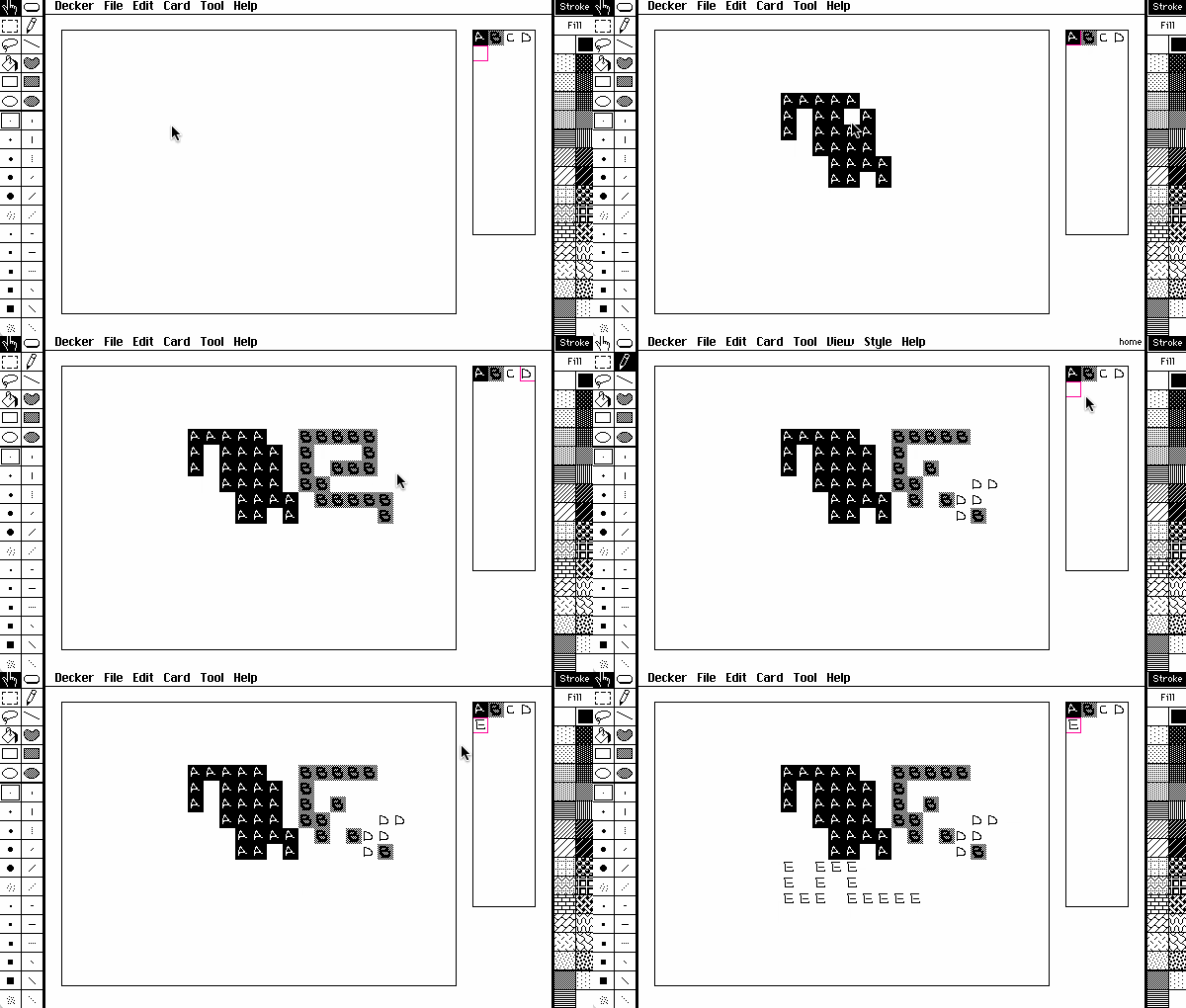
I made a contraption called a "gridpalette" which uses the currently selected grid overlay dimensions (app.grid) to divide up the card background underneath it and allow you to select a tile. It exposes a .value attribute which slices the selected tile out of the card background.

I then made a canvas which responds to drag events by asking the gridpalette for its value and then splatting it onto the card background at the pointer position(s) rounded to the closest grid cell:

on click pos do
 drag[pos]
end
on drag pos do
 cell:app.gridsize
 card.image.paste[pal.value me.pos+cell*floor pos/cell]
end


The whole card together as an example you can paste into a deck and try:

%%CRD0{"c":{"name":"home","script":"\n","image":"%%IMG3AgABVgQQyEmrvTjrzbv/YCiOZGmeaKqubOu+cCzPdG3feK7vfO//wKBwSCwaj8ikcslsOp/QqHRKrVqv2Kx2y+16v+CweEwum8/otHrNbrvf8Lh8Tq/b7/i8fs/v+/+AgYKDhIWGh4iJiouMjY6PkJGSk5SVlpeYmZqbnJ2en6ChoqOkpaanqKmqq6ytrq+wsbKztLW2t7i5uru8vb6/wMHCw8TFxrMBycrLzAENz9DR0g3H1YHN2MrT29DW3n3MANnJ0M3b3+h5yxPjz+3RIsrp82DrAeLZ7uT6zvDs6xju4RNIr+AVe/fyNdi3UJs/cR4I4jNIkYo8hMz0NVwmjV1ECxIrilxyUd5Ah+MYeuwQcuLIl0lMVjC3UZpDahJaBrygE6bPHybDneQ3TWXOjyB/KhVSMmU5hjWf/aPQs2WypVh9NH23EVu3fwBBYstKdkdKmvzQxivLVutZjk/R4mxLl+Tbm9w61t2L5C7evF/5Ch5MuLDhw4gTK17MuLHjx5AjS55MubLly5gza97MubPnz6BDix5NurTp06hTq17NurXr17Bjy55Nu7bt27hz697Nu7fv38CDCx9OvLjx48iTK1/OvLnz59CjS59Ovbr169iza9/Ovbv37+DDix9Pvrz58+jTq1/Pvr379/Djy59Pv779+/jz69/Pv7///wAGKOCABBZo4IEIJqjgggw26OCDEEYo4YQUVmjhhRhmqOGGHHbo4YcghijiiCSWaOKJKKao4oostujiizDGKOOMNNZo44045qjjjjz26OOPQAYp5JBEFmnkkUgmqeSSTDbp5JNQRinllFRWaeWVWGap5ZZcdunll2CGKeaYZJZp5plopqnmmmy26eabcMYp55x01mnnnXjmqeeefPbp55+ABirooIQWauihiCaq6KKMNuroo5BGKumklFZq6aWYZqrpppx26umnoIYq6qiklmrqqaimquqqrLbq6quwxirrrLTWauutuOaq66689urrr8AGK+ywxBZr7LHIJqvsssw26+yz0EYr7bTUVmvttdhmq+223Hbr7bfghivuuOSWa+656Kar7rrstuvuu/DGK++89NZr773qRgA=","widgets":{"map":{"type":"canvas","size":[400,288],"pos":[16,32],"volatile":1,"script":"on click pos do\n drag[pos]\nend\n\non drag pos do\n cell:app.gridsize\n card.image.paste[pal.value me.pos+cell*floor pos/cell]\nend\n","show":"transparent","scale":1},"pal":{"type":"contraption","size":[64,208],"pos":[432,32],"show":"transparent","def":"gridpalette","widgets":{"c":{"size":[64,208],"pattern":36},"sel":{"size":[100,42],"pos":[140,0],"value":"0"}}}}},"d":{"gridpalette":{"name":"gridpalette","size":[100,100],"resizable":1,"margin":[2,2,2,2],"description":"choose a tile from the card background.","script":"cell:app.gridsize\nwid:floor card.size[0]/cell[0]\n\non selpos do\n i:get_id[]\n cell*(wid % i),(floor i / wid)\nend\n\non get_id do 0+sel.data end\non set_id x do sel.data:0+x view[] end\non get_value do card.parent.image.copy[card.pos+selpos[] cell] end\n\non drag  pos do set_id[sum (floor pos/cell)*1,wid] end\non click pos do drag[pos] end\n\non view do\n card.show:\"transparent\"\n c.clear[]\n c.pattern:colors.magenta\n c.box[selpos[] cell]\nend","widgets":{"c":{"type":"canvas","size":[100,100],"pos":[0,0],"locked":1,"volatile":1,"show":"transparent","scale":1},"sel":{"type":"field","size":[100,20],"pos":[176,0],"show":"none"}}}}}

This probably isn't quite what you have in mind, but it might serve as a starting point. Drawing the tiles themselves and rearranging them is pretty convenient here, because we can just use all of Decker's normal drawing tools and grid-snap features, but since drawing with tiles directly copies them to the card background we can't make post-hoc edits to the tileset after we draw a map.

If you wanted to store a tilemap as an array of tile indices, rather than directly drawing on the card background like this, you might make the drawing area another contraption that manages storing and redrawing such a map, using the .id field exposed by the palette instead of .value. Maybe you'd need a separate editor for tiles, too, with associated metadata? You could add more drawing tools, or an undo/redo stack, or separate collision layers, etc, etc. Tools can start out very simply, but your preferences and desired workflow will shape how complicated they need to become.