

Just started with Decker and was learning the grid widget. I have a question about it. Is it possible to adjust the width of individual columns or are columns always equiwidth, based on the total width of the widget?
In interact mode, you can drag dividers between the column headers to adjust their sizes:
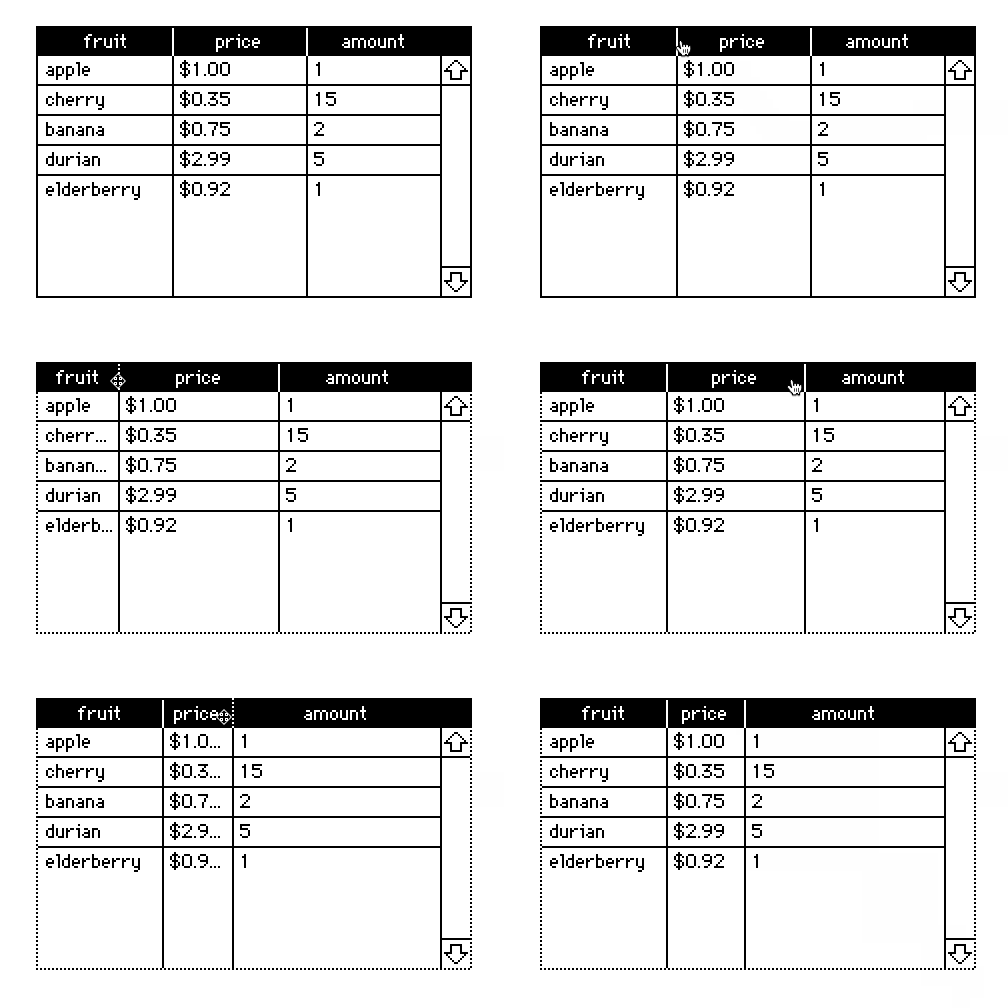
If you ever want to "unfix" the column widths you can click "Reset Widths" from the grid properties panel.
You can also set the column widths of a grid with scripts or via the Listener with the "grid.widths" property, which accepts a list of column widths in pixels:
mygrid.widths:60,30
Manual resizing constrains the minimum width of columns so that you can always distinguish their drag handles, but with scripting/the Listener it is possible to set columns to 0 pixels wide, as a way of hiding columns from the user without removing them from the underlying table.
Does that make sense?
27 days ago(+1)
Bless you, sir! It makes perfect sense. Did I miss something in the documentation or are these details not provided? I looked all over and couldn't find anything.
From the decker reference manual,
If the grid has headers and more than one column is displayed, you can drag the space between column headings to resize the columns. By default, every column is given equal horizontal space. You can restore default spacing by clicking "Reset Widths" in the grid properties dialog.
The .widths property is described in the Grid Interface section, along with all the other scriptable properties:
x.widths: A list of up to 255 widths of table columns, in pixels. r/w.