

There are a few ways to do what I think you're asking for. You can set a canvas to have a "scale" setting greater than 1 to upscale whatever is drawn on it, and then draw text on it, or you could draw text on a canvas normally, copy the contents of the canvas as an image, upscale that, and then draw the upscaled image back to the canvas.
Presuming we start with the glyph editor in "All About Fonts", we could do the following:
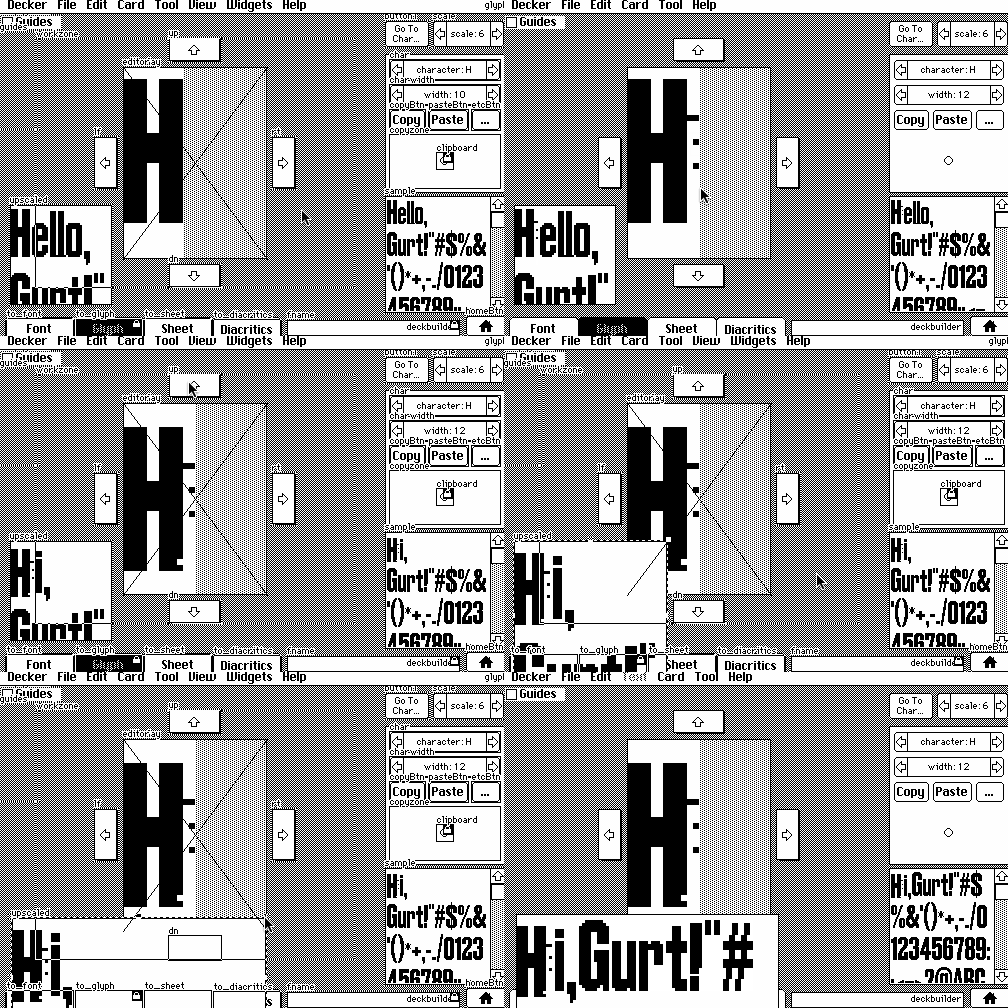
1) create a new canvas widget and name it "upscaled". From its "Canvas properties" modal, set the scale factor as "2" (just for starters).
2) modify the card script, adding the following three lines to the "on view ..." function after the line that reads "sample.font:f"
upscaled.font:f
upscaled.clear[]
upscaled.text[sample.text (0,0),(1,2)*upscaled.lsize]
(This will word-wrap the beginning of the text in the "sample" field within the canvas, with a little extra room so it cuts off instead of ellipsizing)
3) tweak the "sample" field so that it triggers an update of the UI whenever it is changed by giving it a script like so:
on change do
 view[]
end
Now the upscaled preview will be updated whenever you draw on the glyph, change other font parameters, or type in the sample field. You can also adjust the "scale" property of the canvas as desired:
How's that?