

Is there a way to use integer scaling to display text in Decker at a multiple of the original font size?
(I'm working on a custom font and would love to include some zoomed in views of certain glyphs, but keep them as live text)
There are a few ways to do what I think you're asking for. You can set a canvas to have a "scale" setting greater than 1 to upscale whatever is drawn on it, and then draw text on it, or you could draw text on a canvas normally, copy the contents of the canvas as an image, upscale that, and then draw the upscaled image back to the canvas.
Presuming we start with the glyph editor in "All About Fonts", we could do the following:
1) create a new canvas widget and name it "upscaled". From its "Canvas properties" modal, set the scale factor as "2" (just for starters).
2) modify the card script, adding the following three lines to the "on view ..." function after the line that reads "sample.font:f"
upscaled.font:f
upscaled.clear[]
upscaled.text[sample.text (0,0),(1,2)*upscaled.lsize]
(This will word-wrap the beginning of the text in the "sample" field within the canvas, with a little extra room so it cuts off instead of ellipsizing)
3) tweak the "sample" field so that it triggers an update of the UI whenever it is changed by giving it a script like so:
on change do
 view[]
end
Now the upscaled preview will be updated whenever you draw on the glyph, change other font parameters, or type in the sample field. You can also adjust the "scale" property of the canvas as desired:
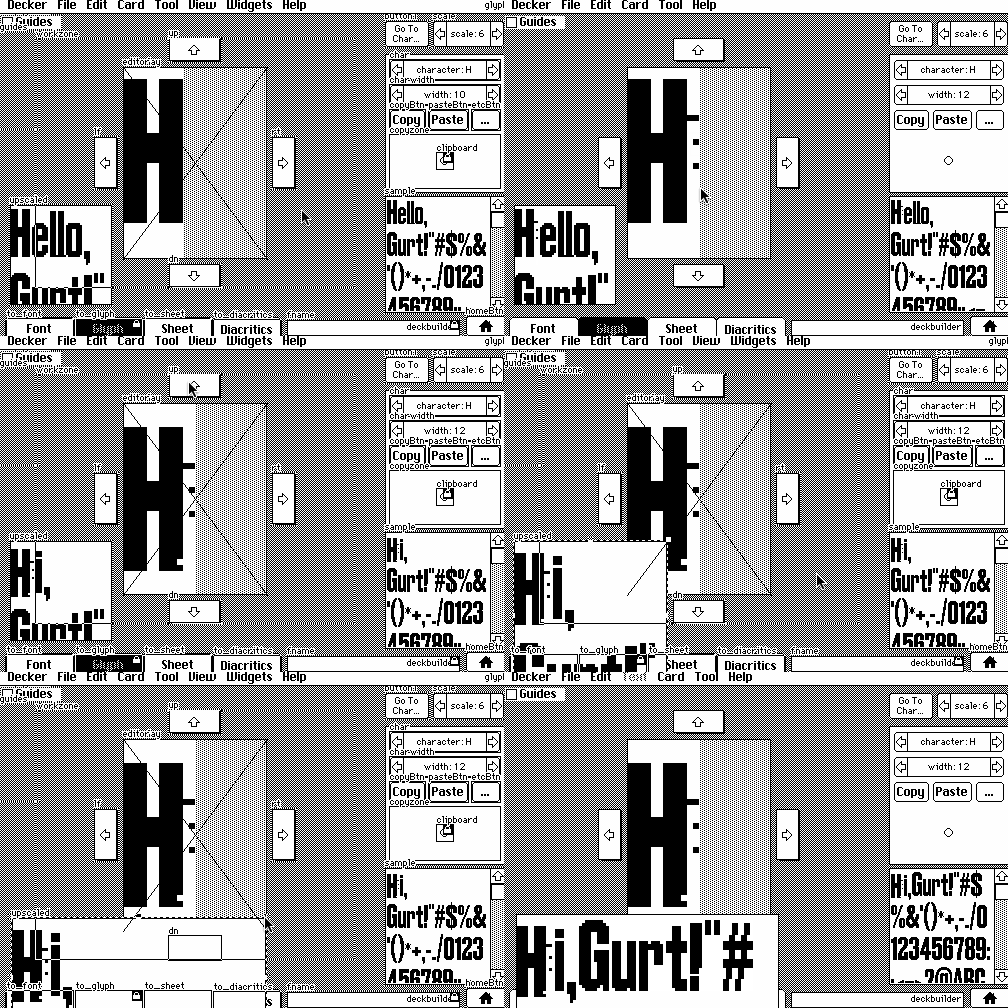
How's that?
Having seen your stream, this can be simplified; for some reason I had assumed you wanted something integrated with the font editor.
Given a field named "f" and a canvas named "c", you can set the font of the canvas and field to your custom font manually, and then give the field the following script:
on change do
 c.clear[]
 c.text[f.text (0,0),(1,2)*c.lsize]
end
Since the contents of the canvas is always being redrawn from scratch to reflect the field contents, you could optionally reduce the file size of your deck a little bit by marking the canvas as "volatile" and dividing the script into a card script that updates the canvas whenever the card is refreshed:
on view do
 c.clear[]
 c.text[f.text (0,0),(1,2)*c.lsize]
end
And a script for the field to kick off an update whenever it changes:
on change do
 view[]
end
And if you wanted the canvas to always reflect the font(s) chosen for the field widget and any rich text inside it, you could generalize the script further to copy the field's font setting to the canvas before doing any drawing and use the field's .value (the rich text contents of the field) instead of .text (the plain-text contents):
on view do
 c.font:f.font
 c.clear[]
 c.text[f.value (0,0),(1,2)*c.lsize]
end
Hope that helps!
Thank you again!! I realized that I phrased my original question in a confusing way, and I once again really appreciate your help! I'll dig into this tonight and try to make some adjustments. It's been a delightful process building out a font though!