

It opens fine on blender 5.2.0, I also had a fresh install to try and it worked too. Can you tell me whats the error or what is wrong?
The exported .glb contains non-uniform scales on many MeshInstance3D nodes (for example, the Stairs object imports with a scale of approximately 0.15, 0.085, 0.345 instead of 1,1,1).
This becomes problematic when creating gameplay collision in Godot. If a StaticBody3D/CollisionShape3D is added as a child of one of these imported meshes (or generated automatically using Godot's Mesh → Create Collision tools), the collision inherits the non-uniform scale. In my case this caused incorrect physics behaviour, including a CharacterBody3D being unable to walk up a stair ramp that should have been perfectly walkable.
The workaround is to keep all collision objects outside the imported mesh hierarchy and create a separate collision scene, but that makes the workflow much more cumbersome, especially for large environments.
If possible, it would be very helpful if the asset could be exported with mesh transforms baked so that the imported nodes have a scale of (1, 1, 1). That makes the asset much easier to use in Godot and other game engines where gameplay collision is authored separately from the visual meshes.
I tested the updated GLB in a completely fresh Godot 4 project. The issue is still present.
The GLB itself still contains non-unit scales on mesh nodes. For example, the Stairs node is exported with:
"scale": [0.149999991, 0.085000001, 0.344688237]
Godot is importing the file correctly; these values are already present in the GLB.
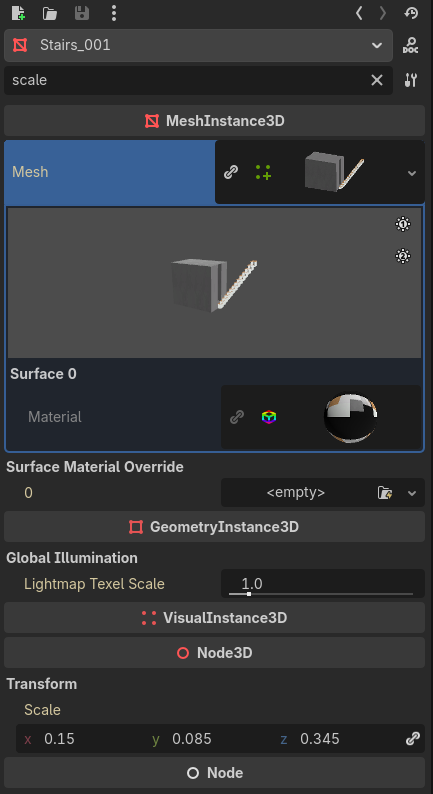
Could you check why the exporter is writing non-unit node scales instead of baking the transforms into the mesh geometry? Ideally, each exported mesh node should have a local scale of (1,1,1).
Thank you for having a look!