

Hello there,
unity has issues with input devices, so anything extra like controllers, extra keyboards and such can cause issues.
When checking my devices I find my keyboard's name pasted 5 times in a row, though deleting one of them causes the keyboard to tweak and not work at all. In Event Viewer, the closest thing I could find was this: Windows cannot load the extensible counter DLL "C:\WINDOWS\system32\sysmain.dll" (Win32 error code The specified module could not be found.). I also have all drivers updated.
In the realms of guess work now:
Main Fixes to Try
- Input Device Conflicts (most common solution):
- Disable Bluetooth completely (Windows Settings → Bluetooth & devices).
- Open Device Manager (right-click Start → Device Manager).
- Under Keyboards, remove the duplicate entries (uninstall all but one), then restart your PC.
- Also check Bluetooth, Human Interface Devices, and Sound, video and game controllers for extras and disable them.
- Wireless devices or hidden pairings often cause this.
- Launch in Windowed Mode:
- Locate the main game .exe in your Starmaker Story folder.
- Right-click → Create shortcut.
- Right-click the shortcut → Properties → Target field.
- Add at the end (after the closing quote): -screen-fullscreen 0
- Try launching with this shortcut. You can also experiment with -screen-width 1920 -screen-height 1080.
- Quick In-Game Attempts:
- While stuck, try Alt + Enter (toggles fullscreen).
- Press F1 multiple times (helps refresh UI in some cases).
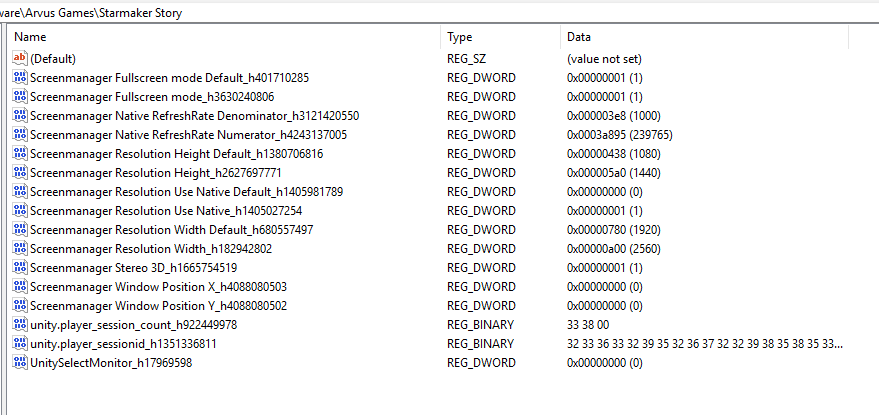
- Registry Reset for Display Settings:
- Press Win + R, type regedit.
- Navigate under Computer\HKEY_CURRENT_USER\Software\Arvus Games\Starmaker Story and look for any Starmaker Story / Arvus-related key.
- Delete entries starting with Screenmanager.
- Launch the game again.
Other steps:
- Run the .exe as Administrator.
- Close any background apps with overlays (Discord, etc.).
- Ensure graphics drivers are up to date.
Start with step 1 (Bluetooth + duplicates) as that's fixed it for others with identical symptoms.
About the Event Viewer error (sysmain.dll)
This is a common Windows performance counter issue and unlikely to be the main cause of your game problem. You can try fixing it with:
cmd
lodctr /r
(run as admin). Or run sfc /scannow + DISM commands. But focus on the input stuff first.