

Haha, relatable! I work in UE myself, had this headache myself in my older game.
for me it was more about trigger box placement and making the box big enough. For me text is also visible all the time, so it only disappears after I interacted with the message. So your “press E” text probably appears/disappears when the box is crossed, not after the player presses E.
You say components overlap, maybe you can put them all together inside the trigger box element? so they would not overlap, but will be a group of elements inside the trigger box item. I did it like that: 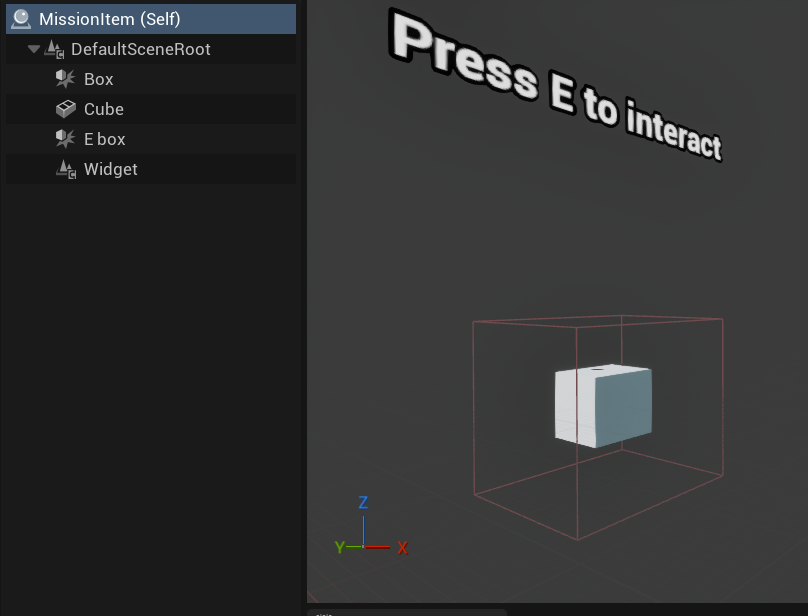
There’s also different way to go about triggers, there’s trigger volume, trigger box and trigger area or something. They work differently and you can try to replace them. Or also it depends on what you chose, “on begin/end overlap” or similar options: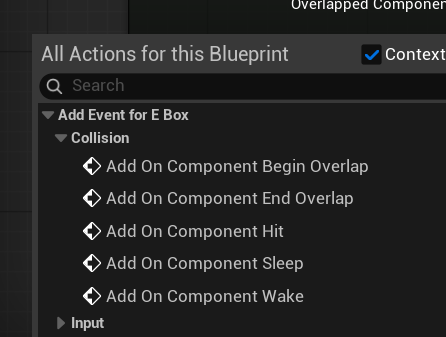
73 days ago(+1)
Thanks for your detailed reply. In my case, the interact component involves identifying if the overlapping actor has a particular component and some other components can also do some things IIRC so that's where I'm suspecting the bug might be. Had to rush through to complete in time so couldn't check too much in detail.
71 days ago(+1)
I see, there’s almost too many ways to do the same stuff in UE! In any case, for a jam game as long as it playable, it is good. And it was a significant jump from your previous game, so the progress is obvious. That’s what matters, and bugs can happen even with AAA releases.