
Indie game storeFree gamesFun gamesHorror games
Game developmentAssetsComics
SalesBundles
Jobs
TagsGame Engines

I feel ashamed to say that while everyone is playing games, I am still working on local deployment.

Due to regional reasons, my game cannot download AI models through the internet, so I can only search for AI models online by myself. But every model I found doesn't match - I mean, they're too small. I am completely unable to play games , may I ask if anyone can help me?
I recommend joining the Discord where people can help you live setting up.

(2 edits)

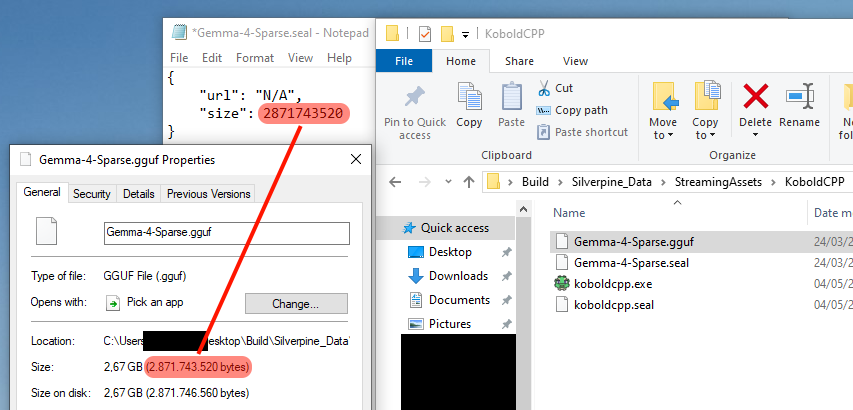
You can manually download the model from any source and put it in the KoboldCPP folder, then create a .seal file of the same name, which is just a JSON with two fields inside. The size field must be the same number as the byte size of the .gguf file, as shown here.

The quantization level of the downloaded model should be Q4_K_M. The .gguf file must be named the same as its alias in the game. For Gemma-4-Sparse, the actual model is Gemma 4 26B-A4B.

Edit: I made a mistake here. The "url" field has to be "https://huggingface.co/bartowski/google_gemma-4-26B-A4B-it-GGUF/resolve/main/google_gemma-4-26B-A4B-it-Q4_K_M.gguf?download=true" for Gemma-4-Sparse, or the game will force you to redownload it from that source.

Edit: As of version 1.7.2, you can now use "N/A" like in the picture to skip the version check.