
NPCs should usually end the dialog and start following you in any kind of "going somewhere" situation, but I will investigate adding this as a feature.
Three Eyes Software
Creator of
Recent community posts
Really you're not meant to edit the exported NPC memories at all, and I can't imagine editing them not causing confusion in some way. NPCs receive information by being part of a conversation, or by having information shared with them by another NPC.
I see that people like having overarching plotlines, so I'd rather have a system that handles this better, than having people edit the exported memories. I'm very much open for suggestions about this if you feel like there's something missing, or that maybe there should be more detailed/frequent/reliable communication.
The field that contains the used actions does nothing if you don't have "Native NPC Actions" enabled. Otherwise it tells the AI what actions were already used. Again, it's not meant to be edited.
I tried changing how the download works so it's more robust and doesn't immediately cancel when it encounters an error on an unstable connection.
Unfortunately, from what I've seen so far, this requires using HttpClient, which is for some reason very slow in Unity (1 mb/s).
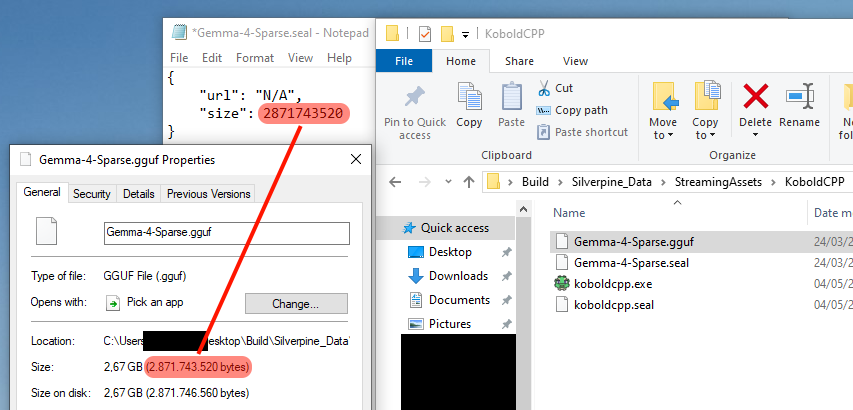
You can download the required files manually by following these steps:
- Download https://github.com/LostRuins/koboldcpp/releases/download/v1.81.1/koboldcpp.exe and place it in Silverpine_Data\StreamingAssets\KoboldCPP
- Download https://huggingface.co/bartowski/Mistral-Nemo-Instruct-2407-GGUF/resolve/main/Mi..., rename it to "Nemo.gguf" and place it in Silverpine_Data\StreamingAssets\KoboldCPP
- Create a file called koboldcpp.seal and edit it to contain this: {"url": "https://github.com/LostRuins/koboldcpp/releases/download/v1.81.1/koboldcpp.exe","size": 478166467}
- Create a file called Nemo.seal and edit it to contain this: {"url": "https://huggingface.co/bartowski/Mistral-Nemo-Instruct-2407-GGUF/resolve/main/Mistral-Nemo-Instruct-2407-Q5_K_M.gguf?download=true","size": 8727635072}

I will release an update when I have figured out how to make the download work better over VPN.
You have to download the ServerKey file and place it in AppData\LocalLow\Three Eyes Software\Silverpine on both your laptop and computer. If it was working before 1.4.1, it's because authentification wasn't actually required until then. If it's not working now, you didn't place the file in the correct spot.
Since 1.4.1, the game compares the name of the item the NPC intends to give to you to a very large list of related terms, and for weapons and equipment specifically, skips calling the LLM for categorization completely. Evidently this doesn't work that well or there wouldn't be someone talking about it 3 days after the patch, so I'll revert this change (or rather have the LLM call as a fallback).
Less niche terms like items containing "ring" or "sword" in their name should always match with fitting items though, and this did work flawlessly during testing.