
Indie game storeFree gamesFun gamesHorror games
Game developmentAssetsComics
SalesBundles
Jobs
TagsGame Engines
(1 edit)

UPDATE - after a lengthy process i have fixed this issue - i had to redo the weigh painting so it would work with unity and VR chat not just resonite 

just put this on my blendshape link and armature link are fine... but im having clipping issues they just get worse when im not upright - this is not a problem iv ever had before and iv added lots off assets to my avi 
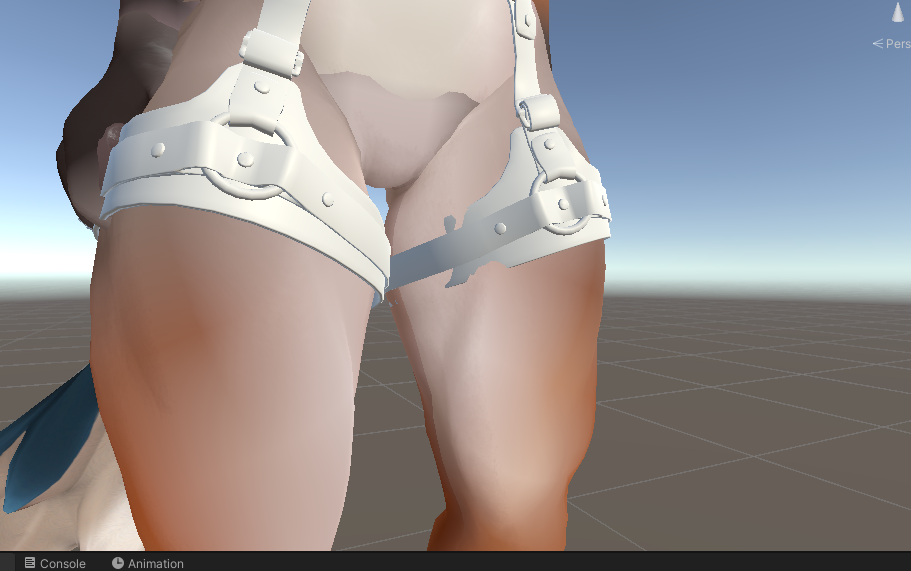
A bit hard to see what is going on without images. The Viwi does have a 'contemptuous' amount of blendshapes to contend with, some of them doing almost the same thing as another. Mismatch was probably inevitable?

(1 edit)

i tested it on a fresh viwi with no changes to the blendshapes and still got clipping and issue with pose changes- i have more images but cant upload more than 1 at a time 

What blendshapes are active in this image?

(1 edit)

only the male chest, everything else is at 0

The avatar is in play mode with the blendshape link and armature link active
(seem smooth abs is also on by default but thats doing nothing)

Matched those blendshapes in blender and I don't have that issue on the thigh.

Now I suspect that there's armature mismatch? Did you first Append the harness in Blender to the Viwi, assign them both to use the same Armature and then export that to Unity?

just to make sure i did it all again

fresh blender file 

my projects FBX

appended the harness mesh into the scene
selected harness then armature

parented with armature deform

exported 

same issue 

Wait. Does it look fine in Blender? The harness clipping occurs once in Unity?

(1 edit)

the clipping only occurs in untiy when in play mode. before play mode it is fine

the issue seems to be with the armature once its linked

It's too bad the issue is in Unity as that's not my forte (I play on Resonite).

Not sure if it helps, but when you export to FBX, did you set Path Mode to "Copy"?