it works fine before the armatures are linked which must mean that there is some extra influence on the armature when they are linked together but alas i cannot find what that may be im going to start removing some bones that are not needed and see if that makes any difference
EDIT - i removed every bone that has no influence on the weights and its till not working correctly.
so basically in unity you have to pair the armature of your clothing to the base avatar armature. There in lies the difference as resonite does that part for you (I assume) but for vr chat you do it yourself either with vrcfury a plugin that does the manual stuff automatically or you can parent it manually by dragging all the bones into the hierarchy. This is where the problem is as there seems to be extra influence where it’s not needed but i cannot find where in the blender file
it actually looks worse when in vr chat. I’d really like to know why this is the case. How have you linked the armature in play mode? Did you manually do it or did you use vrc fury?
genuinely not sure whats going on fresh project - fresh avatar - no blendshapes - your prefab - viwi is v 1.0.1 - unity project is 2022 - play mode with gesture manager to emulate vr chat
i understand that you cant include the avatar with the product but its very easy to create a prefab in unity with the asset setup so its drag and drop for any user. literally just create it on a viwi in unity- prefab the asset with all its parts setup - then right click and export package.... done
yes i have custom stuff for the viwi but it was still not working on the base one with no changes
i have no idea if there are any poses causing this issue but im very frustrated that even with blender and unity knowledge i cant get this to work as intended.
I have no idea I checked them and there was no other groups with weights that shouldn't be but if im totally honest if this is not made for vr chat you should say that - your comment "Could it be that there's confusion with bones/vertex groups in Unity, where the harness wants to 'follow' another bone of similar name?"
that's your job to fix. not the customer
this will come off as aggressive but iv basically spent my money on an asset that is either not finished or miss-sold
im really not happy with this.... iv tried fixing this in many ways and its not working at all so now i have a asset iv paid for that does not work for vrchat
ahhh ok i see no its not goanna change anything with path mode... i manually parented the armature to see if the link was causing any issues and its not so it seems its a unity/vr chat issue... im going to have to either manually fix some weights or do some corrective blendshapes
i tested it on a fresh viwi with no changes to the blendshapes and still got clipping and issue with pose changes- i have more images but cant upload more than 1 at a time
UPDATE - after a lengthy process i have fixed this issue - i had to redo the weigh painting so it would work with unity and VR chat not just resonite
just put this on my blendshape link and armature link are fine... but im having clipping issues they just get worse when im not upright - this is not a problem iv ever had before and iv added lots off assets to my avi


 only the male chest, everything else is at 0
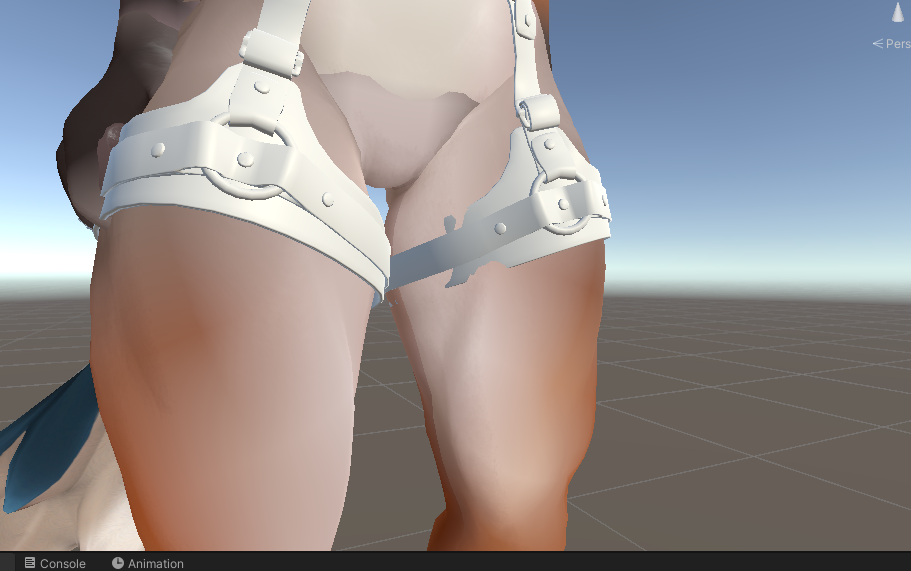 i tested it on a fresh viwi with no changes to the blendshapes and still got clipping and issue with pose changes- i have more images but cant upload more than 1 at a time