

Forgive me if this has been asked before, but how do I change a buttons outline to a color? I found out how to make the inside a color, but not the outline. I've tried everything. If its not a thing, would you mind implementing it? Thanks!
168 days ago (+1)
It's not currently possible... So, widgets can have one .pattern attribute at a time. In the case of basic buttons we have that one color + black (or whatever else you've changed pattern 1 to be).
But there's still some options to get the result you want.
If this happens to be a visual direction you like... it might be good to know that the black lines and the inside color swap locations if you set the button to have inverted visibility:
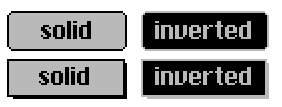
And then there are the "Make a button look like anything" options.
The first one is to have the appearance of a button as an image on the surface of the card and place an invisible button on top of it.
Or, if you want your customized button to have a specific click animation... you could paste images of your ideal button inside of the animButton contraption and use that. (It's the second contraption in the linked post)
If you want to copy an image of a standard button, select it and use [Edit > Copy Image] in the menu. This will copy the appearance of the widget into an image on the clipboard that you can paste anywhere else, to edit it or use it for other purposes.
If one of these options sounds good but it's unclear how to do something, please let me know.