Indie game storeFree gamesFun gamesHorror games
Game developmentAssetsComics
SalesBundles
Jobs
TagsGame Engines

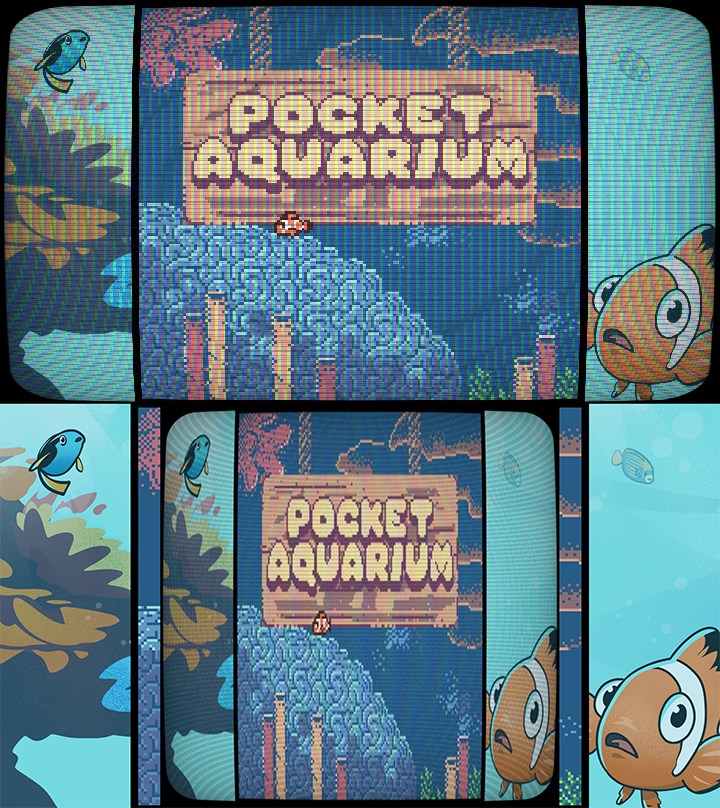
We're new to Godot so this could be  a simple fix but we're trying to apply this CRT filter specifically to the GB window. When applied to the game window directly, the CRT filter replaces the game visuals, so you can't see anything.

When you apply it to the canvas, it catches everything, and when you resize it, it's still catching the whole screen information and just squishing it down. How do we get it to apply just to the game window?

(3 edits)

Looks like the shader you’re using is a “screen reading shader”. Somewhere in the shader code itself, you’ve got something like hint_screen_texture. Remove that, then a new variable will be exposed in the material variables. Make GodotBoy set it’s texture to that variable.

https://docs.godotengine.org/en/stable/tutorials/shaders/screen-reading_shaders.html

If it works how I think, this texture is taking your entire screen as input. You need to be able to set what exactly it’s catching. Should be easy to fix!

Alternitively, if you wanna learn some shader code, might be good chance to make it read only the part of the screen you want it to. But that might be more effort than it’s worth.

What shader are you using? Looks fun, could be good to include in a future release.

https://godotshaders.com/shader/vhs-and-crt-monitor-effect/

I'm using this one! Somebody else mentioned it further in the comments. It's hard to tell from the lower res screenshot I attached but I basically turned off the rolling effect and reworked it to be a little more minimalistic but that filter has a ton of features to customize.

And thank you for the advice!