

Don't worry! Open up your file in a basic text editor (notepad or whatever you've got).
You'll see stuff at the top that looks kinda like this:
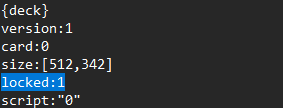
Change that line to say locked: 0 and you should be good.
Don't worry! Open up your file in a basic text editor (notepad or whatever you've got).
You'll see stuff at the top that looks kinda like this:
Change that line to say locked: 0 and you should be good.
thank you for saving my bacon again!
(i'm not sure why but decker doesn't respond to hotkeys in expected ways)
No problem! :D
With the unlock deck shortcut (CTRL + U + L + D) sometimes I forget to hold a letter until the end and that's why it doesn't work on the first try for me.
And if I had to guess about other hotkey difficulties people might have (not assuming in your case, just general advice):
Sometimes people aren't familiar with the "^c" notation in the menus. Where the ^ means "CTRL on Windows and Linux"/"CMD on mac"
Or if someone is using web decker, I believe some of the hotkeys are effectively blocked by web browsers because browsers use those shortcuts too and they take priority.
If you're having trouble/weirdness that don't seem related to any of that stuff then it might be worth making a bug report about it?