Indie game storeFree gamesFun gamesHorror games
Game developmentAssetsComics
SalesBundles
Jobs
TagsGame Engines
(+1)

Hey! Just wanted to share that I instantly became a fan of your assets, went through your website/ unitypage and itch. These are undoubtfully very cool and stylized projects which I admire a lot. 

I am also a 3D assets developer, I'm currently trying to build a 'universal' palette so I can use it in my next projects. Have you ever tried to build something like that? I noticed that your different projects use different textures depending on their mood. But just curious..
(1 edit)

Thanks a lot for the message and for taking the time to go through my stuff on itch and elsewhere, I really appreciate it. About the palette: your timing is perfect, because I’ve just refreshed my texture pipeline with „future-proof universality” in mind. I used to work with very small atlases, a few dozen colours on a tiny texture, and that was fine for a long time, but as the packs grew it started to block me: no UV space left, no room for new materials or variants. Now I treat a 2048 texture as my base atlas, intentionally leave some empty areas for future extensions, and from that base I can comfortably generate 1k/512 versions if someone needs lighter assets. In that free space I can not only keep adding new colour/material samples, but also pack in bits of text - signs, labels, markings - without having to create separate dedicated text textures.

Instead of one palette that should cover everything, I prefer a few palettes that are universal within a given mood. One base for neutral/daylight sets, another for darker / dungeon / swamp stuff, and another for neon where contrast and saturation behave differently. Inside each mood I keep one main texture and slowly fill the empty areas as the pack grows, so new updates still feel like the same world, just richer.

When it comes to colour choices, I try to mix intuition with some classic schemes from the colour wheel. For more futuristic moods I lean into complementary, high-contrast pairs - opposite hues give that punch and energy. For natural daylight landscapes I prefer analogous harmonies: ground, rocks, soil stay in related tones, different forest layers (undergrowth, bushes, canopy) are still neighbouring colours, but pushed apart in value and temperature. Accents - flowers, small props, gameplay elements - often come from the opposite side of the wheel so they pop immediately in the frame. For nature I generally avoid very synthetic hues, so I usually end up with earthy mixes: greens nudged slightly towards browns and yellows, and so on. My personal “colour flow” gravitates towards a pastel-like feel - an almost idyllic, candy softness, but slightly roughed up so it doesn’t become sterile. It’s a lot of gentle, light tones with a hint of juiciness and a bit of “dirt” in the colour, which keeps the scene pleasant but not plastic. All of that comes straight from colour theory, it’s just that after years of practice it feels like intuition in day-to-day work.

While browsing your profile I found Praise the Storm and Pixel Renderer - really cool combo. The game nails that “storm cult” vibe, and the pixelator looks like a great custom idea/tool, congrats if that script is yours. I’ve been dreaming for a while about making a very raw, ascetic game with a heavily limited palette, focused on mood and exploration rather than detail density, so tools like that are extra tempting. I’m really curious how you define your own “universal” palette for projects like these - is it mostly a set of colours, or more of a full bundle of materials and shaders? If you ever share a breakdown, I’d be happy to compare approaches.

Thank you so much for the detailed reply. and for taking time to explore my work. If you are interested, my portfolio has some artwork i did using either flat or gradient textures: https://bukkbeek.github.io/

Similar to you, I used colors/ gradients to match the aesthetics I'm going for. But then I wanted to make a universal palette:

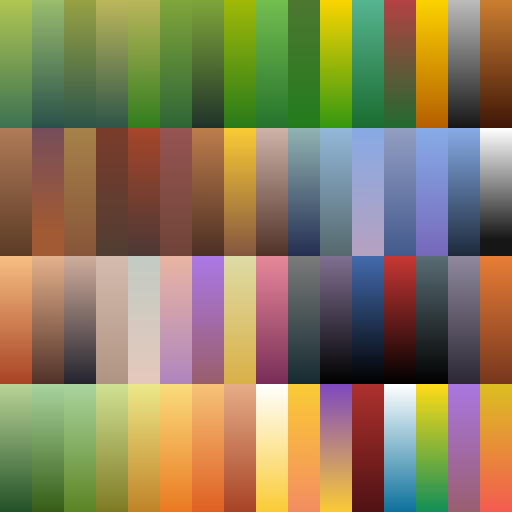
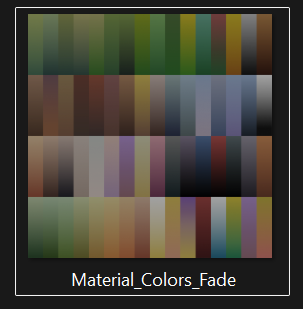
This is one of my gradient palettes: 

But this did not live up to my expectations as I had to tone it depending on the project. For example this following airship used a less saturated one: https://sketchfab.com/3d-models/nomads-barge-wandering-airship-of-elysium-7192f9...


This also has a flat version as well:

In all, I maintain a material library to use from if these are not enough (specially for grounds/ camo), then I bake it:


But I think this final palette still needs a lot of refinement as I ended up using some colors many times and some never used at all. 

On the other hand, I was thinking an approach similar to your idea as well, having a bigger single atlas and build colors as I go. 

That's how I approached making my portfolio game: REBEL.101 by Bukkbeek using following texture:

Hi!

So, coming back to the idea of a universal palette: in my packs I’m leaning more and more toward a single shared 2048 texture atlas, roughly divided into four working zones. One of them is a grid color used for picking materials: a full spectrum of base colors plus their shades, which I treat as the foundation. The remaining space I intentionally leave empty so I can keep adding new colors over time as different projects need them.

That free space is also a workspace for artists using my packs. They can paint in their own colors there or drop in textures for signs, billboards or labels. Obviously, if someone edits the original atlas that ships with the pack, there’s always a risk that a future update will overwrite it. In practice though, I assume studios hook up their own extra textures and keep things clean in their pipeline, instead of modifying the “factory” file. For me, mixing grid colors and utility textures like signage on a single atlas is completely fine.

About your point on having to tone colors down depending on the project: my solution is to prepare variants of the same texture. From one base set of colors and shades I create a brighter and a darker copy, because users asked for those options. They then build their own materials on top of that - for example, they plug in the “brighter” atlas and get new variants of their prefabs without touching the original.

The fact that there are colors on the atlas that you’re not using right now isn’t really an issue in my view. As the project evolves, you can gradually replace them with new hues, or just keep them in reserve until they’re needed. With a 2048 atlas where a single cell in my grid color is about 62 pixels, it’s very hard to actually run out of space - you can always add, shift or replace something.

That’s why I think your final decision on REBEL 101, to move toward a bigger atlas, is a solid one. A texture of that size not only makes your own work more comfortable, it also leaves plenty of room for future users who might want to add their own content. That’s exactly why I build large atlases myself, designed from the start with future expansion in mind.