
Indie game storeFree gamesFun gamesHorror games
Game developmentAssetsComics
SalesBundles
Jobs
TagsGame Engines

RPG Maker Cook Tool Deluxe

The one stop shop for deploying RPG Maker MV/MZ games · By AceOfAces

Is R6 incompatible with Windows 10? Build failure and executable not runnable

A topic by inushisyo created 10 days ago Views: 56 Replies: 7
Viewing posts 1 to 2

I would like to report a possible compatibility issue with RPG Maker Cook Tool DX R6.

Version: R6.03 OS: Windows 10 22H2

On Windows 10, DX Cook fails with an error and it is not possible to build the project at all. Additionally, the error log does not properly record the failure, making debugging difficult.

Furthermore, executables built on Windows 11 cannot be launched on Windows 10. The game fails to start even though the build itself completes successfully on Windows 11.

I have tested a wide range of NW.js versions, but none of them work on Windows 10. On Windows 11, both building and launching the game work without any issues, so this appears to be a Windows 10–specific bug.

As a workaround, I am considering downgrading to an R5 version, but I could not find any older releases available. Is there a way to obtain an R5 build, or is there an official workaround for Windows 10?
Hello, inushisyo!

Can you check the Event Viewer for any errors on Windows 10? You can see them by opening Event Viewer and then going to Windows Logs -> Application.

Thank you for your reply!

I checked the error logs in the Windows 10 Event Viewer, but no errors were found.
Since no logs are being generated, I don’t know the exact details of the error, but selecting “Package game files” consistently causes an error on Windows 10.

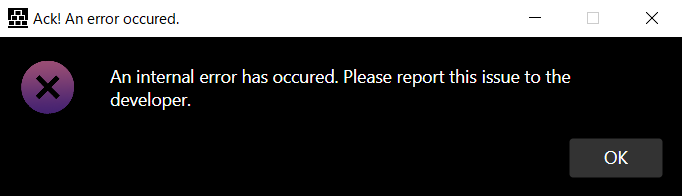
Image that appeared during the build on Windows 10


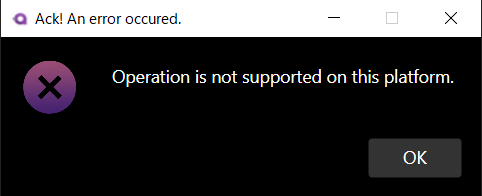
Image that appeared when trying to open game files built on Windows 11 using Windows 10
[NW.js v0.48.4]


(1 edit)

It's rather weird that this error happens when "Package game files" is turned on. I want      to take a closer look at whatever logs are available (accessible via Utilities -> Export logs). Maybe I  can find the error.

As for the second error. I'm not sure why this happens, but   I have a suspicion as to what's causing it. I'll look into it and send you a test build.

A bit of a follow up: I rolled up a potential fix for the bootstrap in the latest update. Hopefully this will fix the "Operation not supported" error.

Thanks for your response!

However, I tried various things, but nothing changed at all compared to before.
The issue where a build made on Windows 11 doesn’t run on Windows 10 is still the same. I’m building with NW.js 0.48.4.

I thought it might be dependent on my environment, so I made some fixes on my side as well, but I wasn’t able to resolve it.

As before, it seems that checking “Package game files” causes the problem.
If it’s unchecked, the build completes successfully.

The error point when building on Windows 10 is shown in the image, as you can see.


After a bit of digging, it turns out that one of the features I  rely on isn't present on Windows 10. I'm working on a compatibility fix right now and I'll upload it soon.

Thank you very much for your continued prompt support.
All of the errors have been resolved, and the issue has now been fixed.
Thank you again for your help!

