


Hello, Redux_Soul!
Just to double check:
1. Is the bootstrap app still running? Check with the Task Manager.
2. Check if the Temp folder is present.
Hello, YoBro!
Digging a bit on the plugins that I could get my hands on, DotMovementSystem is one of (or the only) culprit, as it tries to pull its name dynamically (Source Code Protection has to patch MZ so it can load the bainry files that nwjs can read). It's fixable by changing the line 298:
const DotMoveSystemPluginName = document.currentScript ? decodeURIComponent(document.currentScript.src.match(/^.*\/(.+)\.js$/)[1]) : "DotMoveSystem";
To this:
const DotMoveSystemPluginName = "DotMoveSystem";
Might send a message to the dev of DotMovementSystem to let them know about it.
If you see similar issues with what you saw in that plugin, check if there any plugins that use document.currentScript (or similar) and simply change the line to hardcode the name.
As for Uncaught SyntaxError: Unexpected token '<': I can't say for certain what causes that on MZ. It doesn't crash MZ games (I tested with both barebones and more plugin heavy projects) and there's no crash or stuck in a loop. Most likely, there's a slight error in patching the html file so it can load the binary version of main.js. Other than that, it's a fluke of an error.
EDIT: If you mean the Source Code Protection on your edit: Yes. It's still an option. Since R6, it's enabled by default when the option to encrypt the assets is turned on. So, you'd need to disable that option first.
Hello, Crimzon_Zero!
In regards to plugins not working after building: the most likely culprit is that some plugins are trying to find their config by checking their name (rather than using a hardcoded one). If they use something like document.src, then they try to get their name dynamically.
At the moment, I can't replicate this. But I have a theory that (assuming that you are on R5) there may be some path handling errors. An update to R6 brought a rework on how relative paths are constructed (so the encryption can work properly, regardless of OS). It is a possibility that the affected files end up on the wrong path (judging from the file not found error in the dev console).
Cook Tool Deluxe doesn't provide encryption for save files, so you'll need to roll up your own (or an existing) plugin for that. But there is a strict cache check option that prevents tampering with the game's files, so you can prevent cheating via that way.
I am considering rolling up encryption for saves and database, if there's enough requests about it.
Hello, Mikochi.
You can bring over the save file from the older game to the new one when using either of them. But you will need to use a plugin that sets a new save location (like my own plugin, which is included in RPG Maker Cook Tool Deluxe). After that, you can use whichever way to transfer it over.
The only way to check is if any plugin tries to pull the name dynamically (via document.src). It's pretty easy to check with a code editor like Visual Studio Code. The fix there is simply to change the line to PluginManager.parameters('<name of plugin here>'); I am working on improving the test build option so it's a lot easier to use.
If you need the previous version, I'll send it via email as soon as possible. If you use the itchio app, you can also change over to the older release by clicking the cog (when viewing the page for the tool or, in the Library menu, right click on the tool and click on Manage) -> Manage -> Change to another version -> select any of the 5.x.y versions.
I wrote the wrong chromium command line argument. It's --disable-devtools.
In any case, you can disable "Encrypt assets" (and, if the game is still stuck on the loading screen, disable "Source code protection"). This will revert it back to the R5.xx behaviour.
If this still happens, I'll send you a link via email.
Hello, Daisuke Tanaka!
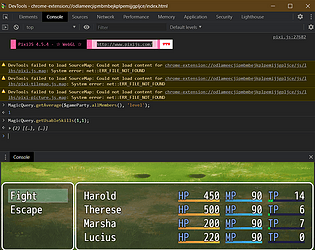
Usually, there's an issue with a plugin that doesn't work properly. The "Encrypt assets" option also turns on the option compile the game's source code, which can break some plugin (usually it's because they try to dynamically find their name via document.src). You can check for errors by enabling the option "Create a test build" on the Project Settings -> Essentials tab. Once it's created, run the game and press F12 to open the dev tools. If they don't open, remove the --disable-dev-tools command line argument on the package.json file.
Right, so looking at the code for the apng plugin, I see that there's a slight compatibility issue with it. It's a tad complicated but to keep it simple: Cook Tool's patch for decrypting relies on a function in browsers that (in a way) aren't exactly compatible with MV's and MZ's setup (the decryption is async only, so I needed to get it to work with code that is synchronous). Most plugins work out of the box, as the patch ensures that everything that uses the standard loading mechanism should work. But the plugin in question does its own thing to load these. And because the decryption is async, the plugin loses the context and just fails to load. The fix for it is to change the line that uses Utils.decryptArrayBuffer to something like this:
static decryptResource(key) {
const resource = this._resource[key];
Utils.decryptArrayBuffer(resource.data, (decrypted) => {
resource.data = decrypted;
const newKey = ApngLoader.convertDecryptExt(key);
resource.name = newKey;
resource.url = newKey;
resource.extension = 'png';
this._resource[newKey] = resource;
delete this._resource[key];
});
};
This change adds a callback, so when the method above finishes, it will load it properly. I haven't tested this, but it should give a clue as to how to fix it. If you aren't able to, I'll work on a fixed version of the plugin.
Hello, reo!
The most likely issue here is the asset compression. When it's turned on (assuming that the "Encrypt assets" option is turned on), it compresses them into WebP (by default). And the converter that handles this doesn't handle apng files. Turning the asset compression off should address this.
This took longer than anticipated, as the exception code gave me two to three potential issues. Just to narrow it down, check if there are corrupt files in the OS. You can do this by following this guide: Use the System File Checker tool to repair missing or corrupted system files - Microsoft Support
I can also send you an experimental version of the tool, to rule out any build issues on my side.
Hello, crniorao05!
Looking at the .NET docs, .NET 9 (the version used for building the app) should support it. Double check that every file from the zip file were extracted. If they were and the app still doesn't open, please do the following:
This is a compatibility issue with a feature of the tool, called JavaScript Source Code Protection. This converts the JS files to files that nwjs understands, thus protecting the source code. Since the tool has to patch the engine to load these files, plugins that try to pull their name dynamically don't work. That feature is a dependency for Deep Level Encryption as well, so it can guard the password.
If you don't want either of these, you can disable both of them in the settings (under Asset Preparation). If you do, I cover this here: https://dragonhousehelpcenter.azurewebsites.net/manuals/rmcooktooldx/devguide. On the WindowEx plugin, I see that it tries to pull its name dynamically, so changing the line $_$.params = getPluginParameters(); to $_$.params = PluginManager.parameters('CTB_WindowExMZ') . As for yours, I can't say for certain. But you can create a test build (the option is found on Project Settings, under the essentials tab). First, remove the --disable-devtools from the package.json file temporarily. Then create the test build. Once that's done, press F12 to open the dev console.
EDIT: Wrote the wrong line fix here. And re-wrote the dev tools instructions.