
Indie game storeFree gamesFun gamesHorror games
Game developmentAssetsComics
SalesBundles
Jobs
TagsGame Engines

Thanks Stoffel1! You're very kind. I hope forum users like it and find it as useful as I do. I've just started with this, so everything is a bit upside down.

I've just uploaded version 1.1 of the plugin with the features you asked for so you can test it. If everything works well, I'll start compiling a version for Mac as soon as possible.

NEW IN VERSION 1.1.0

--------------------

- Internal Clock: Scroll subtitles without DAW transport

  - Play/Pause/Reset controls

  - Adjustable speed (0.5x to 2.0x)

- MIDI CC Window Toggle: Show/hide subtitle window via MIDI controller

  - Configurable CC number (0-127)

  - Works with sustain pedal, buttons, or any CC source
Wow!!!
That was fast!
I will test v1.1 tomorrow and will report soon.

Startet a first test of v1.1.0 after uninstall of v1.0.0:
- no changes to v1.0.0 visible
- the info window says v1.0.0
- demo timeout right from the start

Sorry, it seems I messed up with the compiler and uploading the files! 

I've just uploaded the updated demo and full version again, please check it when you can.

Thanks for your help!

(2 edits)

Report to v1.1.0.
Tested in FL Studio and Gig Performer I'm testing within purchased apps, but both developers have a free version. Midi works fine and the loaded file is stored within both programs.

Bugs:
- sometimes demo timeout right from the start if with external clock
- never demo timeout with internal clock
- no response to midi controller if the main window is in the background

Wishes:
- 3 min. are not much time to test everything that is possible with the app...
- The main window is a bit too big for my Flat TV Screen (1360 x 768). Maybe you could implement a switchable size?
- Tip from the GP Forum: Import of plain txt files (would be great).
   Maybe switching from row to row with a timecode at the beginning (mm.ss)

Btw: Thank you for your great work!

Hi Stoffel1,

Thanks for the detailed report and for testing Subtitle Viewer VST, really appreciate it!
Glad to hear MIDI is working smoothly and the loaded file persists in both hosts.

I've already fixed the issues you mentioned:

  • Demo timeout with external clock โ†’ fixed, but I only tested in Renoise
  • No MIDI controller response when the main window is in the background โ†’ fixed but not tested, as I don't have a controler to test this. Please, let me know if it works now.
  • Demo limit increased โ†’ bumped from 3 minutes to 9 minutes so you have plenty of time to test everything thoroughly

Regarding your wishes:

  • Window too big for 1360ร—768 screen โ†’ removed the decorations below, now the window is a bit smaller
  • Plain .txt file import โ†’ great suggestion, and easy to implement. I tested it and it should be working [mm.ss]

Thanks again for the super helpful feedback and the kind words — it really helps push the plugin forward!

Have just tested the last v1.1.0 (FL Studio, Gig Performer):

Running Fine:

- very stable

- multiple instances load, store (within DAW file) and show their own subtitles

- multiple instances have their own clocks

Bugs:

- As VST3 plugin SubtitleViewer should also be fully active in host if the main windows is closed

- No reaction in host if the parameter for start button is routed to a midi in within host

The most used routing within host is:

1. select a midi in

2. select midi channel for the plugin

3. route a midi controller to a midi automation parameter of the plugin.

The automation behaviour should be like e.g. in TAL-Filter-2, a filter freeware.

Have also tried this with ReNoise, but sadly it does not offer these things normally used in DAWs (or I have not found it), so I was not able to test this.

Wishes:

- no slider for midi controller, but a midi automation parameter

- button Window toggle is not needed if automatable

- show rows without text, so the musician knows he has nothing to sing now

- buttons Start and Reset midi automatable

(1 edit)

Thank you Stoffel1 for testing the plugin so thoroughly. I'm going to start working on fixing the bugs and then implementing the features you mentioned. I just added a text editor, to quickly edit subtitles and make corrections without leaving the DAW, this will be very useful for voice talents dealing with bad written scripts. 

The truth is that I started this plugin project for personal use, but I realised it could be useful to others. Now, it's growing, thanks in large part to your help.

I'll keep you posted.

Hey Stoffel1!

Just uploaded version 1.3 of Subtitle Viewer VST. Please, check it out when possible, specially the features you suggested.

Thanks in advance!

Have just tested the last v1.3.0 (Gig Performer):

Running Fine:

- very stable

- multiple instances load, store (within DAW file) and show their own subtitles

- multiple instances have their own clocks

- fully active in host if the main windows is closed

- midi input can be selected within host

- main windows is more clean

- buttons Start and Reset are midi automatable

Bugs:

- still don't show rows without text, so the musician knows he has nothing to sing now

Wishes:

- a "Set Timecodes" mode with midi automatable button that shows the first line of a loaded file, generates a timecode if pressed and then switches to the next line of the file (TXT or LRC).

- ability to store the edited TXT or LRC file.

I would like to express my sincere thanks for the work and hope that the app, due to its unique features, will become a valuable tool for musicians.

Since I perform on stage a lot, it's important for me to have an easy-to-use and stable program.

I think that most of what one could want from a text display is now included in your program.

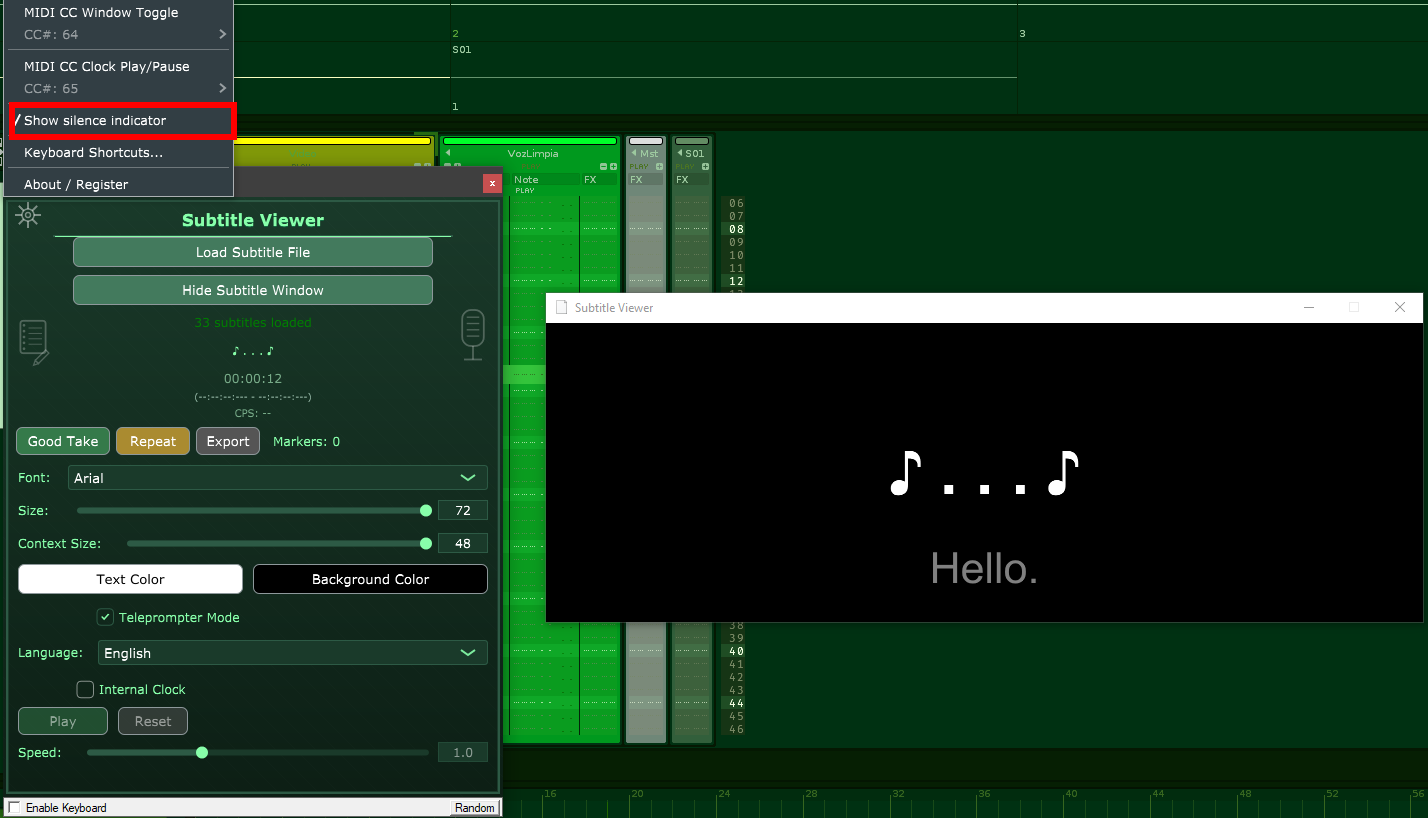
Thanks for the quick answer and helping me to polish this plugin. Please, select the "Show silence indicator" option. You should see something like this:


 I tested it in Renoise and it works, but let me know if it works in your DAW. And I'll review the wishes and implement them ASAP. 

Thanks again!

Wow, you've been very busy!

A lot of new and useful implemented things!!

Running Fine:

- new window "About"

- new window "Settings"

- menu "Keyboard settings"

- store the edited file

Bugs:

- still does not show empty lines without any text within loaded file

- window Edit Subtitle shows a different window when just opened, instead of the window when Next was pressed

- window Edit Subtitle does not show empty lines without any text within loaded file (means: show nothing)

- buttons Save deletes empty lines without any text within the loaded file

Wishes:

- maybe it would be better if the timecode is stored as before: 00.00.000 (sorry for that...)

- ability to set and edit (overwrite) timecodes within window Edit Subtitle (maybe a new button "Set TC" or so) with the following behaviour:

1. when window Edit Subtitle is opened and the button is pressed the first time, the internal clock starts (without switching the text!) and the loaded file gets written the timecode 00.00.000 before the text of the first line.

2. when the button is pressed again, the actual timecode is written to the next line of the textfile and this line is shown within window Edit Subtitle.

3. ...and so on, until 4.

4. if the last line within the file is reached, the button will write the timecode to a new generated empty line behind the last text line and the internal clock stops and resets.

Many, many thanks and sorry for my lousy english!