

Try this:
- go to MacOS Build\Recoil Reach\Recoil Reach.app\Contents\Resources\data_Vertical Weapon Platformer_macos_x86_64
- open Vertical Weapon Platformer.runtimeconfig.json
- under
"configProperties"add"System.Globalization.Invariant": true.
Thanks! I tried that but for some reason it still isn't working for me - maybe it's an issue on my end?
TBH a lot of times during these game jams sometimes the game builds for MacOS don't work on my computer, not sure why that's happening exactly. Sometimes they do but sometimes they don't :(
I believe if it is like linux it may need to be given executable permissions try this guide. https://blog.verslu.is/maui/application-cant-be-opened-macos/
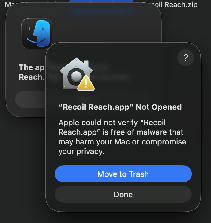
Also on Mac here. Tried the fix and it got a little further, this time getting to the warning. I bypassed it in security and opened anyways but still ended up at the same "can't be opened" message.
I believe if it is like linux it may need to be given executable permissions try this guide. https://blog.verslu.is/maui/application-cant-be-opened-macos/