

idea, but no idea, about the save screen.
Thanks for upgrading this so towns belonging to the same game are now grouped!
What i found tho is that you can "Branch" in savegames.
Here is how i did this, saving manually each step:
1. Started out in "Gladdon"
2. Moved to brand new town "Gladlow"
3. Moved to another brand new town "Gladdene"
4. Loaded up the earlier save "2. Gladlow"
5. Moved and Branched to "Wellsstead"
This resulted in the save screen looking like in the attached pic.
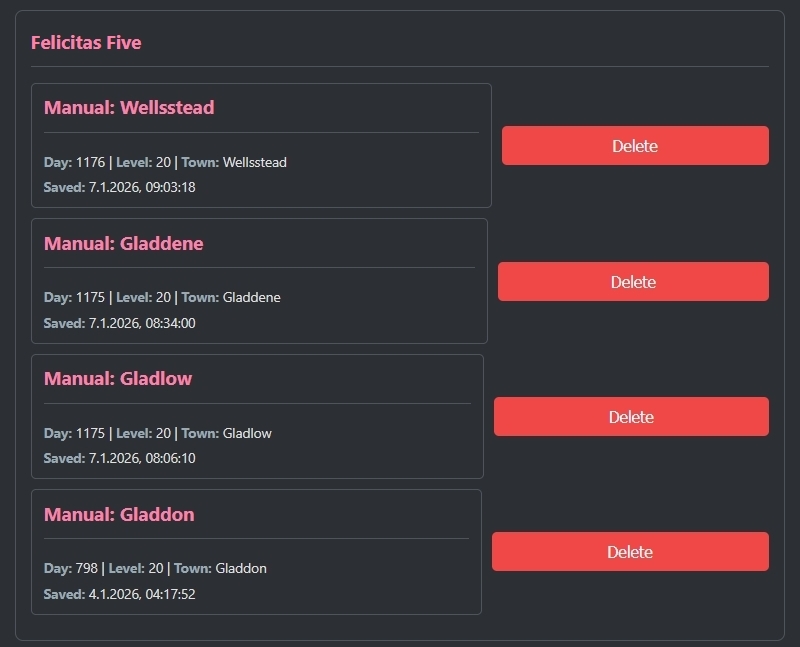
I know that Gladdene and Wellsstead are NOT connected even though they are both connected to the older towns. This "Branch", is not represented visually or typed out in any way.
Hardly have any idea how to display this, all i could think of was adding the connected towns in the save card like:
"Day: 1176 | Level: 20 | Town: Wellsstead (connected towns: Gladlow, Gladdon)"
Aware this might be somewhat messy when you add alot of towns. Maybe you can think of something better.
It is also not super important but maybe you can make somethign out of it.
regards,
Fun fact: By that time i had the third town starting with "Glad" i thought it was a game glitch that every new town in a game starts with the same prefix, but it turned out to be just my odd luck.
Was Glad to see the prefix "Well" instead of "Glad", now all was Well.