
Indie game storeFree gamesFun gamesHorror games
Game developmentAssetsComics
SalesBundles
Jobs
TagsGame Engines
(+1)

Thanks a bunch for the write-up!

Have you tried using the normal/non-SDK version on deployed games? As far as I can tell, that’s usually the one RPG Maker deploys games with. Maybe the folder structure changed too much between versions of NW.js to update it directly in the install directory though.
(+1)

You’re welcome!

No, I hadn’t tried that yet! I’d been totally focused trying to get the ‘unsigned’ zip to function, so I hadn’t thought about if fixing an already deployed version manually was even possible!

I gave it a go with the SDK version first and it ran without any trouble. The Normal NW.js also works but asks permission for network access as well as Keychain/Passwords. I denied both and it still functioned fine with my own test game. It might be relevant though for games that need internet access.

In summary, updating the NW.js of a deployed MV Mac version is doable without any other apps/programs! The method is the same as updating the Mac playtest mentioned above and can be done with either the SDK or Normal versions.

I tried it on my Windows desktop PC and this method can also be used by Windows users (and most likely Linux users also) to update a deployed Mac version of their game while on their preferred OS.

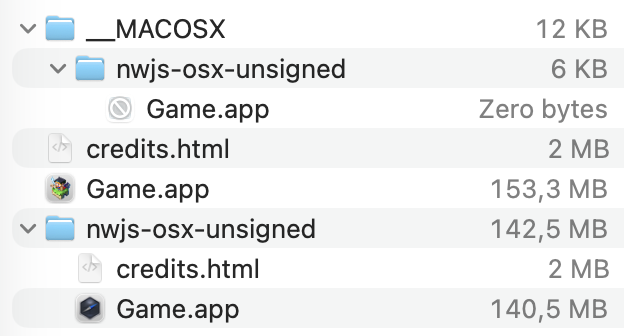
Your suggestion that the folder structure has changed is probably correct, though I think I should clarify my results from trying to update the 'unsigned' zip  as I’ve probably explained it poorly. Unzipping it, placing the NW.js files in what should be the correct places, removing the ‘Versions’ folder and re-zipping everything back together, always results in three very odd deployments as you can see below.


The first Game.app is an empty shell at 0 bytes.

The second .app is the MV game exported with only the resource files and nothing else. 

The third .app is an unconfigured version of NW.js that runs but does nothing else.

The file sizes of the .apps fluctuate by several hundred megabytes depending on what I try. You can make the second and third .apps function normally by adding the missing files of one to the other, but it’s about the same amount of steps as exporting an out of date one and fixing it. 

I still couldn't find a solution to updating the unsigned zip for ease of automation, but I suppose the nice thing with being able to update the deployed version instead is that at least you'll always have the latest NW.js installed.

Thanks for the suggestion!