Thanks a lot for this tutorial!
I’m a Mac user of MV and following your instructions for Windows and with a little bit of trial and error, I managed to recently get a functional playtest in Mac OS Tahao 26.
You can achieve a functional Mac playtest by doing the following:
Step 1: Download and prepare to copy NM.js SDK files
- Go to: https://nwjs.io/downloads/ and download the Mac ARM64 SDK. (Or 64-bit SDK if you wish to maximise compatibility with older Mac OS versions. At the time of writing this, the current version is 0.106.1)
- Unzip the file and open the resulting folder. Right-click ‘nwjs.app’ and choose ‘Show Package Contents’. Then go into the ‘Contents’ folder.
- Leave this window open to prepare for later steps.
Step 2: Preparing RPG Maker MV
- In Steam, right-click RPG Maker MV and select ‘Manage’ then choose “Browse Local Files”. (You can also browse to it through: Your User folder > Library > Application Support > Steam > steamapps > common > RPG Maker MV)
- A Finder window will open. Right-click ‘RPGMaker MV.app’ and choose ‘Show Package Contents’
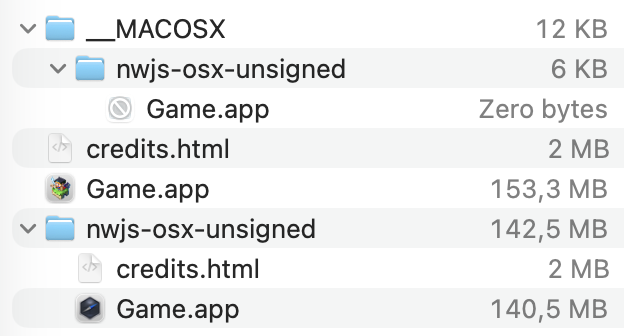
- Navigate to Contents > MacOS. You should now see three ‘nwjs’ folders with ‘lnx’, ‘osx’ and ‘win’ as well as a .zip file called ‘nwjs-osx-unsigned’.
- Open the ‘nwjs-osx-test’ folder and (you guessed it) right-click on ‘Game.app’ > ‘Show Package Contents’. Finally open the contents folder.
- You’re now set up to drag and drop files!
Step 3: Updating the NW.js of the playtest
Unlike the Windows and Linux solutions, there is a bit more to drag and drop to the correct place. I’d recommend making a copy of the nwjs-osx-test folder just in case!
Now from the SDK ‘nwjs.app’ Contents folder, do the following.
From | Copy | To | Paste/Overwrite Location in Game.app |
njws.app > Contents | ‘Frameworks’ folder | -> | Contents |
njws.app > Contents > MacOS | ‘nwjs’ | -> | Contents > MacOS |
njws.app > Contents | All files within ‘Resources’ | -> | Contents > Resources |
Finally: Delete ‘Versions’ folder [FROM] Contents > Versions [IN GAME.APP]
Your end result should look something like this:

Now you’re done! (: Run a playtest in RPG Maker MV to see if it works!
----------------------------------------
There's probably a more optimised solution out there waiting to be discovered, but this is just what seemed to work for me.
I want to mention that in my first playtest I encountered an ‘Error Loading Extension’ but it was quickly solved thanks to the above tutorial.
Lastly, while the above solution I’ve given solves the issue of playtesting on more recent versions of Mac OS, it doesn’t fix problems with deployment/exporting. The ‘nwjs-osx-unsigned’ folder that Windows, Linux and Mac all have in ther RPG Maker MV folder are what MV seems to use to make the Mac version of a user’s game. I tried manually updating the zip with different parts from the SDK but I could never achieve a half-usable result like what happens with the out of date version that’s there already.
The work around I found was to use m5kro’s ‘RPG Maker Launcher’ which patches your app for you with an up to date version of nwjs. It also works for turning Windows exports into running Mac apps which is a great bonus if your Mac export still doesn’t work! The app/program is available at the following link: https://forums.rpgmakerweb.com/index.php?threads/rpg-maker-launcher-for-macos-osx-3-3-2.174332/
Hope this is half helpful and thanks again for the tutorial! (: