
Indie game storeFree gamesFun gamesHorror games
Game developmentAssetsComics
SalesBundles
Jobs
TagsGame Engines

The dream of dedicated Decker hardware - The Deck Kiosk

A topic by Millie Squilly created 81 days ago Views: 440 Replies: 12
Viewing posts 1 to 7
(+8)

I've been working on something of a project of building a dedicated box for running Decker things. Basically, it's a raspberry pi with the UI of the default OS stripped down a bit and a bunch of Decker stuff on it, paired with a display I got off aliexpress and a retro looking keyboard and mouse. My plan is to build an enclosure for it that resembles a classic Apple Mac, and hopefully I'll have something of that to show off soon.

But in any case here's a video of it in operation running Gray Lo-Fi's In Dreams Of Strife: 

I also have long-term plans to write a Decker-based menu interface instead of using desktop shortcuts - there's a few danger zone features that'll make that possible.

I've been blogging about it a bit but realised I hadn't mentioned anything here yet so now I have haha.
(+4)

So excited to see this come together!

How did you get the decks to have custom icons in the file manager?

(3 edits) (+4)

They're .desktop files! Essentially like shortcuts in Windows. So I can set the name and icon to be whatever I want them to be, as well as passing in extra parameters to Decker when I open it (so I can have them always open fullscreen). The actual .deck files live elsewhere.


So for example for the links to my zine I might have a file named issue1.desktop that contains this

[Desktop Entry]
Name=zine of millie, issue 1
Exec=decker --fullscreen "/home/milliesquilly/kioskfiles/zine/s1/zine of millie issue 1.deck"
Comment=
Terminal=false
Icon=/home/milliesquilly/kioskfiles/icons/zine.png
Type=Application
Name[en_AU]=zine of millie, issue 1
(+4)

You are an absolute legend!

(+3)

Haha thank you but nooooooo I'm just some girl messing around with a raspberry pi lol

wonder if it could work on an eink reader. Probably too slow and too limited especially for animations and sound though.

(+3)

Yeah I have not messed around much with eink displays but my understanding is they are pretty slow to refresh. Tbh the inciting moment was realising that I could get small LCDs with a 1024x768 display which fits a 2x scaled default Decker resolution very nicely

ohh that’s interesting! I also don’t know a lot about eink, there are like phones and tablets that use eink displays now but that’s pretty niche and run android so idk if an average kindle for example could work.

Yeah I don't think they have a good enough refresh rate to have a mouse cursor which might be an issue

(+2)

It's real! 

I'll do a blog post in more detail at some point
(+2)

here is the blog post in question https://milliesquilly.com/deck-kiosk-mostly-done-at-least-hardware-wise/

(1 edit) (+2)

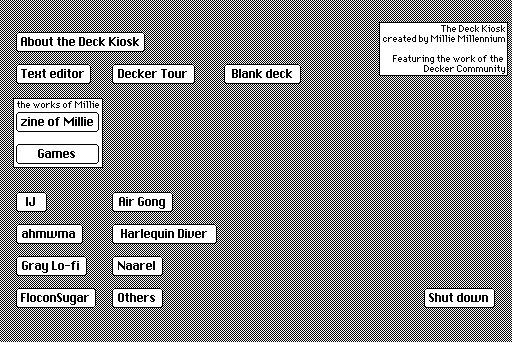
I've been working on a launcher for this written in Decker. Thanks to some of the newer danger zone decker features I've managed to get something working. It looks something like this, the buttons lead you into a directory listing all the decks in a certain folder where you can launch them from.

I've whacked it up on github if you'd like to poke around. As a note, this is pretty specific to my setup and will require a custom danger build of native decker to work, so getting it going for your own purposes may take some effort but hopefully it can inspire some other works. https://github.com/micpp42/deck-kiosk-launcher/

There's a few things I can probably still do with it, like listing the names of decks a bit friendlier or patching in a nicer quit function (for now I've just got my desktop environment set up to auto-relaunch decker after you alt-f4 it) or some solution to hardcoding in the folder names to make it easier to add stuff but for an initial version I'm pretty happy with this.

Edit: there's a quick video of it in action on social media: https://bsky.app/profile/milliesquilly.com/post/3maxln5s5nk2i