
On Sale: GamesAssetsToolsTabletopComics
Indie game storeFree gamesFun gamesHorror games
Game developmentAssetsComics
SalesBundles
Jobs
TagsGame Engines
(1 edit)

There is a problem when I start the game, instead of the menu, there is a black screen, and it disappears when I move my mouse to a certain area between the white and black , but the image appears for a fraction of a second. I can interact with the menu, and there is sound, but there is no constant image.

Can you tell me what the cause of this problem might be?
(+1)

Hello! This is the first time I've encountered this problem, but I promise I can help you. Am I correct in understanding that you are playing on a PC? If so, the problem seems to be related to using old drivers. This is just one possibility. I can suggest updating your drivers, but if that doesn't help or you already have the latest version, try downloading the game from another source (Mega, Google Drive, Itch). Also, can you tell me if you've played our game before? Did previous versions of SlutCraft run normally?

Good evening.
I've been playing for quite a long time in the browser, and recently I stumbled upon a PC game file and decided to download it, but I encountered the same issue with 4 different sources. I updated my drivers and searched for ways to fix the problem with exe files, but the result remained unchanged.

While we are looking into your case, I would like to ask you for a favor: could you try downloading an earlier version of the game (for example, 0.48 or 0.47) and check whether it works on your computer?

uhhhh. 
I downloaded 0.47 and 0.48 give identical result that mega that google drive result didn't change still black screen.

Hello again! Thank you for checking the older versions.

Since the result is the same, this confirms that the issue is not with the game files, but rather a conflict between the game engine and your graphic card.

Please try the following steps:

  1. Launch the game.
  2. Once you are on the black screen (or hear the sound), press Shift + G on your keyboard.
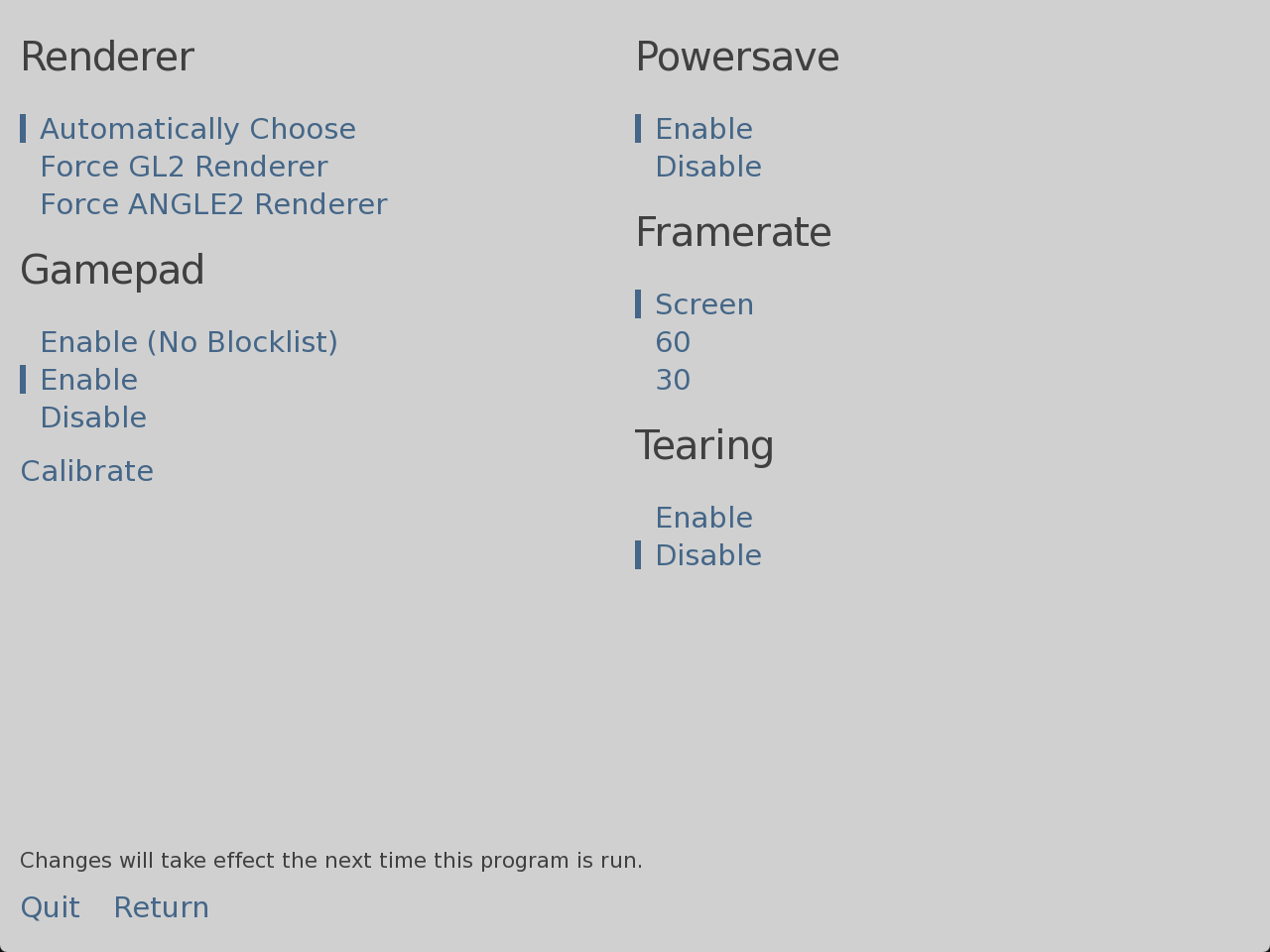
  3. A "Graphics Acceleration" menu should appear.
  4. Under Renderer, try selecting OpenGL (or GL2). Then click "Return" or restart the game.
  5. If that doesn't work, open the menu again (Shift + G) and select Software.

Let me know if this solves it!

Good afternoon.
The keyboard shortcut (Shift + G) switched to the <graphics acceleration> mode.
I briefly saw the menu, but I couldn't make out its functionality or the location of OpenGL.
If possible, could you provide a screenshot of the <graphics acceleration> menu so that I can intuitively access OpenGL?
Thank you for your assistance in resolving this issue