

uhhhh.
I downloaded 0.47 and 0.48 give identical result that mega that google drive result didn't change still black screen.
Hello again! Thank you for checking the older versions.
Since the result is the same, this confirms that the issue is not with the game files, but rather a conflict between the game engine and your graphic card.
Please try the following steps:
- Launch the game.
- Once you are on the black screen (or hear the sound), press Shift + G on your keyboard.
- A "Graphics Acceleration" menu should appear.
- Under Renderer, try selecting OpenGL (or GL2). Then click "Return" or restart the game.
- If that doesn't work, open the menu again (Shift + G) and select Software.
Let me know if this solves it!
Good afternoon.
The keyboard shortcut (Shift + G) switched to the <graphics acceleration> mode.
I briefly saw the menu, but I couldn't make out its functionality or the location of OpenGL.
If possible, could you provide a screenshot of the <graphics acceleration> menu so that I can intuitively access OpenGL?
Thank you for your assistance in resolving this issue
Good afternoon! It took some time to resolve this issue. If you see the window for 0.5 seconds, it means that it closes automatically. I suggest two solutions:
Press Shift+G not when you enter the menu, but when you have finished loading the game after the “slutcraft ver. 0.49.1” splash banner. Then you “should” see a screen with hotkeys, and immediately after loading, press Shift+G.
There is also another option if the first one doesn't work. Close the game, hold down the Shift key, and double-click the shortcut to open the game. Hold down Shift while the game is launching, and immediately after the loading is complete, you will see the same engine settings screen.
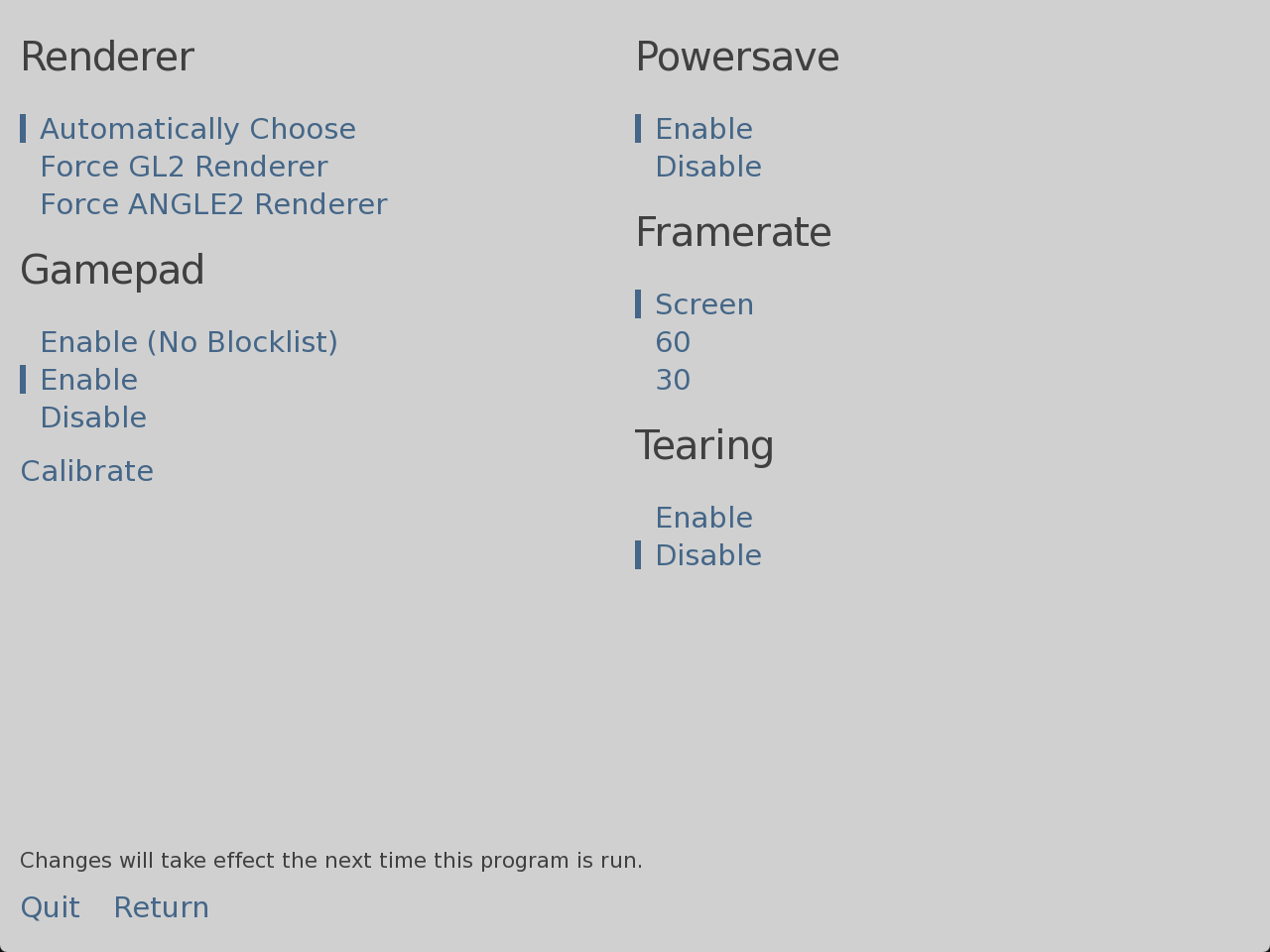
Happy New Year 2026!
Best wishes!)
There were changes but with a restart it's still the same black screen and no further changes.
There was a moment when when aiming at an active element such as the panels in the menu the screen would light up and immediately go out but after a restart it stopped working.
I tried all of the above but unfortunately the result is still the same.
232 days ago(+1)
A miracle happened. I opened the game through the folder by right-clicking on the shortcut and holding Shift, launched it, and the picture is there, everything works! Thank you so much for helping me solve the problem!! Thank you again!