I think you have a nice concept here, but it needs work on explaining/showing things to the player better. The line colors are much improved from the last time I played and far more visible. I like the addition of the tutorial, even if it could use some improvements.
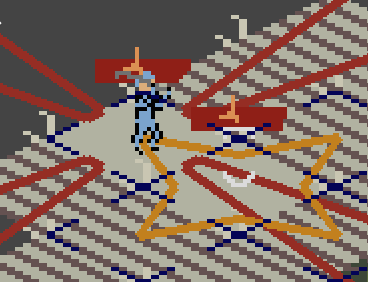
The UI and tutorial need some work. Having played this in a previous jam, I had an idea of what to do going in, but still found the tutorial confusing. I think the biggest issue is that the tutorial tells you to use Brace, and then says to beat the enemy, but does not clearly walk you through dealing damage. From what I could tell, the only way to deal damage in that first tutorial is to rely on reactions, but Brace removes your reaction. I think it would be better if the tutorial had a character with a different ability and/or walked you through using a reaction attack once, the way it has you use Brace. Part of the confusion also likely comes from the order of instructions. You mention the reactions, then go on to selecting and deselecting. Then you have the player select and use the Brace ability. Someone starting out is likely going to think they should be using abilities like you taught them, and probably has not fully processed the previous info on reactions, that you did not have them use, especially since it is just move into position and end turn. Maybe have them use Brace for a turn, then on the next turn have them use a reaction as part of the guided steps in the tutorial. It would also be nice if the dialog box went away after you had nothing more to explain, as it did cover up things while playing. The player's unit/subordinate seems to be missing. The lines show where they are, but there does not seem to be a sprite there.
You mention the enemy HP amount in the tutorial dialog, but it does not look like HP amounts are shown anywhere else. It would be nice if the HP numbers were shown, at least for your own units.
When I got to the second tutorial fight I saw to red things that look like maybe they are bottles lying on their sides, with Godot icons nearby. I tried hovering and clicking on them, but could not figure out what they are. They are also in an area you cannot initially get to. It is also odd to have a character that is in a spot where it seems they cannot move, but still show the movement grid when selected. Getting the enemy to 0 HP caused everyone to quickly move around to the area that had previously not been accessible, including the unit that previously could not move. This could use with a bit of explaining in game when it happens. I think something flashed on the screen, but it was too quick to read.