
Indie game storeFree gamesFun gamesHorror games
Game developmentAssetsComics
SalesBundles
Jobs
TagsGame Engines

Games downloading with internet explorer symbol?

A topic by Ace of Blue Spades created Oct 13, 2025 Views: 331 Replies: 5
Viewing posts 1 to 4

So I have tried downloading some GBA homebrew games, and some of them are just the internet explorer symbol, with no indication I actually got the game? I'm not sure what to do about that, as redownloading just does the same. Weird thing is it's not happening to all of them. 
Moderator

...What do you mean by the "internet explorer symbol"? You mean the icon? Did you end up saving web pages instead of the game files somehow?

(2 edits)

Yes I mean the icon, I didn't think that was confusing. In any case, I have tried downloading some of these files multiple times, got the icon, and when I try to open it to check if I see anything it just seems to open up an empty microsoft edge page. I don't know what's going on.


The specific ones I'm doing this with are GBA roms and the files are named with .gba at the end. I have extremely limited experience with both this site and emulators. 

The confusing thing is that you really shouldn't be downloading an icon, so there's something fishy about it, but the information you provide isn't enough to understand what the problem is.


Could you post a link to one of the games the icon is downloading?

Also, indicate whether you're downloading using a browser or the Itch app.

I'm downloading through a browser. Here is a link to one of the games I'm having trouble with. 


https://itch.io/queue/c/3268267/all-homebrew-gba-roms?game_id=3904650&password=

(+1)

I just tried it and the game works fine. Download the "heartwrench-advance.gba" file, which is a .GBA file extension used by Game Boy Advance ROMs.


I think the problem is in your computer's settings. You most likely have the .gba files incorrectly associated with the browser, which is why you see the browser icon.

However, if the game is compressed in .zip, you won't have the icon problem because it's compressed. That's why you think some files download well and others don't.


Try the following:

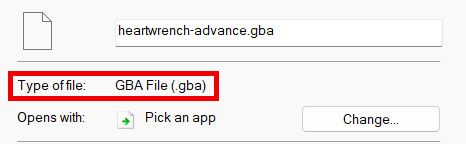
Right-click on the "heartwrench-advance" file. In the menu that opens, go to the last option, the one that says "properties."

A window will open, and the file type box should say GBA.


If it says GBA, then you downloaded the file correctly. You just need to run it in your emulator as you would with a .zip.

You can try directly associating the GBA extension with the emulator. You can do this with the "change..." button to the right of "open with..."

This topic has been auto-archived and can no longer be posted in because there haven't been any posts in a while.