
Indie game storeFree gamesFun gamesHorror games
Game developmentAssetsComics
SalesBundles
Jobs
TagsGame Engines
(4 edits)

Hi,

Yeah, I've got Comic mode checked, but it makes no difference whether it's on or off.

This happens in any game, for example, in GIRLS' FRONTLINE 2: EXILIUM and Wuthering Waves or many others, but I just re-checked these two and the situation is the same.

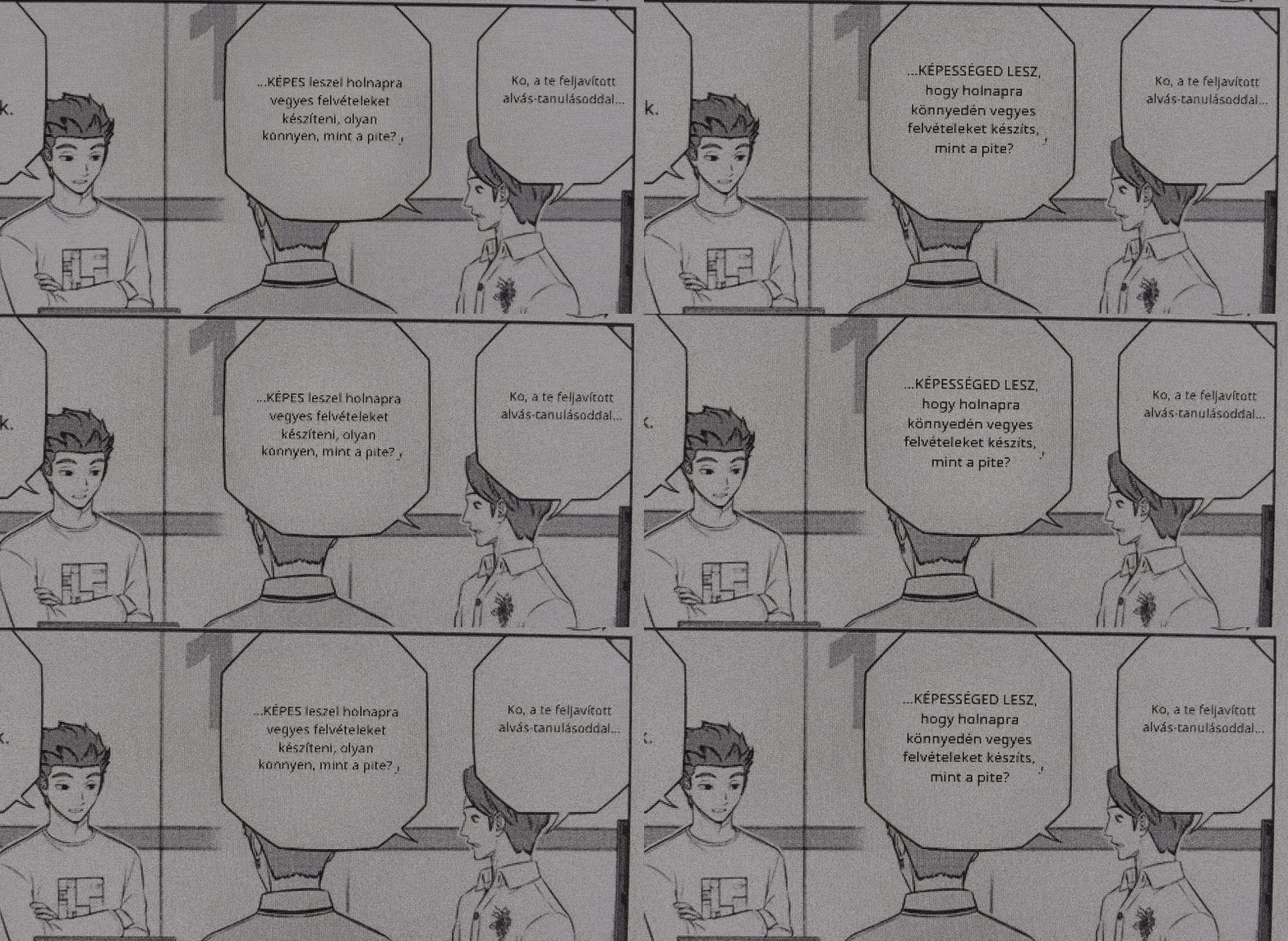
To be more precise, if there's even a small amount of movement, the text starts jumping around the screen and re-translating itself constantly. After a bit, it gives me a '429 too many requests' error, and I can't use it for a few seconds.

But the text jumping can sometimes happen in automatic mode even with no movement, like in GIRLS' FRONTLINE 2: EXILIUM, which is basically a visual novel that doesn't have much motion to begin with, just some minor effects.

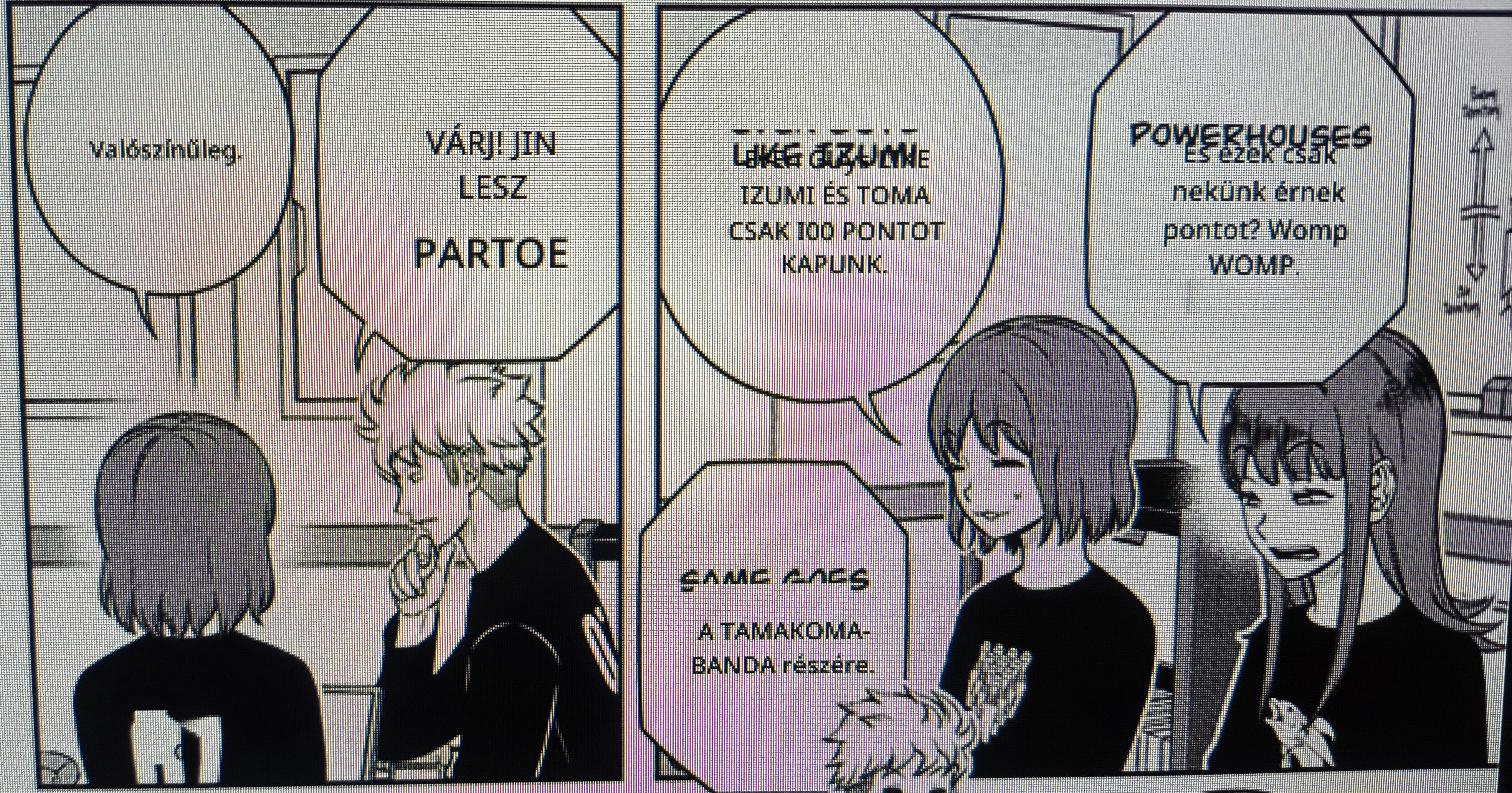
I gave it a try with some manga too (using RapidOCR and Comic mode), and I saw the same text jumping and re-translating within some speech bubbles. On top of that, it couldn't translate some words—I'm not sure why. Sometimes, when I tried a second time, it would recognize a word it missed before but then fail on a different word it had gotten right the first time. lol.
(1 edit)

Ah! I see. What you're speaking of here is not a new problem for 0.5.0. It has always been there. I've tried to fix it in the past, but did not succeed at that point in time. I know how to fix it in two different ways in theory though and it will be worked on very soon as this is crucial for many games.

The problem right now is that I allow new translation requests as soon as the image changes by even just one pixel. This is the most performant check I can make, but obviously it has massive drawbacks.

When you tried the manga, you saw text jumping around even if you completely let go of keyboard and mouse? If so, that's definitely not intended and something I'd have to look into.

About recognition.. yes, sadly, OCR is very complex and I ought to give the users a few more configurable values so it fits their use cases better. There's never going to be a one size fits all solution for this, no matter how much I'd like it to be as simple as possible for everyone. :/

Thank you very much for your feedback!

Hi,

I figured, but it's okay, it's not a huge problem.

Yes, it happens even when I don't touch the keyboard or the mouse. It's not every time, but it happens pretty often.

Also, it has trouble translating some words correctly.


It's nothing too serious, though. I'm still happy with the app overall. Keep it up.

Heya,

Thank you very much for the examples, it helps a lot! :)

I have just released 0.5.04. It introduces a translation & text rendering cache. Please try it out and let me know if that solves that specific problem.

Regarding the other issue, I think that is the OCR simply not picking up the words, or they do and the confidence threshold I have set is too high. I am going to add user configurable options for these. I hope I can release a 0.5.05 version tomorrow with that in place.

Once again, thank you, you have been very very helpful.

Hi,

Version 0.5.04 has fixed the text jumping issue I showed in the first picture. I re-tested it with the same manga chapter, and the text didn't jump this time. I also tried it with another manga and it worked fine there too. So far, it looks like that's solved.

Yep, unfortunately, the word recognition problem is still there in this version.

I did notice something interesting with the new version when it comes to games, though: automatic translation doesn't work if Comic mode is on. It won't translate the text. it just shows the original. If I try again, the selection box even disappears. In previous versions, automatic mode worked even with Comic mode turned on. This isn't a huge deal since I can just turn it off, and it works fine, but I figured you should know.

The good news is that with this new version, the text doesn't jump in games anymore either! I re-tested with those same two games, and for now, it seems like the jumping text issue is gone there too. Hopefully it stays that way, but we’ll see if it works with other games too :)

I also have one more observation. It's not a problem, but I thought I'd mention that when the app is running during a game and you use NVIDIA Freestyle/Nvidia filters, the app seems to slightly weaken the filters' effect. For example, if I need the Sharpen+ filter's Intensity at 15 for the right sharpness without the app running, I have to turn it up a lot more to get the same effect when the app is in use. At least that's what I've found with Wuthering Waves.

That's everything. Thanks for the new version! :)

Heya norby,

That's great to hear! I hope it works for most cases. I'll add a user configurable value later in case this doesn't work at all in some scenarios.

You may be able to fix the word recognition now in the 0.5.05 version that I just released. It has a 'Confidence threshold' value you can change for any of the OCR engines. Setting it lower will allow more text to be captured (but can increase the 'error' rate).
If it still doesn't work even if you lower the value, then you'll have to wait for the 0.5.06 version which will have more user-configurable values relevant to OCR. 

Thank you very much for the notice on the Comic mode bug. I had not encountered it before, and it is completely breaking that mode whenever anything is moving in the background.. As far as I know, I have now fixed it completely in the 0.5.05 version. Please let me know if it keeps happening!

Thank you for the heads up on the filters - I think I know the cause of this issue, but I am not certain that I know of any way to solve it.. If it is what I think it is, this only occurs in Desktop/Attached mode, and not the Internal mode, correct?

Cheers again for all this feedback! :)

Hey,

Unfortunately, it's still not working for me. I tried setting the Confidence threshold to a low value, but nothing changed. I guess I'll just have to wait for the new version.

Yep, now it's totally working. Automatic translation is functioning perfectly even with Comic mode turned on :)

Yeah, I used it in Attached mode. It doesn't work in Internal mode. It just gets stuck at "Verifying launch".

(1 edit)

Alright, no worries! I just uploaded 0.5.06 for you. It adds 'Box threshold' and 'Text threshold' values for you to configure. Try lowering the Box Threshold number and see if that makes the text get picked up! The settings will be found at the bottom of the OCR tab.

Yay! Nice one. Progress.

Ah, okay, just a few specific games I assume? Afaik most games you have mentioned do not use any of the normal graphics APIs, thus Attached is the only one that'd work (or Desktop..)

Unfortunately, it's still no good. I couldn't get it to work at all. I played around with a bunch of different settings, like lowering the Confidence and Box thresholds, trying both automatic and manual Model and Font Selection, and even switching to a different Screenshot Capture API and Text Removal Algorithm but nothing helped.

On that second picture, I forgot to mention another issue besides the word recognition problem: some bubbles were translated correctly, but you could still see the original text or word underneath. That's another bug.

Right now, I only use Nvidia filters with Wuthering Waves, but I'm guessing the same thing would happen in other games if I was using Attached mode.

Got it, I didn't know that. Thanks for the heads-up. :)

Dang, that's interesting.. Could you please send me a few screenshots of problematic Comic book scenes like the example you showed me? Much easier to figure out what's going on if I can do hands-on testing.

About the second bug, yes, unfortunately I am already aware of that one. It's important to fix and I will likely try to find a way to get it done within the next few days.

Thank you again 🙏🏼